
Your receptionist handles 3 calls at once, a patient has been waiting online for 4 minutes to reschedule an appointment, and meanwhile 2 people hung up because no one answered them. If this scenario sounds familiar, you're not alone: 42% of patients who fail to schedule an appointment on the first attempt simply look for another professional (Accenture, 2024).
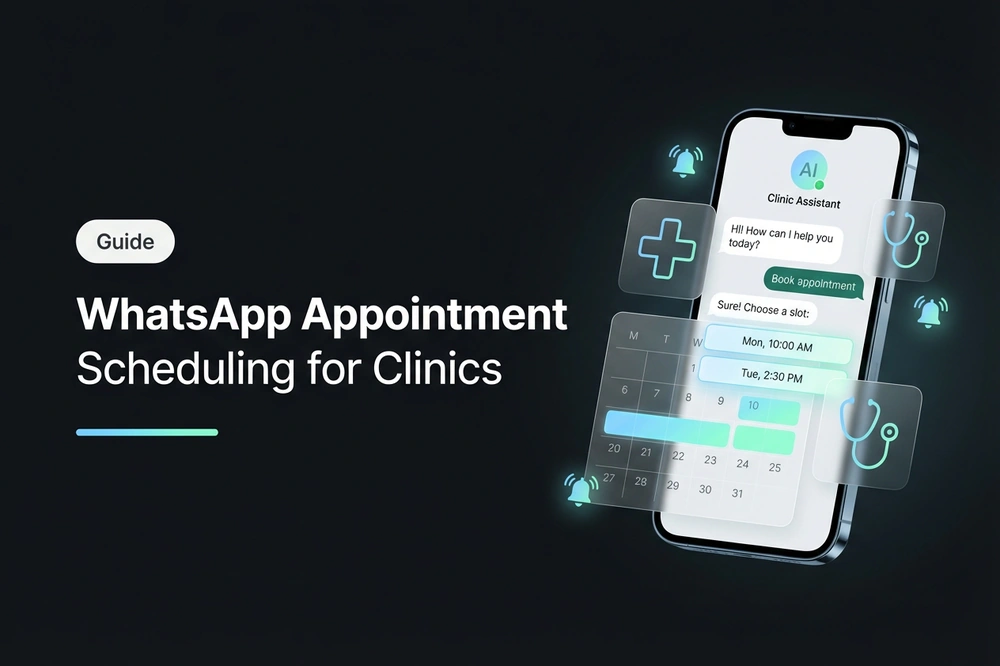
The WhatsApp appointment scheduling with a chatbot changes this dynamic. The patient types "I want an appointment," the bot shows available times, the patient chooses, receives instant confirmation, and a reminder 24 hours prior — all without anyone from the clinic touching the phone. The result: more appointments scheduled, fewer no-shows, less administrative burden.
In this guide, you will learn how a conversational WhatsApp scheduling system works, how to implement it step-by-step in a clinic or health center, and the mistakes to avoid for it to truly work.
What is WhatsApp appointment scheduling
WhatsApp appointment scheduling is a system that allows patients to book, reschedule, and cancel medical appointments directly from a WhatsApp conversation, without needing to call by phone, download an app, or access a web portal.
It's not a simple "write to us and we'll reply." It's an automated flow with a chatbot that:
- Shows available specialties or professionals — the patient chooses what they need.
- Presents available times in real-time — by consulting the professional's agenda.
- Confirms the appointment instantly — without waiting for someone on the other end to validate it.
- Sends automatic reminders — via WhatsApp, email, or SMS, configurable by time (24h, 2h before).
- Allows rescheduling or canceling — the patient writes again and manages their appointment without intermediaries.
The difference with a web form or a traditional booking system is the zero friction: the patient doesn't leave WhatsApp, doesn't need to create an account, doesn't need to remember a password. They write to the same number where they received the reminder for their last consultation and schedule the next appointment in less than 2 minutes.
To operate at scale, the system needs to be connected to the WhatsApp Business API (not the personal app or the free version of WhatsApp Business) through a Meta-authorized BSP. This enables the sending of approved reminder templates, the management of multiple simultaneous conversations, and integration with the clinic's management system.
Why WhatsApp is the ideal channel for medical appointments
In Latin America, WhatsApp has a 96% penetration on smartphones (Statista, 2025). It's not merely another channel — it's the channel where your patients already are. Compared to the alternatives:
Phone vs. WhatsApp
| Criterion | Phone | WhatsApp with chatbot |
|---|---|---|
| Availability | Office hours (8-10h/day) | 24/7, 365 days |
| Simultaneous capacity | 1-3 calls per receptionist | Unlimited |
| Handling time | 3-5 min per appointment | <1 min (automated) |
| Appointment registration | Manual, prone to errors | Automatic, error-free |
| Reminder | Manual call or generic SMS | Automatic WhatsApp with appointment details |
| Cost per booked appointment | $2-5 USD (staff time) | ~$0.05 USD (API message cost) |
Proprietary App vs. WhatsApp
Developing a proprietary appointment app costs between $15,000 and $50,000 USD, requires the patient to download it (only 12% do so), update it, and remember their password. WhatsApp is already installed on the patient's phone. The adoption rate is immediate because there's nothing to adopt.
Web Portal vs. WhatsApp
An online appointment portal solves 24/7 availability, but requires the patient to navigate to the site, search for the professional, choose the time, and complete a form. The average abandonment rate for web forms is 67% (Baymard Institute). On WhatsApp, the conversation guides the patient step-by-step — the completion rate rises to 85-90%.
The key data point: no-shows
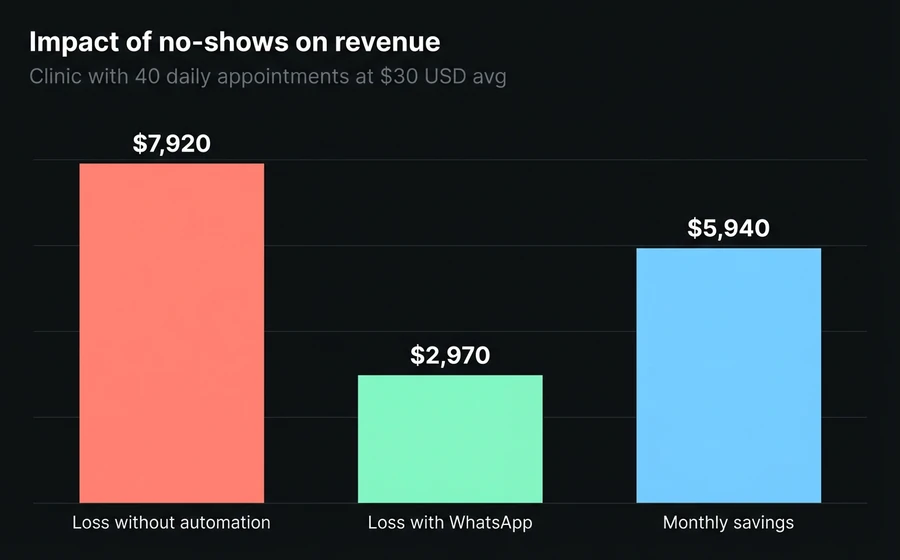
No-shows are the main pain point for any clinic. In LATAM, the average no-show rate is around 25-30% (OPS, 2023). WhatsApp reminders reduce it to 10-15% — an improvement of 35-50% that directly impacts revenue.
A clinic with 40 daily appointments and a 30% no-show rate loses 12 appointments per day. At an average of $30 USD per consultation, that's $360 USD daily, $7,920 USD monthly. Reducing no-shows to 15% recovers $5,940 USD monthly — more than enough to justify any investment in automation.
How a conversational scheduling flow works
A well-designed flow has 5 stages. Each lasts seconds, and the patient progresses without typing free text — they only choose options with buttons:
Stage 1: Identification
The patient messages the clinic's WhatsApp number. The chatbot greets them and asks what they need. If it's a patient who has consulted before, the bot identifies them by their phone number and retrieves their history.
Stage 2: Service and professional selection
The bot displays the available specialties or services (e.g., "General Medicine", "Dermatology", "Nutrition"). The patient chooses. If there are multiple professionals for that specialty, the bot lists them or automatically assigns the one with the earliest availability.
In clinics with multiple branches, the bot also asks for the preferred location.
Stage 3: Time slot selection
The chatbot consults the selected professional's schedule in real-time and presents the next available time slots. The patient sees concrete options ("Monday 15/7, 10:00", "Tuesday 16/7, 14:30") and chooses with a tap.
The configuration allows defining:
- Appointment duration: 30, 45, or 60 minutes depending on the specialty
- Minimum lead time: how many hours in advance an appointment can be booked (e.g., 8h, 24h)
- Availability window: how many days in the future are shown (e.g., 14, 30 days)
- Buffer between appointments: 10-15 minutes of buffer between appointments
Stage 4: Confirmation
The bot confirms the appointment with all details: professional, date, time, location, and any prior instructions (e.g., "bring previous studies", "arrive 15 minutes early"). The patient receives this confirmation as a WhatsApp message that remains in their chat — they can consult it anytime without searching their email.
Stage 5: Automatic reminders
The system sends configurable reminders before the appointment. The most effective configuration is a 24-hour reminder (so the patient can confirm or cancel on time) and another 2-hour reminder (so they don't forget to leave).
Reminders are sent via WhatsApp using templates approved by Meta, and can include action options. If the patient cancels, the slot is automatically released and another patient can take it — without any staff intervention.
Step-by-step: implement WhatsApp scheduling in your clinic
Step 1: Define schedules and their rules
Before configuring any technology, define the clinic's schedule structure:
- How many schedules do you need? One per professional, per specialty, or per branch. An individual practice needs 1 schedule. A clinic with 5 specialists and 2 locations may need 10.
- Appointment duration: define by specialty (e.g., general clinic 30 min, psychology 60 min, nutrition 45 min).
- Operating days and hours: for each professional.
- Blocked days: holidays, vacations, maintenance.
- Reminder rules: how many to send, by which channel, how far in advance.
Tip: do not complicate the first implementation. Start with 1-2 schedules, validate the flow with real patients, and then expand.
Step 2: Connect the WhatsApp Business API
For automated scheduling, you need the WhatsApp Business API, not the free app. The difference:
| Feature | WhatsApp Business App | WhatsApp Business API |
|---|---|---|
| Automated chatbot | No | Yes |
| Multiple simultaneous conversations | No (1 device) | Yes (unlimited) |
| Reminder templates | No | Yes (approved by Meta) |
| Calendar integration | No | Yes (via API) |
| Multiple agents | No | Yes |
The API is contracted through a BSP (Business Solution Provider) authorized by Meta. Platforms like AsisteClick include API access as part of the solution, without the need to contract a separate BSP.
Step 3: Design the chatbot flow
The chatbot is the central piece. Its flow should be:
- Linear, not labyrinthine: each step has a maximum of 2-4 options. If the patient gets lost, they can type "back" or "start" at any time.
- With buttons, not free text: the patient chooses from predefined options. This eliminates interpretation errors.
- With human handover: at any point, the patient can choose "Talk to reception" and the conversation is transferred to a human agent with the full context of what has already been discussed.
The bot builder allows you to assemble this flow without programming: it's a visual editor where interactions (flow nodes) are connected with conditions and actions.
Step 4: Configure reminders
Reminders are the biggest driver for reducing no-shows. Configure:
- First reminder: 24 hours before — allows the patient to reschedule if they have a conflict.
- Second reminder: 2 hours before — last-minute reminder. Include address and map link.
- Channel: WhatsApp is the most effective (98% open rate), but have email as a backup.
Reminder templates must be approved by Meta. Variables such as patient name, appointment date/time, location, and professional's name are automatically populated with appointment data at the time of sending.
Step 5: Integrate with the existing management system (optional)
If the clinic already uses a management system (HIS, electronic health record, health ERP), bidirectional integration allows for:
- Appointments scheduled via WhatsApp automatically appear in the doctor's system.
- Changes in the system are reflected in WhatsApp — if the secretary blocks a time slot, the bot stops offering it.
- Patient data is synchronized — name, phone, appointment history.
Integration is done via REST API which receives parameters such as calendar_id, access_token, time zone, and availability filter, and returns available slots in a structured format.
If the clinic does not have a previous system or uses Excel/notebook, the online scheduling module functions as an independent system — it does not require integration with anything.
Step 6: Add video consultation (for telemedicine)
For consultations that do not require physical presence (follow-up, study control, psychology, nutrition), the appointment can include an integrated video call link. The patient receives the link in the same WhatsApp chat, taps it at the time of the appointment, and enters the consultation — without downloading Zoom, without searching for links in email.
This is particularly relevant for patients in rural areas or with reduced mobility. Clinics offering a hybrid model (in-person + virtual) can double their care capacity without adding physical consulting rooms.
Step 7: Launch, measure, and adjust
Do not wait for the perfect configuration. Launch with a simple message in the waiting room: "Now you can schedule your next appointment via WhatsApp. Text [number]."
The first 2 weeks are critical: review bot conversations to detect points where patients get stuck, adjust flow options, calibrate reminder times.
Frequent errors in appointment automation
Error 1: Offering too many options at each step
A menu of 8 specialties with 3 sub-options each generates a tree of 24 possible paths. The patient becomes overwhelmed and abandons. Solution: maximum 4 options per step. If the clinic has 12 specialties, group them into categories ("General Medicine", "Specialties", "Studies") and then break them down.
Error 2: No human escape
There are situations that the bot cannot resolve: a patient who needs an urgent appointment, a question about whether the professional accepts their health insurance, a complaint. If there is no option to "talk to a person," the patient gets frustrated and leaves. The conversational chatbot must have the option to escalate to a human agent at each stage of the flow, transferring the complete conversation context.
Error 3: Generic reminders without action
"Remember your appointment" is not a good reminder. It lacks: with whom, at what time, where, and most importantly — the option to confirm, reschedule, or cancel directly from the message. A reminder without action buttons is an SMS disguised as WhatsApp.
Error 4: Not blocking real-time availability
If the bot's schedule is not synchronized with the clinic's schedule, two patients can book the same time slot. The result: overbooking, poor experience, and loss of trust in the system. Real-time synchronization is non-negotiable.
Error 5: Ignoring post-implementation absenteeism
Implementing the system does not eliminate absenteeism — it reduces it. It is necessary to continue measuring and optimizing. If a professional has 20% absenteeism even with reminders, perhaps their patients need a third reminder (1 hour before), or the service hours are not convenient for their patient profile.
Impact metrics: what to measure and what to expect
Benchmark table by center type
| Metric | Without automation | With WhatsApp scheduling | Improvement |
|---|---|---|---|
| Absenteeism rate | 25-30% | 10-15% | −50 to −60% |
| Time to schedule | 3-5 min (phone) | <1 min (chatbot) | −80% |
| Off-hours appointments | 0% | 30-40% of total | +30-40% |
| Reception admin load | 3-4h/day | <30 min/day | −85% |
| Booking completion | 30-40% (web forms) | 85-90% (chatbot) | +120% |
| Cost per appointment | $2-5 USD | ~$0.05 USD | −97% |
The 4 metrics that matter
- Absenteeism rate — the key metric. Measure before and after implementation. Target: reduce by at least 35%.
- Appointments scheduled by channel — what percentage comes from WhatsApp vs. phone vs. web. In 3 months, WhatsApp should be 60-70%.
- Response time — how many seconds the bot takes to respond to the first message. It should be <5 seconds.
- Escalation rate to human — what percentage of conversations escalate to an agent. If it's >20%, the bot's flow has weak points that need improvement.
Data export and analysis
Data for scheduled appointments can be exported in CSV format with fields such as: appointment day/time, calendar name, patient contact details, email, phone, additional data, and conversation ID. This allows cross-referencing scheduling information with satisfaction metrics, waiting times, and billing.
Frequently asked questions
Do I need to change my current management system to implement WhatsApp scheduling?
No. The online scheduling module can work in two ways: as a standalone system (if you don't have one already) or integrated with your existing management system via REST API. In the second case, the calendar synchronizes bidirectionally — the bot's appointments appear in your system and vice versa.
How much does it cost to implement WhatsApp scheduling for a clinic?
The cost depends on volume and complexity. A solution with a chatbot, multiple calendars, and automatic WhatsApp reminders starts from $110 USD/month on platforms like AsisteClick, including connection to WhatsApp Business API and no charge per scheduled appointment. Compared to the cost of a dedicated receptionist ($800-1500 USD/month) or losses due to absenteeism ($5,000-8,000 USD/month), the return on investment materializes in the first month.
Can older patients use a WhatsApp chatbot to schedule appointments?
Yes, if the flow is well-designed. The key is for the bot to use buttons (not free text) and simple language. "Choose your time" with 3 button options is easier to use than any web form. WhatsApp has an 89% penetration among people over 55 in LATAM (eMarketer, 2024) — the barrier is not technology, but the flow design.
Can I offer video consultations through the same WhatsApp channel?
Yes. The system can send an integrated video call link as part of the appointment confirmation. At the time of the appointment, the patient taps the link from the same chat and enters the consultation without downloading additional apps. This is especially useful for follow-ups, nutrition consultations, psychology, and any specialty that does not require a physical examination.
How are multiple branches and professionals managed?
The system supports multi-calendar from a single platform. Each professional or branch has its own calendar with independent schedules, durations, and reminder rules. The chatbot asks the patient for their preferred location (or detects it from their history) and shows only the schedules for that branch. An administrator can view all calendars in a unified calendar-style view (day, week, or month).
Conclusion
Scheduling appointments via WhatsApp is not a future trend — it's a tool available today that clinics of all sizes are already using to solve three concrete problems: reception saturation, no-shows, and the loss of patients who fail to schedule.
Implementation does not require months nor six-figure budgets. With a platform for customer service that includes a chatbot and scheduling module, a clinic can be operational in days — not weeks.
Most importantly: measure from day one. No-shows before vs. after, appointments scheduled by channel, patient satisfaction. Data is what justifies the investment and guides continuous optimization.
If your clinic still relies on the phone to manage appointments, the cost of not automating is already higher than the cost of doing so. Check plans and prices →
Keep reading: