
Your AI chatbot has access to the same technology used by Fortune 500 companies. So, why does it sometimes respond like an intern on their first day?
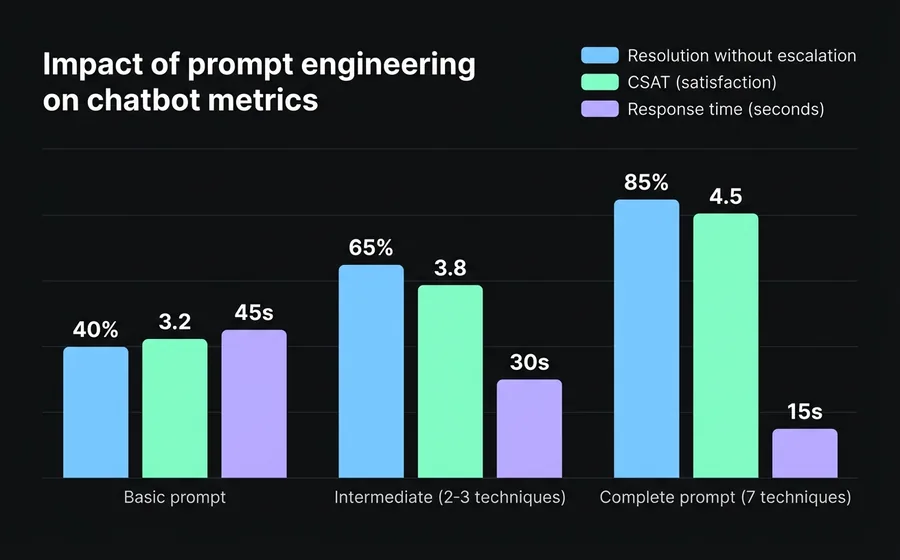
The difference isn't in the AI model — it's in the instructions you give it. A well-written prompt can transform a generic bot into an assistant that resolves 80% of queries without human intervention. A poorly written one generates vague answers, hallucinations, and frustrated customers who end up asking to speak with a human.
Prompt engineering is the discipline of systematically designing these instructions. It doesn't require programming knowledge. It requires understanding what your customer needs and how to translate that into clear rules for the AI.
In this guide, you will learn 7 concrete techniques — each with prompt examples ready to use on your chatbot platform.
What is prompt engineering (and why your chatbot needs it)
Prompt engineering is the process of designing the instructions an AI model receives to generate accurate, consistent, and useful responses. In the context of an enterprise chatbot, this means writing the "system prompt" — the set of invisible rules that define how the bot behaves in each conversation.
According to a study by Juniper Research, generative AI chatbots handle up to 87% of Level 1 support interactions without escalation. But that percentage directly depends on the quality of the prompts: a poorly instructed bot might only resolve 30-40% before the customer asks for a human agent.
The difference between a basic prompt and a well-designed one isn't cosmetic. It's operational: fewer escalations, shorter response times, and customers who get what they need in the first message.
Technique 1: Role prompting — define who your bot is
The most fundamental technique. Before any instruction, you tell the AI who it is, who it works for y what its objective is.
Without role prompting, the AI responds as a generic assistant. With role prompting, it responds within a specific context that shapes its tone, vocabulary, and priorities.
Basic prompt (without role):
Answer questions about our products.
Prompt with role prompting:
You are the virtual assistant for TechStore, an electronics store with 15 years in the market. Your goal is to help customers find the right product for their needs and resolve post-sale queries. You speak in neutral Spanish, with a professional yet approachable tone. Never invent technical specifications — if you don't have the information, state it.
The difference is dramatic. The second prompt establishes:
- Identity: who it is and who it works for
- Objective: help find products + resolve queries
- Tone: professional yet approachable
- Limits: do not invent data
When to use it: always. It is the foundation of any production system prompt.
Technique 2: Zero-shot — clear instructions without examples
Zero-shot means giving direct instructions without showing response examples. It works when the task is clear enough for the AI to understand it solely from the description.
Example for a bot for ISP technical support:
When a customer reports internet connection problems, follow this sequence:
- Ask if the problem affects all devices or just one.
- Ask them to restart the router (turn off, wait 30 seconds, turn on).
- If the problem persists after restarting, request the customer number to verify the service status in their area.
- If there is an incident registered in their area, inform them of the estimated resolution time.
- If there is no incident and the problem persists, create a support ticket and transfer to a technician.
With explicit step-by-step instructions, the bot follows a diagnostic flow without needing to see previous examples. The AI is capable of interpreting this type of sequential instruction and executing it consistently.
When to use it: for flows of customer service with defined steps, FAQs, and tasks where the instruction is self-explanatory.
Technique 3: Few-shot — teach it with examples
When the instruction alone is not enough for the AI to understand the expected format or tone, you provide 2-3 concrete interaction examples. The AI uses these as a pattern to generate similar responses.
Example for a bot for appointment scheduling in a clinic:
When a patient wants to schedule an appointment, respond with this format:
Example 1:
Client: "I want to schedule an appointment with an orthopedist"
Bot: "I'd be happy to help you schedule your orthopedics appointment. We have availability with Dr. Martínez (Mondays and Wednesdays from 9 AM to 1 PM) and Dr. López (Tuesdays and Thursdays from 2 PM to 6 PM). Which day and time works best for you?"Example 2:
Client: "I need an appointment for my 5-year-old son."
Bot: "For pediatric patients, I will refer you to our specialist. Dr. Suárez attends Monday to Friday from 8 AM to 12 PM. Do you prefer a particular day?"Example 3:
Client: "How much does the consultation cost?"
Bot: "The cost of the consultation depends on your medical coverage. Could you please tell me the name of your health insurance or prepaid medical plan? If you are a private patient, the consultation costs $15,000."
Examples teach the bot three things that a generic instruction does not convey: offering specific options with schedules, adapting the response to the context (adult vs. pediatric), and asking before assuming.
When to use it: when you need the bot to follow a specific format, a particular tone, or when textual instructions produce overly generic responses.
Technique 4: Chain-of-thought — make it reason step by step
Chain-of-thought (CoT) is a technique that forces AI to break down a problem before responding. Instead of going straight to the answer, the AI first analyzes the situation internally.
This is especially useful when the bot needs to make decisions that depend on multiple variables — for example, recommending a product, classifying an inquiry, or calculating a budget.
Example for a bot from a sales software company:
When a potential client describes their needs, before recommending a plan, internally analyze:
- How many users/agents does it need? (this defines the base plan)
- What communication channels does it use? (WhatsApp, email, social media)
- Does it need AI automation or only live chat?
- What is its monthly conversation volume?
Based on that analysis, recommend the most suitable plan. If you don't have enough information, ask the most relevant missing question — only one per message, to avoid overwhelming the client.
Step-by-step reasoning reduces recommendation errors. Without CoT, a bot tends to always recommend the most expensive or most popular plan. With CoT, it evaluates real needs before responding.
When to use it: complex decisions with multiple variables, personalized recommendations, ticket classification by priority.
Technique 5: Constraints — what it should NOT do
As important as telling it what to do is defining what it should not do. Constraints are explicit limits that prevent problematic responses.
Example of constraints for a bot from a financial services:
CONSTRAINTS:
- Never give personalized financial advice. You can explain products in general, but always add: "For a personalized recommendation, we suggest speaking with one of our advisors."
- Do not mention competitors by name. If the client asks for comparisons, focus on what our platform offers.
- Do not share specific interest rates or commissions without the client having provided their account number — conditions vary by profile.
- If the client expresses frustration or anger, do not attempt to resolve the issue. Immediately transfer to a human agent with the conversation context.
- Never invent data, percentages, or deadlines. If you do not have the information, say "Let me verify that with our team" and create a ticket.
Constraints are the bot's safety net. A chatbot without constraints can invent return policies, promise non-existent discounts, or inadvertently give legal advice.
When to use it: Always. Even the simplest bot needs at least 3-4 basic constraints (do not invent data, know when to transfer, do not discuss topics outside its scope).
Technique 6: Output formatting — controls the response format
AI can respond in long paragraphs or short lists. It can use emojis or be completely formal. Output formatting defines how the response looks — not just what it says.
Example for an e-commerce:
Formatting rules for your responses:
- Maximum 3 sentences per message. If you need to provide more information, divide it into short messages of maximum 2 lines.
- Use bullet points for product lists or steps (maximum 5 items).
- Do not use emojis.
- When displaying a product, use this format:
[Product Name]
Price: $XX.XXX
Stock: available / last units / out of stock
[Product Link]- For amounts, use a format with dots as a thousands separator (e.g., $1.250.000) and never unnecessary decimals.
Format matters more than it seems. On WhatsApp, a 10-line message feels like a wall of text. In webchat, a bulleted list reads better than a paragraph. The bot must adapt its format to the channel.
When to use it: whenever the bot interacts through a channel where the reading experience matters (WhatsApp, Instagram, webchat). Especially important for bots that display products, prices, or steps to follow.
Technique 7: Knowledge grounding — anchors responses to real data
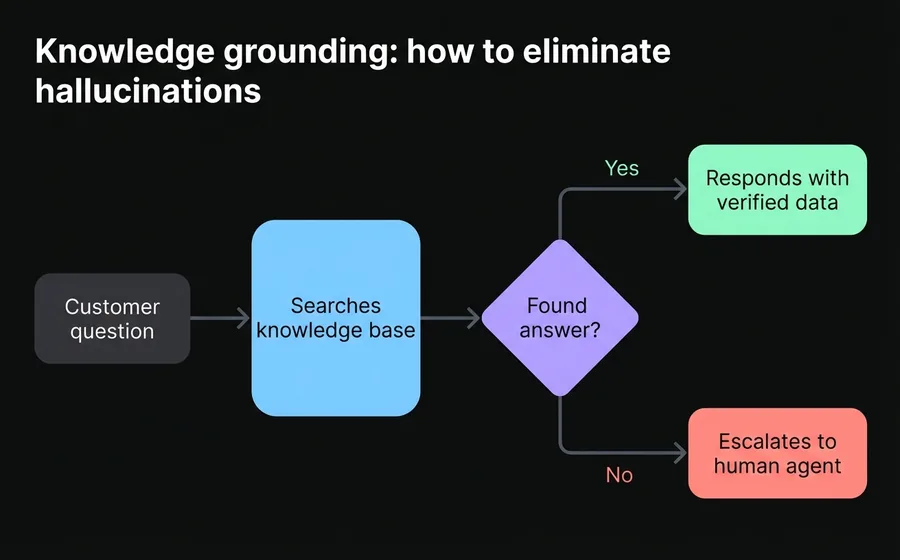
The most powerful technique to eliminate hallucinations. Knowledge grounding means connecting the bot to a verified knowledge base (documents, PDFs, FAQs, databases) and giving it the explicit instruction that it should only respond with information from that source.
Example of grounding instruction:
You have access to the company's knowledge base, which includes: updated product catalog, return policies, business hours, and frequently asked questions.
FUNDAMENTAL RULE: respond ONLY with information that is in the knowledge base. If a customer asks something that is not covered, respond: "I do not have that information available at this moment. Would you like a specialist from our team to contact you?"
Never complete partial information with assumptions. If the knowledge base states that product X comes in 3 colors but does not specify which ones, respond: "Product X is available in 3 colors. I will transfer you to an advisor to confirm the exact options."
This technique is the difference between a chatbot that "seems" intelligent and one that truly is reliable. Modern AI chatbot platforms — such as AsisteGPT — allow you to upload documents, PDFs, and URLs as a knowledge base, and the bot uses that information as the primary source for each response.
When to use it: whenever the bot handles factual information (prices, policies, specifications, schedules). It is especially critical in regulated industries such as healthcare, finance and insurance.
How to combine techniques in a production prompt
In practice, no single technique is used alone. A production prompt combines several techniques into a single structured system prompt.
This is an example of a complete prompt for a customer service bot from a SaaS company:
[ROLE]
You are the virtual assistant for CloudApp, a SaaS project management platform. Your goal is to resolve N1 support queries, guide new users through onboarding, and escalate complex technical queries to the N2 support team.[KNOWLEDGE]
You have access to CloudApp's help documentation. Respond ONLY with information from that source. If something is not documented, state it explicitly.[PROCESS — Chain of Thought]
Before responding, internally classify the query:
- Is it a question about functionalities? → Respond with the documentation.
- Is it a technical error? → Ask for the error details (message, browser, step-by-step to reproduce it) and create a ticket.
- Is it a plan change or billing request? → Transfer to a human agent.
- Is it a greeting or casual conversation? → Greet briefly and ask how you can help.
[CONSTRAINTS]
- Do not share credentials, tokens, or internal technical information.
- Do not offer discounts or benefits that are not documented.
- Maximum 2 questions per message to the user.
- If the user expresses frustration after 2 exchanges without resolution, transfer to an agent.
[FORMAT]
- Short messages: maximum 4 lines per response.
- Use bullet points for steps to follow.
- When escalating to an agent, include a summary of the context so the agent doesn't ask the customer to repeat everything.
This prompt combines the 7 techniques: role prompting (identity), knowledge grounding (documentation), chain-of-thought (internal classification), constraints (limits), output formatting (short messages), and the structure itself includes implicit few-shot in the classification examples.
Common mistakes when writing prompts for chatbots
Being too vague
"Respond kindly to customers" is not a prompt — it's a wish. AI needs operational instructions: what information to ask for, how to respond to complaints, when to escalate.
Not defining what to do when it doesn't know
If the prompt doesn't include an instruction for the "I don't have that information" case, the AI will invent an answer. Always define the fallback: transfer to a human, ask to rephrase the question, or admit that it doesn't have the answer.
Overly long prompts without structure
A 2000-word prompt in a single paragraph is difficult for AI to process. Use sections with clear headers (ROLE, RULES, FORMAT, CONSTRAINTS). The structure helps both the AI and your team when they need to review or modify the prompt.
Not iterating based on real conversations
The first prompt is never the final one. Review bot conversations weekly: where does it make mistakes? What questions can't it answer? Every error is an opportunity to refine the prompt. The best companies iterate their prompts as they iterate their product — continuously.
Copying generic prompts from the internet
A prompt designed for an e-commerce business doesn't work for a clinic. A prompt for technical support isn't useful for sales. The effectiveness of a prompt is directly tied to how specific it is to your business, your products, and your customers.
Frequently asked questions
Do I need to know how to code to do prompt engineering?
No. Prompt engineering is writing instructions in natural language. It doesn't require code, APIs, or technical knowledge. Anyone who knows the business and its customers well can write effective prompts. Platforms like AsisteGPT allow configuring hidden prompts directly from the administration panel, without touching a line of code.
How often should I update my chatbot's prompts?
At least once a month, and whenever your products, policies, or processes change. Review conversations where the bot couldn't resolve the query — these are the clearest indicators of what's missing in the prompt. Companies with mature bots make weekly adjustments based on resolution and CSAT metrics.
How many techniques should I use in a single prompt?
A typical production prompt combines 4-5 techniques. Role prompting and constraints are mandatory. Knowledge grounding is practically indispensable if the bot handles factual information. Few-shot and chain-of-thought are added depending on the complexity of the queries. The important thing is that the prompt is clear and structured, not that it uses all possible techniques.
Does prompt engineering replace training chatbots with NLP?
It doesn't replace it, it complements it. The NLP chatbots are trained with question/answer pairs and are excellent for predictable flows and exact answers. Prompt engineering is used with generative AI-based (GPT) chatbots to handle open-ended queries and more natural conversations. Many companies use a hybrid model: NLP for the predictable, GPT with good prompts for everything else.
How do I know if my prompt is working well?
Measure three indicators: (1) resolution rate without escalation — what percentage of queries the bot resolves on its own, (2) bot CSAT — customer satisfaction after interacting with the bot, and (3) hallucination rate — how often the bot invents information. If you want to go deeper, the chatbot ROI formula gives you a complete framework for measuring economic impact.
Conclusion
Prompt engineering is not a mysterious art reserved for AI engineers. It is a practical skill that any customer service team can develop. The 7 techniques we saw — role prompting, zero-shot, few-shot, chain-of-thought, constraints, output formatting, and knowledge grounding — cover 95% of the scenarios an enterprise chatbot faces.
The key is to start with a solid prompt that combines at least role prompting, constraints, and knowledge grounding, and iterate weekly based on real conversations. A well-designed prompt can raise a bot's resolution rate from 40% to over 80% — without changing the AI model, without writing code, without hiring more agents.
If you are looking for a platform that allows you to apply these techniques directly to your WhatsApp, Instagram, and web chatbots, AsisteGPT provides the dashboard to configure hidden prompts, upload knowledge bases, and measure results — all without programming. Discover available plans.