
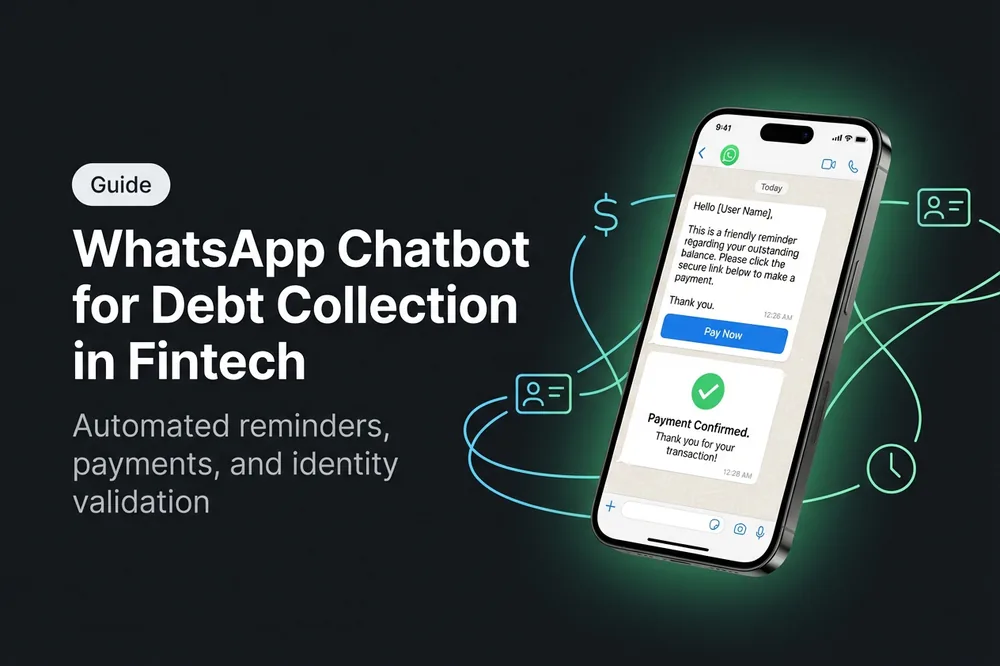
In Latin America, 7 out of 10 collection efforts are still made by phone. The problem: 85% of those calls go unanswered (Juniper Research, 2025). Meanwhile, WhatsApp has a 98% open rate and an average read time of 3 minutes. The math is simple: if your collections team keeps calling, they are losing against a channel where the debtor already is.
A WhatsApp collections chatbot doesn't replace your team — it unlocks it. It automates repetitive tasks (reminders, identity validation, sending payment links) and frees up human agents to negotiate cases that truly require a conversation. The result: increased contactability, higher recovery, lower cost per interaction.
In this article, you will learn, step by step, how to implement a WhatsApp collections chatbot in a fintech operation — from flow architecture to common pitfalls to avoid.
What is a WhatsApp collections chatbot
A collections chatbot is an automated assistant that manages the collection cycle through WhatsApp Business API. It's not a generic bot that responds "Hello, how can I help you?". It's a flow specifically designed to:
- Identify the debtor — validates their identity using a document number (DNI, CURP, RUT depending on the country).
- Inform about the debt — queries the outstanding balance in real-time via the management system's API.
- Offer payment options — generates a personalized payment link (MercadoPago, Clear, PSE, etc.).
- Record the payment — once completed, automatically updates the status in the collections system.
- Escalate to a human — if the debtor needs to negotiate a plan, refinance, or has a complex case, the bot transfers the conversation to an agent with full context.
The difference with an IVR or a collections email is the bidirectionality: the debtor can respond instantly, ask questions, request a receipt, or ask for an extension — all within the same conversation.
For it to work, the chatbot needs to be connected to the WhatsApp Business API (not the personal app or WhatsApp Business App) through a BSP (Business Solution Provider) authorized by Meta. This ensures the sending of approved templates, compliance with WhatsApp policies, and the ability to send proactive (outbound) messages at scale.
Why WhatsApp beats call centers in collections
It's not about abandoning the phone — it's about starting with the right channel. The data speaks:
Contactability
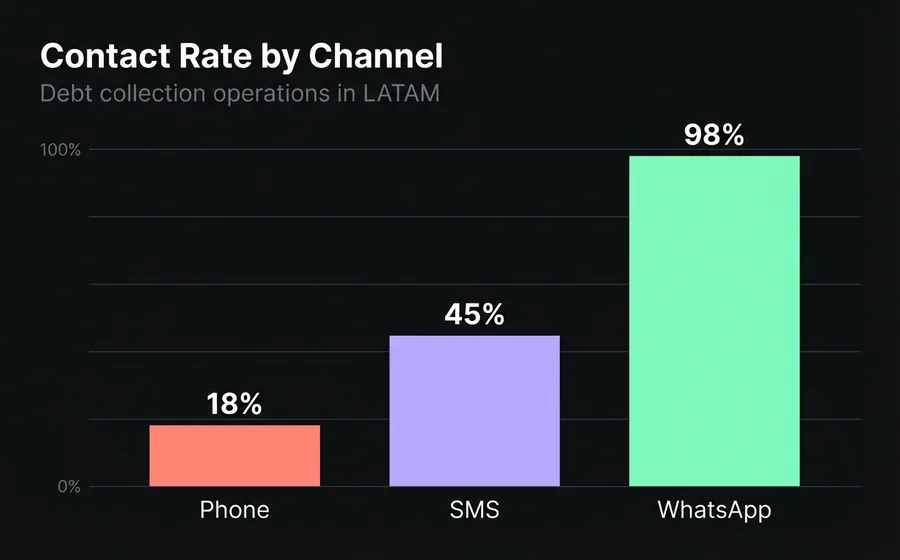
- Phone call: 15-20% effective contact rate (debtor doesn't answer, wrong number, voicemail).
- SMS: 45% open rate, but without the possibility of interactive response.
- WhatsApp: 98% open rate, 40-60% response rate for well-designed collection messages.
The difference is significant. If your portfolio has 10,000 delinquent accounts, you contact ~1,800 by phone. Via WhatsApp, at least 9,800 read your message.
Cost per interaction
A phone interaction costs between USD 1.50 and USD 3.00 depending on the country and duration. It includes: agent salary, telephony, dialing software, supervision. An automated WhatsApp interaction costs between USD 0.03 and USD 0.08 (Meta template message cost + infrastructure). This represents a 95% reduction in the cost per interaction.
Debtor experience
This matters more than it seems. A debtor who receives a WhatsApp message with their balance and a payment link can resolve it in 2 minutes, from their mobile phone, without speaking to anyone. It's discreet, immediate, and convenient. A debtor who receives a call while working feels pressure, discomfort, and often simply doesn't answer — not because they don't want to pay, but because the channel is not convenient.
Fintechs that migrated from call center to WhatsApp as a first point of contact report a 25-40% increase in recovery rate in the first delinquency segment (0-30 days past due). The reason is simple: more people read the message, more people access the link, more people pay.
How it works: anatomy of an automated collection flow
A WhatsApp collection flow has 5 stages. Each can be 100% automated or have a human intervention point depending on the case's complexity.
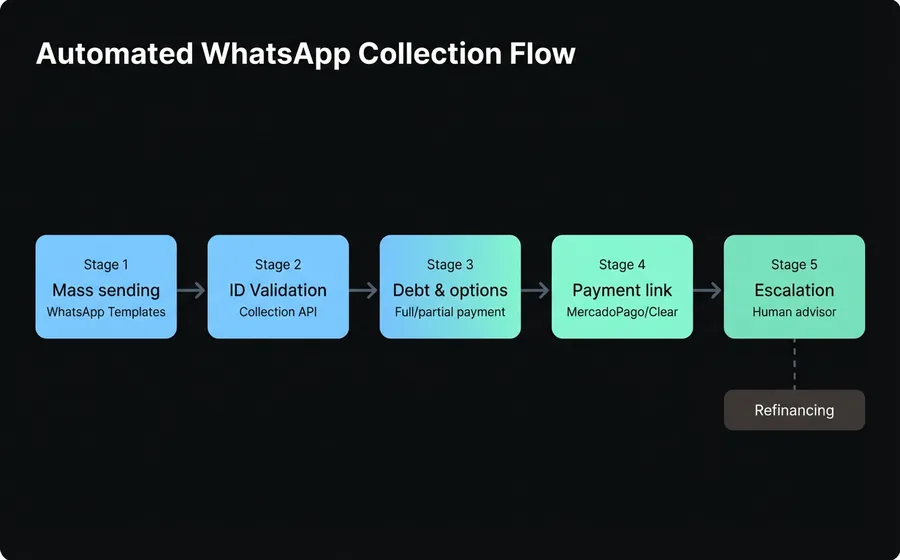
Stage 1: Mass reminder delivery
The process starts with an outbound message. Using the WhatsApp Business API, Meta-approved templates are sent to the entire delinquent portfolio. The typical message includes:
- Personalized greeting (customer name)
- Amount due
- Due date
- Call-to-action button ("View my debt" or "Pay now")
Important: Collection templates must comply with Meta's policies. They cannot be aggressive, threatening, or include sensitive information in the message preview. A typical approved template says: "Hello {name}, you have a pending payment of ${amount}. Tap here to see details and payment options."
The mass sending tool allows scheduling deliveries by delinquency segment (0-15 days, 15-30, 30-60, 60-90+), customizing the message according to the amount, and segmenting by product type (personal loan, card, microcredit).
Step 2: Identity Validation
When the debtor responds or taps the button, the chatbot initiates verification. It requests the document number (DNI, CURP, RUT) and validates it against the API of the collections management system. If the document matches the registered WhatsApp number, the bot displays the debt information.
Why is it necessary? Because WhatsApp is not an authenticated channel by default. The number could belong to someone else, or the debtor could be using a different phone. Document validation is the minimum security standard for operating in the financial sector.
Step 3: Debt Presentation and Options
Once identity is validated, the bot presents:
- Debt details: principal, interest, late fees, total amount due.
- Payment options: full payment, partial payment, installment plan (if company policy allows).
- Active credits: if the client has more than one product, they can view each one and choose which to pay.
This information is queried in real-time from the collections system's API. It is not static text — it updates every time the debtor interacts.
Step 4: Payment Link Generation
The bot generates a unique payment link tied to the debtor's account. The most used processors in LATAM are:
- MercadoPago (Argentina, Mexico, Brazil, Colombia, Chile, Uruguay)
- Clear (Argentina)
- PSE (Colombia)
- SPEI/CoDi (Mexico)
The link is sent within the WhatsApp conversation. The debtor taps, completes the payment with the processor, and the processor's webhook notifies the collections system that the payment has been registered. The bot automatically sends a confirmation message.
If the debtor wishes to report a payment via bank transfer (without using the link), they can upload the proof directly in the chat. The bot registers it and notifies the collections team for manual verification.
Step 5: Intelligent Escalation to an Advisor
Not all cases are resolved with a bot. When the debtor wants to negotiate an interest discount, needs a refinancing plan outside of standard options, has a claim or dispute regarding the amount, or simply asks to speak with a person — the bot transfers the conversation to a human advisor within the same omnichannel platform.
The advisor receives the full context: name, document, debt, previous payment attempts, conversation history. They do not start from scratch. This is critical: context-rich transfer reduces the advisor's average handling time by 40-50%.
Step-by-step: implementing a collections chatbot
Step 1: Activate the WhatsApp Business API
You need a Meta-authorized BSP that provides you with API access. This includes: a verified number, bulk sending capacity, template management, and a message reception webhook. Meta's verification process takes between 2 and 5 business days.
Tip: do not use the WhatsApp Business App (the green one). It does not allow bulk sending via API, does not support multiple simultaneous agents, and does not have a webhook. For a collections operation, you need the API — there is no shortcut.
Step 2: Connect your collections management system
The chatbot needs to query balances and record payments in real time. This requires an API integration between the automation platform and your core system. The typical endpoints you need to expose are:
GET /deudor/{documento}— returns customer data and debtGET /deudor/{documento}/operaciones— returns active creditsPOST /pago— records a payment or payment promisePOST /comprobante— attaches proof of payment image
If your system does not have an API, you will need to build one or use middleware. Many LATAM fintechs use collections management systems that already have these endpoints ready.
Step 3: Design message templates
WhatsApp templates require Meta approval (24-48 hours). Design at least these:
- Soft reminder (0-15 days): informative, friendly. "Hello {name}, we remind you that you have a pending payment of ${amount}."
- Firm reminder (15-30 days): more direct, includes consequences. "Your account has a delay of {days} days. Avoid additional surcharges."
- Management notice (30-60 days): last notice before escalation. Includes option to contact an advisor.
- Payment confirmation: "Your payment of ${amount} was successfully recorded. Thank you."
Rule: each template must have a clear call-to-action button. Do not send a wall of text without a CTA.
Step 4: Build the chatbot flow
The collections bot flow has this structure:
- Customer receives template → taps button → starts conversation
- Bot asks for document → validates against API → shows debt
- Client chooses payment option → bot generates link → client pays
- Webhook confirms payment → bot sends proof of payment → case closed
- (Alternative) Client asks to speak with an agent → bot transfers with context
Each flow branch must have a timeout: if the debtor does not respond within 24 hours after opening the conversation, the case returns to the queue for the next management cycle.
Step 5: Schedule bulk sends by delinquency bracket
Do not send the same message to the entire portfolio. Segment:
| Delinquency bracket | Frequency | Tone | Main action |
|---|---|---|---|
| 0-15 days | Every 5 days | Friendly/reminder | Direct payment link |
| 15-30 days | Every 3 days | Firm | Payment link + agent option |
| 30-60 days | Weekly | Urgent | Refinancing offer |
| 60-90+ days | Bi-weekly | Formal | Referral to agent |
The WhatsApp bulk sending tool allows scheduling these sends with personalized variables (name, amount, days overdue) and measuring the open and response rate of each campaign.
Step 6: Measure, adjust, scale
Start with a delinquency segment and a portfolio segment. Measure for 30 days. If the numbers are better than the call center (spoiler: they will be), scale to the rest.
Common Errors in Collections Automation
Error 1: Using WhatsApp Business App instead of the API
The personal app or the Business App do not support programmatic bulk sending, multiple agents, or integration with systems. If you are sending messages one by one from the app, you are not automating — you are doing the same as before with another phone.
Error 2: Aggressive Templates that Meta Rejects
Meta reviews each template. If it includes threats ('you will face legal consequences'), coercive language, or sensitive financial information in the preview, it rejects it. And if your number accumulates rejections, it lowers your quality rating and limits your sending capacity. Draft with firmness but without aggressiveness.
Error 3: Not Validating Identity Before Showing the Debt
Showing a balance without verifying who is on the other side is a security and regulatory compliance risk. Always validate with a document before revealing financial information.
Error 4: Not Having a Human Escalation
A bot that does not allow speaking with an advisor generates frustration and complaints. The debtor needs to know that they can access a person if their case requires it. The escalation must be visible and fast — not hidden in a 5-level menu.
Error 5: Measuring Only the Volume of Messages Sent
Sending 50,000 messages means nothing if you don't measure how many generated a payment. The metrics that matter are those in the next block.
Metrics That Matter: How to Measure Success
To know if your collections chatbot works, you need to track these 6 metrics:
| Metric | Formula | LATAM Benchmark |
|---|---|---|
| Contactability Rate | Messages read / messages sent | 90-98% |
| Interaction Rate | Debtors who responded / messages read | 35-55% |
| Payment Conversion Rate | Payments completed / debtors who interacted | 15-30% |
| Cost per Management | Total channel cost / activities performed | USD 0.03-0.08 |
| Average Resolution Time | From template sending until payment registered | 4-24 hours |
| Escalation rate | Conversations escalated to human / total | 15-25% |
If your escalation rate is greater than 30%, the bot's flow needs more self-service options. If it's less than 10%, you are probably trapping cases that should go to an agent.
Compared to a traditional call center where the cost per interaction ranges between USD 1.50 and USD 3.00 and the contact rate is 15-20%, a well-implemented WhatsApp chatbot can generate a ROI greater than 500% in the first 6 months.
Frequently asked questions
Is it legal to collect payments via WhatsApp in my country?
Yes, as long as you comply with local data protection and collection regulations. In Argentina (Law 25.326), Mexico (LFPDPPP), Colombia (Law 1581), Chile (Law 19.628), and Brazil (LGPD), sending collection messages via WhatsApp is legal if the debtor consented to the channel when contracting the credit. Consult your legal department to confirm the opt-in in your contract.
How much does it cost to send a collection message via WhatsApp?
The cost depends on the country and the template category. In Argentina, a "utility" category message (collections) costs approximately USD 0.03-0.05 per conversation (24-hour window). In Mexico, it's ~USD 0.02-0.04. These costs are charged by Meta through the BSP. Compared to USD 1.50-3.00 for a call, it's a fraction.
What happens if the debtor blocks my number?
If a debtor blocks you, you cannot send them more messages from that number. The block rate in well-managed collections is 2-5%. To minimize it: do not send more than 2-3 messages per week, always offer a clear opt-out, and use a respectful tone. If your block rate exceeds 10%, review the frequency and tone of your templates.
Can I send the debt amount in the WhatsApp message?
You can include the amount in the message body (once the debtor opens the conversation), but not in the template preview. The preview is visible without opening the message, and exposing financial information there violates Meta's policies and can lead to privacy issues. Use neutral text in the preview and show the details once the debtor interacts.
How long does it take to implement a collections chatbot?
With a platform that already has the collections template and payment processor integration ready, implementation takes between 2 and 4 weeks. This includes: WhatsApp API activation (2-5 days), template design and approval (3-5 days), integration with the collections system (1-2 weeks), and testing (3-5 days). Without a pre-existing platform, development from scratch can take 2-3 months.
Conclusion
Collections via WhatsApp is not a trend — it's the new standard for fintechs in LATAM. The numbers leave no room for doubt: 98% open rate versus 15% phone contactability, 95% reduction in cost per interaction, and a 25-40% increase in early recovery rate.
The key is not to send more messages — it's to automate the complete flow: from mass reminders to identity validation, payment link generation, and automatic registration. A well-implemented chatbot resolves 70-80% of cases without human intervention, and those that escalate to an agent arrive with full context to close quickly.
If your collections operation still relies on calls that no one answers, explore how an omnichannel platform with AI can transform your recovery rate.