
If you're searching for "chatbot WhatsApp price" you've probably already passed the first filter: you understood that you need to automate your WhatsApp channel and now you want to know how much the bill will hurt. Spoiler: most pages that rank for this query show you a single number (the SaaS plan) and omit the other two costs that end up doubling or tripling your real investment.
This guide is different. In 2025, Meta changed the WhatsApp Business Platform pricing model from conversations a messages (WhatsApp Business pricing) and most Spanish posts haven't updated yet. Here you'll find the 3 real costs (software + Meta + BSP), a comparative table of 6 active platforms in LATAM, 3 concrete scenarios with monthly total cost calculations, the difference between a rules-based chatbot and an AI Agent (and when each pays off), and the 5 mistakes that double your bill without you knowing.
If you manage an SMB with 500-2,000 chats per month, a mid-sized company with sales and support flows, or a contact center processing 50,000+ messages, you'll leave this post with a concrete number next to your name and the criteria to choose wisely.
What it really costs: the 3 costs no one tells you about
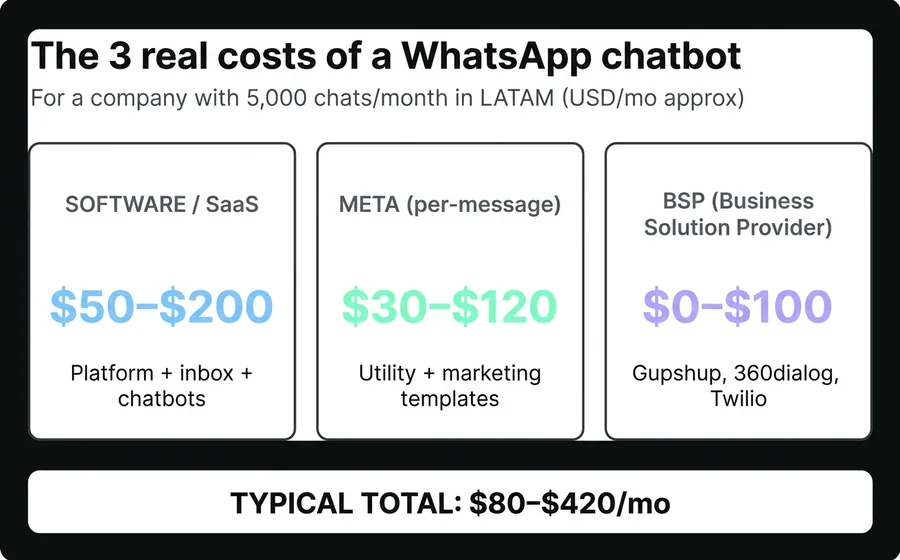
The market's first deception: when a provider tells you "USD 49/month," they're only talking about the software. The real bill for a WhatsApp chatbot has 3 layers that add up, and understanding each one is the difference between budgeting well and panicking by the third month.
Cost 1: Software / SaaS platform
This is the "list price" you see on any page: the monthly subscription you pay to the provider for access to the dashboard, chatbots, unified inbox, CRM, and reports. In LATAM, there are three clear tiers:
- Low (USD 15-50/month): platforms like ManyChat, Tecca, initial plans from local providers. Designed for 1-2 agents and small volumes (1,000-3,000 chats/month). Limited functionality: rules-based chatbots, no generative AI, basic integrations.
- Medium (USD 50-300/month): most serious providers for SMBs and mid-sized companies. Multi-agent, CRM integrations, bulk messaging, reports. This tier includes AsisteClick's Business and Company plans, Whaticket, B2Chat, Beex, Aurora Inbox.
- High (USD 500-3,000+/month): enterprise solutions like Twilio, Zendesk, Salesforce Service Cloud, premium plans from LATAM providers. They justify the price if you have a contact center with 20+ agents, guaranteed SLA, and regulated compliance (banking, healthcare, government).
What almost no one tells you: platforms that charge "USD 99/month unlimited" usually have a soft cap on chats (1,000-2,000) after which they either upgrade your plan or charge per message. Reading the SaaS fine print is as important as looking at the main price.
Cost 2: WhatsApp Business Platform (what you pay to Meta)
Here's what changed. Until June 2025, Meta charged per 24-hour conversation according to category (marketing, utility, authentication, service). As of July 2025, the model is per-message for template messages (those initiated by the company). What this means in real money, in LATAM (respond.io WhatsApp pricing + official WhatsApp Business pricing):
- Utility template messages (reminders, confirmations, OTPs): approx. USD 0.0085 per message in Argentina/Mexico.
- Marketing template messages (promos, launches, re-engagement): approx. USD 0.0305 per message in Argentina/Mexico.
- Service messages (replies within the 72-hour customer-initiated window): free, up to the limit of 1,000 service conversations per month (after which fees apply).
- Authentication template: between USD 0.0135 and USD 0.0588 depending on the country.
A company that sends 5,000 monthly reminders via WhatsApp pays Meta approximately USD 42 extra per month, in addition to the SaaS. If that same company makes 2,000 marketing sends, it adds up to USD 61 more. And if it is in Brazil, Mexico, or Colombia, rates vary (Brazil tends to be 40% cheaper in utility, the United States can be 2x more expensive in marketing).
Cost 3: BSP (Business Solution Provider)
To access the WhatsApp Business API, you need an Meta-authorized BSP that provides the number, manages the quality score, and handles the technical integration. In the region, the most used are Gupshup, 360dialog, MessageBird (Bird), Infobip, and Twilio. There are three billing models:
- BSP-included in the SaaS: some platforms (including AsisteClick, which operates with Gupshup as an official BSP partner) absorb this cost within the plan. You don't pay anything extra to the BSP, only Meta.
- Separate BSP with fixed fee: USD 25-100/month additional per number.
- BSP that charges markup per message: between 10% and 30% on top of the Meta rate. At high volumes, this is noticeable.
Rule of thumb: if your provider bills you for SaaS + Meta + BSP separately and the three total more than USD 200 for 5,000 chats per month, there's room to negotiate or switch platforms. If everything comes in a single package of USD 50-150, you're probably fine.
Comparison table: 6 active platforms in LATAM
This table compares 6 platforms with public figures as of April 2026, assuming a common scenario: 1 operator + 2-3 collaborators, 5,000 chats per month, without generative AI. Prices in USD, monthly plan (not annual). The "+ Meta" is the approximate cost of extra template messages that most companies pay separately.
| Platform | Equivalent plan | SaaS Price/month | Chats included | Separate BSP | Multi-agent | Bulk sending | Generative AI |
|---|---|---|---|---|---|---|---|
| AsisteClick (Argentina) | Business | USD 20 (16 annual) | 4.000 | No (Gupshup included) | 1 op + 3 collab | Yes (Wadalio) | AI Plus Plan (USD 208 annual) |
| Whaticket | Pro | USD 89-159 | Unlimited (soft cap) | No | 3-10 agents | Yes | Paid add-on |
| B2Chat | Business | USD 89-249 | Per user | Variable | Per slot | Yes | Add-on |
| Aurora Inbox | Pro Plan | USD 99+ | Per agent | No | 2-10 agents | Yes | Yes (with cost) |
| ManyChat | Pro WhatsApp | USD 15-150 | Per active contacts | Yes (Twilio or 360dialog) | Limited | Limited | Add-on |
| Twilio + Studio | Pay-as-you-go | USD 0 base | 0 (all per-message) | Yes (self-service) | Requires development | Via API | Via integrated OpenAI |
Sources: public pricing pages of each provider (consulted April 2026), Capterra Conversational AI, Tecca: best WhatsApp Business API platforms 2026.
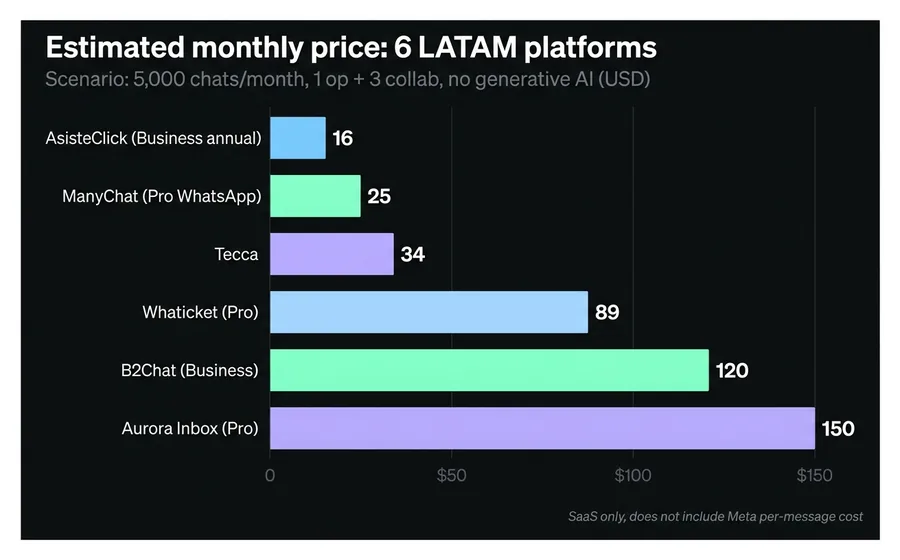
Quick read: for a LATAM SME with medium volume, AsisteClick is the cheapest on the market in its tier (USD 16-20/month with BSP included and 4,000 chats), although Whaticket and Aurora offer higher chat limits in superior plans. Twilio is the most flexible for technical teams but requires development; ManyChat is the most popular option for simple marketing automations without the need for a professional unified inbox.
Traditional Chatbot vs. AI Agent: the difference that defines your bill
This is the decision that has the most impact on your total cost — and the one that generates the most confusion. "WhatsApp Chatbot" is used as an umbrella term for two things that cost differently and perform differently.
Rule-based Chatbot (traditional chatbot)
A rule-based chatbot works with predefined flows: if the user says "hello", the bot responds with a menu; if they choose "1", it sends them to another node; if they type something outside the flow, it escalates to a human or repeats the menu. Technology behind it: decision trees + keyword recognition + sometimes NLP trained with question/answer pairs (what in AsisteClick is called AsisteNLP).
- When it's the best option: clear transactional flows (collections, reminders, order tracking, short FAQ), when the universe of queries is limited (fewer than 50 intents), and when cost is the priority.
- Cost: included in the base plan of most LATAM platforms. It does not add recurring expense beyond the SaaS.
- Main limitation: breaks down when the customer asks something off-script. It falls into loops ("I didn't understand, can you repeat?") and ends up escalating to a human faster than it seems.
AI Agent (chatbot with generative AI / GPT)
An AI Agent uses large language models (GPT-5.4, Claude, Gemini, Llama) connected to a proprietary knowledge base via RAG (Retrieval Augmented Generation). Instead of following a tree, it reads your PDFs, internal FAQs, product catalog, operational documentation, and answers anything within that knowledge using natural language. When it doesn't know, it escalates with full context to a human.
- When it is the best option: customer service with a broad universe of queries (more than 50 intents), consultative processes (advisory, technical sales, complex product support), when response quality matters more than cost.
- Cost: between USD 80 and USD 500/month in addition to the base SaaS, depending on the volume of tokens consumed. In AsisteClick, AsisteGPT is included in the AI Plus plan from USD 208/month (annual) without token variability — the cost of OpenAI/Anthropic is absorbed into the plan.
- Main limitation: a poorly configured AI Agent (without a curated knowledge base, without guardrails) can invent answers (hallucinations). It requires serious setup: defining system prompts, loading the knowledge base, testing with real cases before exposure.
Summary table
| Criterion | Rules-based Chatbot | AI Agent |
|---|---|---|
| Extra monthly cost | USD 0 (included in base SaaS) | USD 80-500 |
| Implementation time | 1-2 weeks | 2-6 weeks |
| Resolution rate without human intervention | 40-60% | 75-90% |
| Handling of unanticipated questions | Poor (loops, escalation) | Good (answers using knowledge base) |
| Maintenance | High (each new flow is manual) | Low (you update the knowledge base) |
| Risk of hallucinations | Zero (responds with loaded content) | Real (mitigated with guardrails) |
The golden rule: If your business has repetitive transactional flows (collections, scheduling, tracking), start with a rules-based chatbot. If you have a consultative operation with a wide universe of questions (SaaS customer service, technical support, assisted sales), paying extra for the AI Agent pays for itself in 2-3 months due to savings in human escalations. The operational difference: a well-configured AI Agent resolves twice as many cases as a rules-based chatbot, and frees up the team for cases that truly require human judgment.
9 features that separate a useful expensive chatbot from a useless cheap one
These are the 9 features that differentiate a WhatsApp chatbot you'll use for 3 years from one you'll abandon after 4 months. If a platform doesn't have them or charges for them as an expensive add-on, it's a sign that you'll end up paying more for less.
1. Multi-agent on a single number
Your entire team (sales, support, collections) must be able to operate the same WhatsApp number from different profiles, with automatic chat assignment based on area, workload, or who previously assisted that client. If the platform forces you to have one number per person, you will fragment your brand and duplicate Meta costs.
2. Omnichannel inbox
WhatsApp is the star channel, but your client also writes to you via Instagram DM, Messenger, web chat, Telegram, and sometimes email. A good WhatsApp chatbot should be part of an omnichannel inbox where every conversation ends up in the same place, assigned to the same person, with the same visible history. Otherwise, your agents jump between 5 windows and lose context.
3. Bulk messaging with approved templates
Sending 1,000 individual messages is not the same as executing a bulk campaign with a Meta-approved template. The technical difference: templates go through Meta moderation (24-72 hours) and can include variables ({{1}}, {{2}}), buttons (call-to-action, quick reply), media (image, video, PDF). In AsisteClick, this layer is called Wadalio and is included from the lowest plan. On other platforms, it's an add-on of USD 30-100/month.
4. CRM integration (native or via API)
If your chatbot doesn't write customer data (name, phone, last contact, pipeline stage) to a CRM, you'll lose those leads. The conversation stays on WhatsApp and no one follows up the next week. Look for platforms with native CRM (like AsisteCRM) or with a documented REST API to sync with your existing HubSpot/Salesforce/Pipedrive.
5. Automatic assignment and routing rules
The chatbot handles the first steps, but when it escalates to a human, it must assign the correct agent: by area, by language, by schedule, by workload. If the assignment is manual ("the supervisor distributes chats by hand"), it doesn't scale. If it's round-robin without context, VIP chats end up with the junior.
6. Native reports and metrics
Average response time, human-free resolution rate, CSAT, escalation reasons, peak hours, agent performance. Without native reports, you can't optimize or demonstrate ROI when the business owner asks "was this worth it?". Beware: many cheap platforms only show "total chats" and hide operational details.
7. Copilot for human agents
When the chatbot escalates, the human agent taking the case should have an AI assistant (a Copilot) that suggests the next response based on history, company knowledge, and similar previous cases. It reduces case handling time by 30-50% and improves consistency.
8. Meta quality score management
WhatsApp assigns a quality score (Green/Yellow/Red) to your number based on user complaints and the blocked message ratio. If you drop to Red, Meta limits your daily volume or suspends the number. A good platform monitors the score, alerts when it worsens, and provides tools to reduce blocks (opt-in management, sending frequency, list quality).
9. Support and onboarding in Spanish
It sounds obvious but it's not: many global platforms (Twilio, MessageBird, Intercom) have documentation and support only in English. If your team is not technical or you're in an SME, you'll suffer. Look for a provider with support in Spanish, ideally with 1-on-1 onboarding for the first 30 days.
If the platform you are evaluating has 7-9 of these features included in the plan, it's good. 5-6, check the fine print of the add-ons. Less than 5, keep looking.
3 real scenarios: SME, mid-market, contact center
Specific figures for 3 operation sizes, calculated with AsisteClick public prices + Meta LATAM rates April 2026. Numbers change by country (Brazil cheaper, USA more expensive), but the order of magnitude applies.
Scenario 1: Local SME (hair salon, consulting room, workshop)
- Volume: 1,000 chats/month, 200 utility template messages (reminders), 0 marketing.
- Team: 1 owner + 1 assistant.
- Recommended plan: AsisteClick Business annual = USD 16/month.
- + Meta utility (200 × USD 0.0085): USD 1.7.
- + BSP: USD 0 (included).
- Monthly total: ~USD 18.
- ROI: 1 hour less per day of the assistant answering the phone pays for itself (assuming USD 5/hour Argentine cost) in less than 4 days.
Scenario 2: Mid-sized company (eCommerce, fintech B2C, clinic with several professionals)
- Volume: 8,000 chats/month, 3,000 utility templates (reminders, confirmations, order tracking), 1,500 marketing templates (weekly campaigns).
- Team: 1 supervisor + 5 agents.
- Recommended plan: AsisteClick Company annual = USD 88/month (includes 10K chats + AsisteNLP + AsisteAPI + Wadalio).
- + Meta utility (3,000 × USD 0.0085): USD 25.5.
- + Meta marketing (1.500 × USD 0.0305): USD 45,75.
- + AsisteCRM add-on (USD 49/month) if desired: USD 49.
- + BSP: USD 0 (included).
- Monthly total: ~USD 159 without CRM, USD 208 with CRM.
- ROI: a full-time agent costs USD 800-1.500 in LATAM. If the chatbot resolves 50% of chats without human intervention, it is equivalent to 2.5 agents of capacity — typical payback of 3-6 weeks.
Scenario 3: Contact center (banking, telco, private healthcare)
- Volume: 50.000 chats/month, 15.000 utility templates, 8.000 marketing templates, 2.000 authentication (OTPs).
- Team: 5 supervisors + 25 agents operating in shifts.
- Recommended plan: beyond 25,000 chats/month the public website pricing no longer applies. AsisteClick negotiates a custom Enterprise plan that typically falls between USD 1,500 and USD 3,000/month depending on exact volume, SLA, multi-country coverage, number of operators and AI services activated (GPT, Copilot, voicebots). Includes dedicated onboarding, account manager and discounts for annual commitment.
- + Meta utility (15,000 × USD 0.0085): USD 127.5.
- + Meta marketing (8,000 × USD 0.0305): USD 244.
- + Meta authentication (2,000 × USD 0.0305 average): USD 61.
- + BSP: USD 0 (included in Enterprise).
- Estimated monthly total: ~USD 2,000-3,500 (plan + Meta costs).
- ROI: A human contact center with 25 agents 24/7 (including night/weekend shifts) costs USD 25,000-40,000/month in LATAM. Automating 70% of the volume frees up 17 agents from repetitive tasks. Typical payback of 30-60 days even at the high end of the range.
These calculations assume the per-message model effective since July 2025. Before the change, a company with 50K chats paid Meta between 2x and 5x more under the per-conversation model, depending on the category mix. If your provider still bills you per conversation, demand an update to the new model or switch..
5 mistakes that double your bill without you realizing it
Error 1: Buying cheap and migrating after 6 months
The classic trap: hiring the USD 25/month platform, discovering it doesn't scale (it lacks decent multi-agent capabilities, reports are poor, there are no professional bulk sends), and migrating to a serious platform after 4-6 months. Real cost: USD 150 of wasted SaaS + 80 hours of your team configuring twice + loss of operational continuity. Better: choose a platform you can grow with for 3 years, even if you pay USD 30 more initially.
Error 2: Not estimating Meta's cost before signing
Many companies only look at the SaaS and find out about Meta's cost when the first BSP invoice arrives. For a company with 5.000 template messages per month in LATAM, that's an extra USD 40-150. If you're going to do mass marketing (10.000+ promos per month), Meta can be higher than the SaaS cost. Better: ask the provider for a projection with your real volume before signing and verify that Meta's rates are updated to the per-message model.
Error 3: Underestimating the quality score (and Meta suspending you)
If your chatbot sends messages that users block or report en masse (sends without opt-in, spam, abusive frequency), Meta lowers your quality score to Red. Your daily volume is limited first, then the number is suspended. Recovery takes 30-90 days, and meanwhile, your WhatsApp channel remains dead. Better: platform with native quality score monitoring and anti-spam rules (frequency, mandatory opt-in, list cleaning).
Error 4: Paying for generative AI without curating the knowledge base
You pay an extra USD 200 per month for an AI Agent with GPT, configure it in an afternoon with a poorly scanned PDF and two old FAQs, and when you launch it, it answers incorrectly 40% of the time. People abandon, you escalate everything to humans, and you pay for the premium SaaS only to end up using just the inbox. Better: dedicate 1-2 weeks to curating the knowledge base (clean documents, updated FAQs, clear definition of the response scope). If you want to delve deeper, How to measure a chatbot's ROI covers the complete formula.
Error 5: Buying features you won't use
The AI Plus plan of USD 260/month is excellent if you're going to use GPT, Copilot, and a full inbox. It's a waste if you only want to send automatic reminders and handle 200 chats a day. The correct question isn't "what's the most complete plan?", but "what's the minimum plan that covers my real use case?". Start there and upgrade when the data justifies it.
Frequently asked questions
How much does a WhatsApp chatbot for businesses cost in 2026?
A WhatsApp chatbot for an SME costs between USD 16 and USD 50/month on LATAM platforms (software only). Adding the Meta cost (USD 5-50 depending on volume) and, in some cases, the separate BSP, the realistic total cost for an SME with 1,000-3,000 chats per month is around USD 25-80 per month. Medium-sized businesses (5,000-10,000 chats) pay between USD 100 and USD 300, and large contact centers exceed USD 1,000/month.
What is the difference between the WhatsApp Business app and the WhatsApp Business API?
The app WhatsApp Business is free, designed for 1 person operating from a mobile phone, with quick replies and a simple catalog. The WhatsApp Business API (WABA) is an infrastructure for businesses: it allows multi-agent operation on the same number, chatbots, bulk messaging with Meta-approved templates, CRM integration, and unlimited volumes. You need WABA when you exceed 1,000 chats/month or when you want to automate.
How much does Meta charge per message on WhatsApp Business Platform in 2026?
From July 2025, Meta uses a per-message (not per-conversation) model. In LATAM, the approximate rates are: USD 0.0085 per utility message (reminders, confirmations), USD 0.0305 per marketing message (promotions), between USD 0.0135 and USD 0.0588 per authentication message depending on the country. Service messages (responding within the 72-hour window initiated by the customer) are free for up to 1,000 service conversations per month.
Are there free options to start with WhatsApp Business API?
There are no 100% free professional platforms, but most LATAM providers offer a 7-14 day trial without a card. Twilio has a limited free-tier plan for development (~USD 15 initial credit). If your volume is very low (<300 chats/month) and you operate alone, the free WhatsApp Business app might suffice — but it doesn't scale.
Is a generative AI chatbot worth the extra price?
Yes, if your operation has a broad universe of queries (50+ intents) and consultative processes (sales, technical support, customer service). A well-configured AI Agent resolves 75-90% of cases without human intervention vs. 40-60% for a rule-based chatbot. The extra cost (USD 80-300/month) is amortized in 2-3 months due to savings in human escalations. It's not worth it if your operation is purely transactional (collections, reminders, short FAQ) — in that case, a rule-based chatbot is cheaper and performs just as well.
How long does it take to implement a WhatsApp Business API chatbot?
On average 3 to 7 business days to have the chatbot operational with basic flows. The process includes: Meta Business Manager verification (24-72 hrs), WABA number provisioning with a BSP, platform configuration, basic flow design, and testing. A generative AI chatbot (AI Agent) adds 2-4 additional weeks to curate the knowledge base and train the prompts. AsisteClick activates the API in 3 business days on average and offers 1-on-1 onboarding with an assigned bot builder.
Does it work for companies in Argentina with local invoicing?
Yes. AsisteClick has an Argentine CUIT (AsisteClick SAS, Buenos Aires) and operates with Gupshup as an official BSP partner, the #1 in Argentina and LatAm. Optional invoicing in USD via FastSpring or in Argentine pesos with an invoice issued by AsisteClick SAS. More than 500 active clients in Argentina, Chile, Colombia, Mexico, Uruguay, Paraguay, Brazil, USA, and Spain.
Conclusion
A WhatsApp chatbot for businesses in 2026 costs whatever you want to spend — from USD 18 total/month for an SME that only sends reminders, up to USD 1,000+ for a contact center with AI automation, multi-country, and high volume. The difference between paying well and paying poorly is not in the SaaS price, but in understanding the 3 real costs (software + Meta + BSP), choosing between a rules-based chatbot and an AI Agent according to your case, and not buying features you won't use.
The concrete task: estimate your real chat volume per month, define whether your operation is transactional or consultative, add the 3 costs with the platform you are evaluating, and compare it against what it costs you today to solve the same with humans. If the ROI is less than 4 months, hire. If it's more than 8, wait one more cycle before investing.
If you want to see AsisteClick plans applied to your specific case, you can review the updated pricing or see the details of everything WhatsApp + AsisteClick includes. And if your operation qualifies for generative AI, AsisteGPT it comes with the OpenAI cost absorbed into the IA Plus plan, with no surprises on the monthly bill.
Keep reading: