
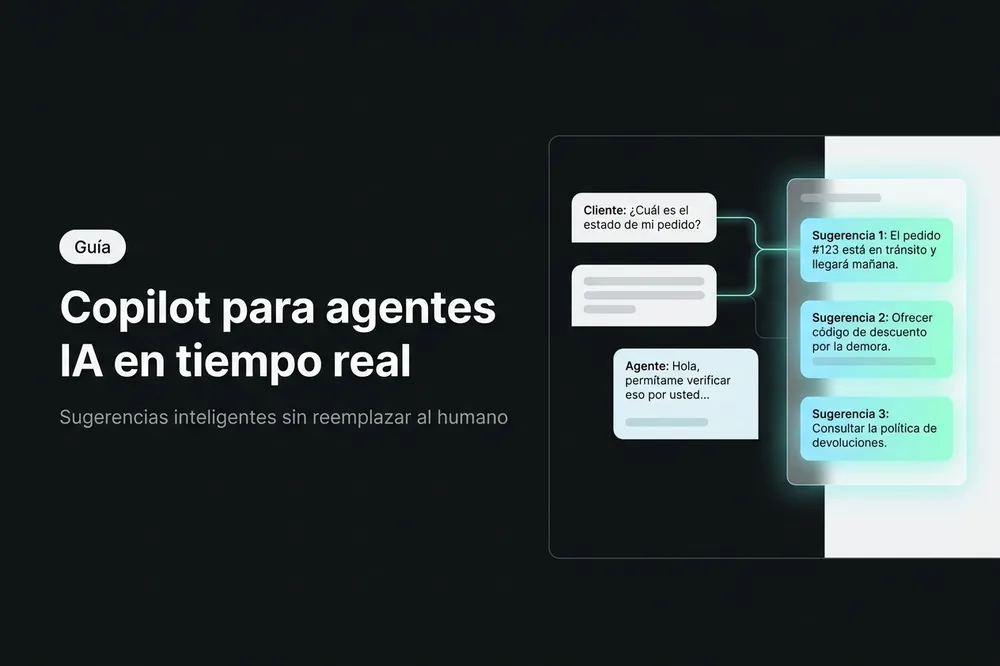
An average customer service agent spends between 30% and 40% of their workday searching for information in internal systems, manuals, and previous conversations before being able to respond. Meanwhile, the customer waits. According to Gartner, by 2028, 60% of customer service organizations will use some form of "AI-augmented agent" — not to replace the human, but to give them superpowers.
This concept has an increasingly concrete name: copilot. It is not a chatbot that serves the customer. It is not a system that replaces the team. It is an invisible assistant that works alongside the agent, suggesting answers, searching for data, and summarizing context — all in real time, without the customer knowing it exists.
In this article, you will understand what a copilot for customer service agents is, how it works technically, what types exist, and how to implement it in your operation without disrupting the team.
Table of Contents
- What is a copilot for customer service agents
- Why a copilot is more effective than replacing the human
- The 5 key functions of an AI copilot
- How to implement a copilot in your operation
- Frequent errors when implementing a copilot
- Frequently Asked Questions
What is a copilot for customer service agents
An AI copilot is a digital assistant that operates within the conversation, visible only to the agent. While the agent chats with a customer via WhatsApp, webchat or any channel, the copilot analyzes the exchange in real time and offers suggestions, data, and relevant information through private notes.
The fundamental difference with a chatbot is who interacts with whom:
- A chatbot speaks directly with the customer. It serves them, answers them, guides them.
- A copilot speaks with the agent. It suggests what to answer, searches for data, summarizes context. The customer never knows it exists.
The most precise analogy is that of an airplane copilot: it doesn't fly the plane, but monitors instruments, alerts about conditions, and executes support procedures. The pilot maintains control and makes the final decisions.
In practice, a copilot is activated when the agent needs it — for example, by mentioning the bot within the conversation (like an @mention in Slack). The system automatically reads the chat history, the customer's name, email, and phone, and responds with contextualized information that only the agent can see.
Why a copilot is more effective than replacing the human
The temptation to automate everything with chatbots clashes with a reality: complex queries require human judgment. A Stanford and MIT study published in 2023 found that customer service agents using AI assistants increased their productivity by 14%, with the strongest impact on new or less experienced agents — a 34% increase for the least experienced.
The key finding: AI didn't replace good agents, it made them better. And it turned novices into competent agents in weeks instead of months.
McKinsey reports a similar pattern: in tasks requiring empathy, negotiation, or ambiguous problem-solving, human-in-the-loop models (human + AI) consistently outperform full automation. The reason: the LLM can process information faster, but the human understands the emotional context and makes decisions that AI cannot justify on its own.
This connects directly with the paradox of automation: the more you automate the routine, the more valuable the human becomes in the complex. A copilot aims precisely at that balance.
| Dimension | Chatbot | Copilot | Full automation |
|---|---|---|---|
| Who serves the customer? | The bot | The human agent | The system (without human) |
| Does the customer know there's AI? | Yes | No | Yes |
| Complexity handled | Low-medium | Medium-high | Only the predictable |
| Agent control | None | Total | None |
| Empathy and judgment | Limited | Human (augmented) | None |
| Ideal for | FAQs, schedules, basic info | Complex support, consultative sales | Processes without exceptions |
The most powerful scenario combines all three: a chatbot resolves simple queries (60-70% of the volume), the copilot augments the agent in complex ones, and full automation handles internal processes like ticket classification or routing.
The 5 key functions of an AI copilot
Not all copilots do the same thing. These are the five capabilities that define a modern copilot for customer service:
1. Response suggestions based on your knowledge base
The most fundamental copilot is one that consults your company's internal documentation and suggests responses to the agent. It works like this: the agent has an open conversation with a customer asking about a return policy. Instead of opening another tab and searching a 200-page PDF, the agent mentions the copilot and asks internally: "what is the return policy for electronic products?".
The copilot searches the linked knowledge base (which may include PDFs, internal documents, URLs from your site, or manuals) and responds with precise information, citing the source. All of this happens as a private note: the customer only sees the final response the agent decides to send.
The critical thing here is that the copilot does not invent. If the answer is not in the documentation, it explicitly states so instead of hallucinating. The agent maintains control over what is communicated to the customer.
Platforms like AsisteClick permiten crear copilots de conocimiento que se conectan a bases de conocimiento con tecnología allow creating knowledge copilots that connect to knowledge bases with technology GPT and RAG
— the same engine that powers generative AI chatbots, but oriented inwards, towards the agent.
2. Instant access to data without changing screens
An agent handling a claim needs to see purchase history, account balance, outstanding invoices. In a traditional operation, this means opening the CRM, searching for the customer, navigating between tabs. Dead time that the customer perceives as waiting. A copilot connected to external systems via API
can resolve this in the same chat window. The agent asks internally: "what is this customer's balance?" and receives the answer in seconds, with real-time data from the ERP or billing system.
Technically, this works because the copilot has access to tools (AI Tools) that execute queries to external webhooks — checking balances, listing invoices, generating payment links — without the agent having to leave the conversation.
3. Automatic conversation summary
One of the biggest friction points in customer service is agent transfers. The customer calls, explains their problem, gets transferred, and has to repeat everything. According to a HubSpot study, 33% of customers say repeating information is the most frustrating part of customer service.
- A summary copilot solves this: at the end of a conversation (or before transferring), the agent activates the copilot and receives a structured summary with: Reason for contact
- customer's Key points
- discussed Decisions made
- during the chat Pending actions
- with responsible parties Customer sentiment
(positive, neutral, negative)
All in a maximum of 10 lines, without sensitive data. The agent receiving the transfer understands the full context in 5 seconds.
4. Assisted communication drafting
Teams handling omnichannel support frequently need to transition from chat to email: send a follow-up, a service confirmation, or a summary of what was agreed upon. Drafting a professional email with the context of a 50-message conversation takes time.
A drafting copilot analyzes the chat history and generates a complete email draft: suggested subject, personalized greeting, body with relevant information, and professional closing. The agent reviews it, adjusts what they want, and sends it. What makes it useful is not the drafting itself (any LLM can write an email) but theautomatic context
: the copilot already knows what was discussed, with whom, what was promised, and what tone is appropriate (formal for complaints, friendly for general inquiries).
5. Quality analysis and opportunity detection
- An advanced copilot not only reacts to agent questions — it also proactively analyzes the conversation. This includes:Verify adherence to protocols
- : Did the agent greet correctly? Did they offer alternatives before escalating? Did they follow the resolution script?Detect cross-selling opportunities
- : if the customer mentions they are expanding their operation, the copilot can suggest the agent offer an upgrade or a complementary service.Real-time feedback
: instead of waiting for a weekly quality audit, the agent receives improvement suggestions during the conversation.
Teams that implement this type of assistance report a 40% increase in operational efficiency and a 40% improvement in customer satisfaction, because the quality of each interaction increases without increasing the agent's workload.
How to implement a copilot in your operation
Step 1: Identify what type of assistance your agents need
- Not all teams have the same bottlenecks. Before activating a copilot, ask yourself: Do agents waste time searching for information?
- → Knowledge base copilot Are there many agent transfers with loss of context?
- → Summary Copilot Does the team send many follow-up emails?
- → Drafting Copilot Do new agents take weeks to become productive?
→ KB + coaching Copilot
The ideal approach is to start with one type and expand. The knowledge copilot usually has the greatest immediate impact.
Step 2: Prepare your knowledge base
- A copilot is only as good as the documentation you provide it. Before activating it:Gather existing documentation
- : product manuals, commercial policies, FAQs, troubleshooting guides, sales scripts. Upload the documents
- to your platform's knowledge base (PDFs, texts, website URLs).Prioritize quality over quantity
: a clear 10-page document is more useful than a confusing 200-page manual.
Step 3: Configure and customize
- Each copilot needs clear instructions on how to respond:Tone
- : formal or approachable? The copilot should speak to the agent, not the customer, but the tone influences the suggestions.Scope
- : does it only respond with what's in the KB, or can it also search the internet?Format
: short or detailed answers? For a summary copilot, you'll want a structured format. For a KB copilot, direct answers. The configuration is defined in the copilot's system prompt, just like in a.
generative AI chatbot
Step 4: Train the team on adoption
- The biggest risk is not technical — it's cultural. Agents might perceive the copilot as "a boss who monitors" instead of "an assistant who helps." To avoid this:Frame it as a tool, not as control
- : "this saves you time searching for information."Let agents choose
- the copilot suggests, never imposes. The agent always decides what to send to the customer.Start with early adopters
: identify 2-3 curious agents, let them try it and share their experience with the team.
Step 5: Measure and adjust
| The KPIs that matter: | KPI | What it measures |
|---|---|---|
| Benchmark | Average response time | Service speed |
| 20-35% reduction | First Contact Resolution (FCR) | Resolution on first contact |
| 15-25% improvement | CSAT | Customer satisfaction |
| 10-20% increase | Onboarding time | Productivity of new agents |
| 30-50% reduction | Copilot usage | Team adoption |
Target: >70% of the active team
Review the knowledge base every 2-4 weeks. If agents ask something the copilot cannot answer, it's a sign that documentation is missing.
Frequent errors when implementing a copilot
Confusing copilot with chatbot
They are complementary, not interchangeable. A chatbot handles repetitive queries that do not require a human (schedules, prices, order status). A copilot empowers the human in queries that do require one (complex complaints, negotiations, technical advice). Implementing only one of the two leaves value on the table. The optimal combination: a NLP or GPT chatbot
resolves 60-70% of the volume, and a copilot assists the agent with the remaining 30-40%.
Do not feed the knowledge base
The most common mistake. The team activates the copilot, uploads a couple of old documents, and when agents ask something not covered, they conclude that "it doesn't work." The reality: a copilot without an updated KB is like a new employee who wasn't given access to the manual.
Solution: assign someone responsible for keeping the KB updated (it can be a supervisor or a senior agent). Schedule monthly reviews. And when an agent reports that the copilot couldn't answer something, add that information to the KB.
Forcing adoption without providing context
Imposing a copilot without explaining "why" generates resistance. Experienced agents may feel that AI questions their expertise. The key: position the copilot as an accelerator of what they already do well, not as a replacement or a control monitor.
Frequently asked questions
Does the customer know the agent uses a copilot?
No. The copilot communicates with the agent through private notes within the conversation, invisible to the customer. From the customer's perspective, they are speaking with a human agent who responds quickly and with accurate information.
Does a copilot replace the chatbot?
No, they are complementary tools with distinct functions. The chatbot directly serves the customer and resolves simple queries without human intervention. The copilot assists the agent during conversations that do require a human. The combination of both covers the full spectrum: the chatbot handles volume, and the copilot improves quality.
What happens if the copilot suggests something incorrect?
The agent always has full control over what is sent to the customer. Copilot suggestions are internal notes that the agent can use, edit, or ignore. If the copilot is well-configured with an updated knowledge base, the rate of incorrect suggestions is low — and when it doesn't have the answer, it should explicitly indicate that instead of inventing.
How long does it take to implement a copilot?
With a pre-prepared knowledge base (existing documents, FAQs, manuals), a copilot can be operational in hours. The real effort lies in preparing and curating the documentation, which can take between 1 and 5 days depending on the complexity of your operation. The team's adoption curve is 1-2 weeks.
Can a copilot be used on WhatsApp and other channels? Yes. The copilot works within theomnichannel inbox
, regardless of the channel through which the customer arrives (WhatsApp, webchat, Instagram, Facebook, Telegram, email, Teams). The agent activates the copilot from the same chat interface where they serve the customer.
Conclusion
An AI copilot does not replace the agent — it turns them into a better informed, faster, and more consistent agent. Instead of searching for information in external systems, the agent receives it in real-time within the same conversation. Instead of drafting emails from scratch, they receive drafts with full context. Instead of transferring without context, they deliver a structured summary.
The difference between a team with a copilot and one without it is not the AI itself — it's the time each agent can dedicate to what truly matters: solving the customer's problem with empathy and judgment. If your team wastes time searching for information, repeating context in transfers, or drafting manual communications, a copilot can resolve these bottlenecks without changing your operation's dynamic. Request a demo of AsisteCopilot or learn about our.