
Roughly 60% of businesses that try "mass sends" on WhatsApp for the first time burn their number in less than 30 days. It's not Meta paranoia: it's the predictable result of crashing into rules that changed in 2026 and that most operators haven't yet internalized.
The three news items of the year that rewrite operations: a monthly cap of 250,000 marketing messages per business portfolio, an automatic pacing system that pauses templates in real time, and a change in Quality Rating logic where a Red rating no longer downgrades the tier instantly. Each one applies from the first send you make this year.
This guide documents the complete architecture: which path to take (and which ones burn you), how to distribute the monthly cap without wasting it, how to manage pacing before Meta pauses your campaign, and how all of this is operated in production. No magic recipes: just the real rules and concrete operations with WABA.
The 3 paths: which scales and which burns you
Before getting into operations, let's discard what doesn't work. In 2026 there are three viable paths —in theory— to send to multiple contacts. In practice, only one scales.
| Method | Daily cap | Monthly cap | Personalization | Tracking | Ban risk |
|---|---|---|---|---|---|
| Unofficial app (WhatsApp Plus, GB WhatsApp, "WhatsApp mass from Excel" bots) | "Unlimited" in theory | 0 (banned in 7-14 days) | Manual | Zero | ⚠️ Permanent |
| WhatsApp Business app + broadcast lists | 256 contacts per list | ~10K if you rotate lists | Manual, no logic | Basic status | Medium: silent rate limits |
| WhatsApp Business API (WABA) via BSP | Tier-based (250 → 1K → 10K → 100K → ∞) | 250K marketing new 2026 | Variables + conditional logic + AI | Quality Rating + delivery + read + reply in real time | Minimal if you follow the rules |
Unofficial apps are detected by client fingerprint: Meta knows you're not using original WhatsApp. The ban isn't by volume, it's by device identity. It's a matter of days, not months.
The WhatsApp Business app with broadcast lists works for an SMB that sends updates to 200 customers once a month. For any larger operation, lists can't be automated, segmented, don't bring analytics, and recipients have to have you saved in their contacts to receive the message (silent rule that discards 40-60% of sends).
Only WABA scales. The rest of this post assumes you're going that route —because any other will fail this year.
The 2026 update: the monthly 250K marketing messages cap
Here begins what most operators in Spanish haven't discovered yet.
Since early 2026, Meta imposed a monthly ceiling of 250,000 marketing messages per business portfolio, regardless of your tier. It's the first time a monthly cap exists: until a year ago, if you had Tier 4 (unlimited), you could send millions of marketing messages per month with no restriction.
Three critical clarifications about how the cap works:
- Applies per business portfolio, not per number: if you have 5 numbers under the same portfolio, the 250K are split across all numbers, not multiplied.
- Only MARKETING counts: UTILITY templates (order notifications, reminders, account alerts) do not deduct from the cap. Messages within the 24-hour service window don't deduct either (when the user wrote to you first).
- Reset is monthly, not rolling: the cap resets on day 1 of each calendar month.
Operations change. Until last year, the strategy was "warm up the number and let it run". Now the question is: how do I distribute my 250K marketing messages per month to maximize results?
Let's do real numbers. 250K monthly messages are:
- 8,300/day sustained throughout the month
- O 50,000 messages on Black Friday + 200K messages for the rest of the month (~6,700/day for the remaining 30 days)
- O 5 large 50K campaigns strategically distributed
If you need more, there's an exception process with Meta. The real criteria (not the official written ones): sustained historical volume for 6+ months, Quality Rating in green sustained for the last 90 days, fully verified business portfolio, and a documented business case. The process takes 4 to 8 weeks.
Internalizing this before your competition is the first differentiator. Most are still planning as if the cap didn't exist.
Quality Rating: the 24h rule that defines your reach
Every WABA number has a Quality Rating that Meta evaluates based on how users receive your messages in the last 24 hours. It's visible in the WhatsApp Manager → Account Tools → Phone Numbers section of Business Manager.
| Status | What it signals | Operational consequence |
|---|---|---|
| 🟢 High (Green) | Low block/report rate, acceptable engagement | You can scale volume. Lets you go up a tier if the rest of the criteria are met. |
| 🟡 Medium (Yellow) | Mixed signals | Warning: your tier cap stays active, but you can no longer go up. If you don't correct, it goes to Red. |
| 🔴 Low (Red) | High rate of blocks or reports | Your maximum tier is locked. 2026 change: there's no longer immediate automatic downgrade. |
The 2026 change is the most important thing in this section and almost nobody covers it. Until 2025, if you fell to Red for 7 consecutive days, Meta automatically dropped you to the next lower tier (from 100K to 10K, for example). In 2026, the Red rating suspends your ability to go up but no longer downgrades the tier immediately —as long as there's no policy violation. It gives you a course-correction window.
This changes operations: before, you had to react in 48-72 hours to avoid the downgrade. Now there's room to experiment, adjust segmentation, change template copy, without losing the sending ceiling.
To understand the 9 concrete operational causes that trigger degradation —from mixing marketing with utility to excessive promotional tone—, read the technical guide to the 9 errors that degrade your WhatsApp Business API number. Here we focus on how to prevent and manage.
The 5 messaging tiers: pyramid and ceiling
Every WABA number starts at a tier and scales up (or down) based on volume + Quality Rating. The pyramid:
| Tier | New conversations / 24h | How to access |
|---|---|---|
| Unverified | 250 | New number, without Business verification |
| Tier 1 | 1.000 | Verified Business Manager |
| Tier 2 | 10.000 | Sustained volume + Quality High for 7 days |
| Tier 3 | 100.000 | Idem, scaled |
| Tier 4 | Unlimited (subject to the monthly 250K marketing cap) | Enterprise operations with direct onboarding |
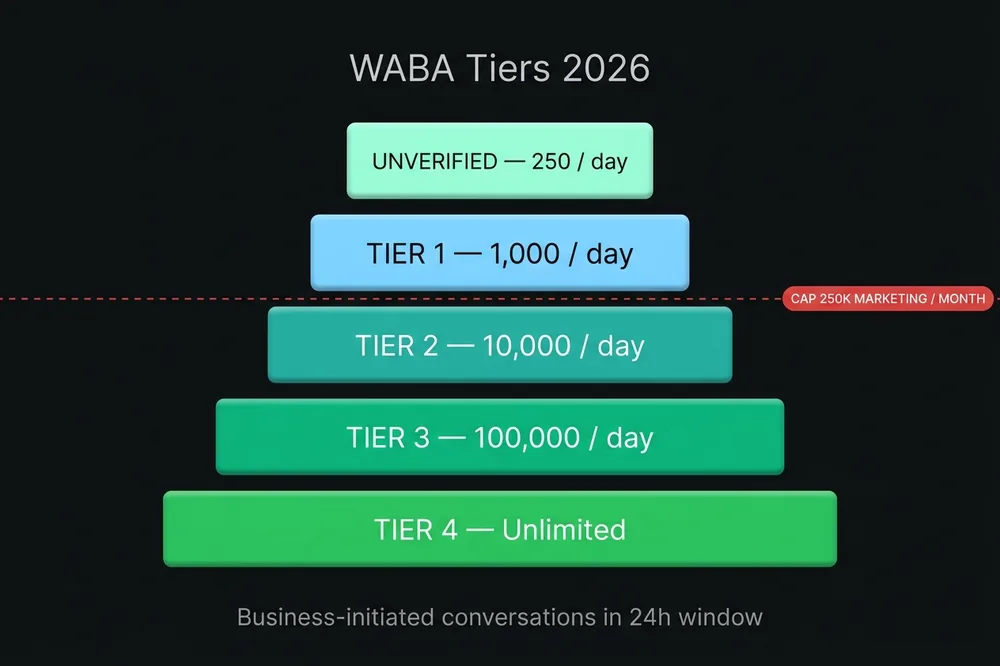
To go up a tier, Meta requires that in the last 7 days you've contacted a unique volume equal to or greater than twice the current tier, and that the Quality Rating stays High throughout that period. That is: being in Tier 2 isn't enough to go up to Tier 3 —you have to be using Tier 2 near its capacity.
On top of the pyramid sits the new 2026 ceiling: 250K marketing/month. A number in Tier 4 unlimited could theoretically initiate 30M daily conversations —but only 250K can be marketing within the month. The rest have to be UTILITY or be within the 24h service window.
Pacing: why your approved template suddenly "doesn't deliver"
This is the concept that almost nobody in Spanish explains and that has many operators confused.
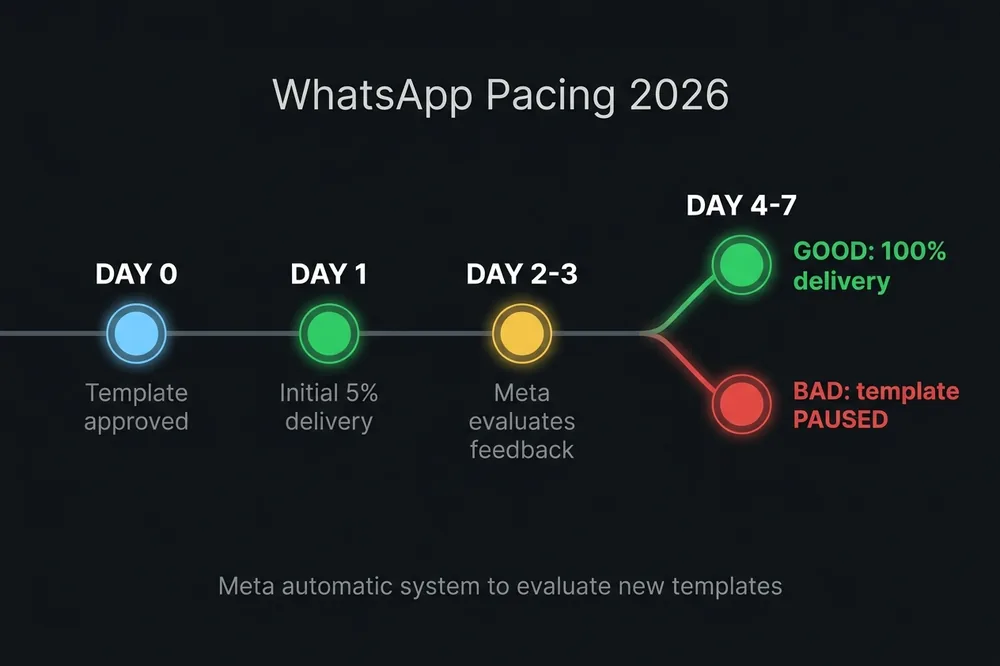
Pacing is Meta's system that pauses template delivery in real time to evaluate feedback before releasing it to the entire audience. It works like this:
- You launch a 50,000 message campaign with a newly approved template.
- Meta delivers the first 5-10% (2,500-5,000 messages) and observes what happens.
- In that initial sample, Meta measures:
- Block rate (how many blocked you upon receipt?)
- Report rate (how many clicked "report as spam"?)
- Engagement (how many clicked CTAs, replied to the message?)
- Based on feedback:
- Positive → delivery continues to 100% of the rest of the audience
- Neutral → delivery continues but at reduced speed (sometimes without explicit notification)
- Negative → the template ends up in PAUSED, the remaining messages aren't delivered, and it requires manual intervention to reactivate it
Pacing activates in three scenarios:
- New templates (first send after approval)
- Reactivated templates after a PAUSED
- Templates without "Active-High" rating (internal per-template rating, distinct from the number's Quality Rating)
The strategy to not fall into destructive pacing is counterintuitive: never launch a new template to your entire base at once. The correct operation:
- Day 1: launch the template to a small, high-engagement audience (customers active in the last 30 days, ~5% of total base). If initial feedback is positive, the template earns Active-High rating.
- Day 2-3: scale to the next segment (active in the last 60 days).
- Day 4-7: launch to the rest of the base, with the template already rated High and without active pacing.
Platforms without intelligent pacing management send the 50K at once and run into the silent pause. The consequence: 5K delivered, 45K in limbo, and no clear report explaining why.
The "2 marketing templates per user per day" rule
Another operational update that the SERP in Spanish ignores.
Meta limits how many marketing messages a user can receive per day: approximately 2 marketing templates in 24 hours, summing ALL brands that write to them. That is: if your customer already received promos from two companies in the morning, your midday message doesn't get delivered, even if you did everything right.
This rule isn't officially documented with an exact number, but it's empirically validated by multiple operators and large BSPs. The operational implications:
- Timing matters more than volume: 8-10am performs better than 6-8pm because the queue is emptier. Large companies blast in the morning, smaller ones can win the window by sending earlier or choosing off-peak hours.
- Days matter: Tuesday-Wednesday-Thursday are best. Monday and Friday are saturated. Saturdays and Sundays have low engagement.
- Your own frequency: no more than 2-3 marketing messages per user per week. If you exceed this, reports go up even if your copy is perfect.
- Segmentation: split your base into cohorts and send at different times to avoid competing with yourself for the "queue".
Combined with the 250K/month cap: the logic is no longer "blast everyone at once" but "plan spaced-out sends". A good case to complement is abandoned cart recovery, where the timing window is what separates a 25% recovery rate from a 5% one.
Real operations with Wadalio: from contact to delivery
So far the context. What follows is the concrete operation of how all this is managed without being a full-time job. We use Wadalio, our mass-send module, as an example —but the principles apply to any serious WABA platform.
Step 1: import contacts with compliance check
The first mistake new operators make is uploading a purchased or scraped contact list. Three guaranteed consequences: blocks, reports, and immediate Quality Rating degradation.
Wadalio validates each import against your own history:
- Flags duplicates (same number appears more than once)
- Detects invalid formats (numbers with strange characters, inconsistent countries)
- Blocks sends to contacts without registered opt-in: if the contact didn't come through a flow where they accepted receiving messages (web form, landing, prior conversation initiated by the user, import with documented evidence), it can't be used.
Opt-in is the foundation. Without it, nothing else matters.
Step 2: segmentation by engagement score
Not all contacts on your list have the same "warmth" for initial pacing. Wadalio cross-references your list against the CRM history and builds engagement segments:
- Active 30 days: customers who wrote to you, opened your last campaign, or interacted in the last month. They're the ideal first target for initial pacing —maximum probability of positive feedback.
- Active 90 days: intermediate cohort. Included after validating pacing with the 30-day active segment.
- Dormant: contacts without interaction in 90+ days. Higher block risk. Sent at the end of the pacing flow and with specific reactivation templates (not aggressive promotions).
- First time: never received a campaign from you. Cautious handling —start with utility or personalized reach-out, not pure marketing.
Step 3: template selection + correct category
Before sending, Wadalio checks that the declared category matches the detected content. If you declare UTILITY but the copy contains promotional language, it warns you in advance —and saves you from having Meta reclassify it later as MARKETING (with the cost difference and cap consumption).
To understand why Meta can automatically reclassify your template since 2025, read the 7 errors that get WhatsApp templates rejected on Meta.
Step 4: scheduling with predictive pacing
Wadalio distributes sends throughout the day or week instead of doing a single batch. When it detects pacing signals from Meta —drop in delivery rate, template entering evaluation—, it automatically stops the remaining sends and resumes them when the template returns to green state.
The manual alternative is to check WhatsApp Manager every hour during a campaign, see if the template's state changed, and adjust manually. No operational team scales like that.
Step 5: real-time monitoring
During and after sending, the Wadalio dashboard shows:
- Delivered vs Read vs Replied per campaign
- Blocked (how many blocked you upon receipt) — the most predictive Quality Rating metric
- Reported as spam — the worst possible signal, triggers degradation
- Pacing status per template — whether it's Active-High, paused, or in evaluation
- Automatic alert if the number's Quality Rating drops to Yellow
Data is cross-referenced with the AsisteChat unified inbox so that a user who replied to a campaign goes directly into the correct customer service flow.
5 errors we see every month
- Launching 50K to a cold list without warm-up. Quality Rating in the red in 24 hours. The rule: always start with the warmest segment and scale progressively over 3-7 days.
- Mixing UTILITY with promotional call-to-action. A template that says "your order left the warehouse" + "enjoy 20% off your next purchase" gets reclassified as MARKETING. You pay 5x more per message and it deducts from the 250K cap. The rule: one template, one function.
- Not including an opt-out option. When the user can't find how to stop receiving from you, they click "report". Reports weigh much more than blocks for Meta. The rule: always include "Reply STOP to stop receiving messages" in every marketing template.
- Sending Saturday or Sunday instead of Tuesday-Thursday. Average engagement is 30-40% lower on weekends. Lower engagement → negative signal for Meta → rating drop. The rule: Tuesday 9am is the winning slot for LATAM (validated across hundreds of campaigns).
- Reusing the same template for very different audiences. A template optimized for recurring customers performs terribly with cold leads. Feedback varies between cohorts, pacing activates repeatedly, and the template ends up in limbo. The rule: one template per engagement cohort.
Frequently asked questions
Is it legal to send mass WhatsApp messages in 2026?
Yes, as long as you use WhatsApp Business API (WABA) and recipients have given explicit opt-in. The WhatsApp Business app allows lists of up to 256 contacts but doesn't scale for real operations. Unofficial apps (WhatsApp Plus, GB WhatsApp and similar) violate Meta's terms and result in permanent bans. The only legal and scalable path is WABA through an authorized Business Solution Provider.
How many messages can I send per day with WABA?
It depends on your number's tier: 250 (Unverified), 1,000 (Tier 1), 10,000 (Tier 2), 100,000 (Tier 3) or unlimited (Tier 4). On top of this pyramid, since 2026 there's a new monthly ceiling: 250,000 marketing messages per business portfolio per month. UTILITY templates and messages within the 24h service window don't deduct from the cap.
What is WhatsApp pacing and how do I avoid it?
Pacing is the automatic pause Meta applies to new templates to measure feedback before delivering to the entire audience. It can't be fully "avoided" —it's part of the system— but it's managed by sending first to small, high-engagement audiences, not the full cold base. If initial feedback is positive, the template earns Active-High rating and pacing deactivates for the rest of the batch.
What's the difference between WhatsApp Business app and WhatsApp Business API?
The WhatsApp Business app is for 1 person operating manually, with a cap of 256 contacts per broadcast list and no automation. The WhatsApp Business API (WABA) is for companies: it supports multiple agents, automation, AI, CRM integrations, and volumes of thousands to millions of monthly messages. WABA requires a Business Solution Provider as intermediary (AsisteClick is a Gupshup partner).
What happens if Meta drops me to Red rating?
Since 2026, Red rating no longer automatically downgrades your tier instantly. Meta gives you a course-correction window to adjust segmentation, copy, or frequency before lowering the limit, as long as there's no policy violation. During the Red period, you can't go up a tier (locked), but you can keep operating within the current cap. If negative signals persist for several consecutive cycles, then the tier drops.
The operation that scales without burning your number
The three 2026 updates —monthly 250K cap, automatic pacing, Red without immediate downgrade— aren't obstacles: they're signals that Meta is finally separating platforms that operate professionally from those that improvise. The good news is that the space to do this right got bigger: there's course-correction room, time to experiment, tools to measure.
The bad news for whoever is still sending to cold lists from unofficial apps is that the margin for that operation is gone.
If you want to see how all this is operated in production without a dedicated team of 3 full-time people —the warm-up, engagement segmentation, predictive pacing, real-time Quality Rating monitoring— check out Wadalio, the mass-send module from AsisteClick. We're a Gupshup partner and manage active campaigns in accounts with volumes from 10K to the full monthly cap. In the plans it's already included, and our team handles number setup, template approval and continuous quality management.
All you have to do: hit "send campaign".