
70.19% of eCommerce carts are abandoned. That number, measured by Baymard Institute as the aggregate of 49 studies, has been stable for a decade. What changed is not the abandonment rate — it's the channel through which you can recover them.
Five years ago the playbook was email: a series of three automated emails, increasing discount, expect a 4-6% recovery rate. That playbook still technically works, but email open rate has fallen below 18% on average according to Mailchimp 2025 benchmarks. WhatsApp, on the other hand, sustains open rates between 80% and 90% in LATAM.
The real difference, however, is not the channel. It's what happens when the customer responds to the message.
In this post we analyze what works in production for recovering carts via WhatsApp with AI, the errors we see repeated every month in LATAM accounts, and the concrete hybrid architecture that real stores already run on Tiendanube and Shopify. No generic content — only what we see in thousands of daily tickets.
The metric almost no one measures correctly
Before talking about tactics, you need to separate two metrics that are often confused:
- Cart abandonment rate: percentage of carts created that don't end in a purchase. Industry baseline 70%. It's structural, you can't bring it down much — a high percentage is a symptom of people comparing, saving for later, or evaluating logistics.
- Cart recovery rate: percentage of abandoned carts that are later recovered via remarketing. This is where you can move the needle.
| Recovery strategy | Typical recovery rate |
|---|---|
| Email series (3 automated emails) | 4-6% |
| Static WhatsApp template without human response | 8-12% |
| WhatsApp + AI Agent answering objections | 18-25% |
| WhatsApp + AI Agent + escalation to human on complex cases | 22-28% |
The ranges in the last item come from real AsisteClick LATAM accounts with tickets between USD 30 and USD 200. We'll see later why the average ticket matters so much.
Why WhatsApp beat email for this
There are three structural reasons — not fashion — why WhatsApp ate email for this use case:
Open rate. Average email open rate 18% (Mailchimp 2025 benchmark). Average WhatsApp template open rate 85-90%. It's a 4-5x multiple. When the difference is an order of magnitude, it's not optional to test it.
Reply rate. In email, if the customer has a specific doubt ("does it arrive before Thursday?", "is size M in stock?"), they have to break the flow: open a new email, write it, wait for a response. On WhatsApp, the reply is one tap. The friction to ask the question collapses, and that's exactly the moment when the sale is lost.
Persistence. Emails get buried in the inbox. WhatsApp messages stay on the phone's home screen until they're read or deleted. The visual persistence of the reminder is radically different.
But — and this is the critical point that almost everyone overlooks — those three advantages are wasted if you treat WhatsApp as an outbound channel. If the customer responds and no one answers in less than 15 minutes, the effect evaporates. That's why the "broadcast template and wait for magic" model yields the 8-12% in the table, not the 25%.
The sequence that works in production
After hundreds of LATAM implementations, there's a pattern that repeats in stores that effectively convert:
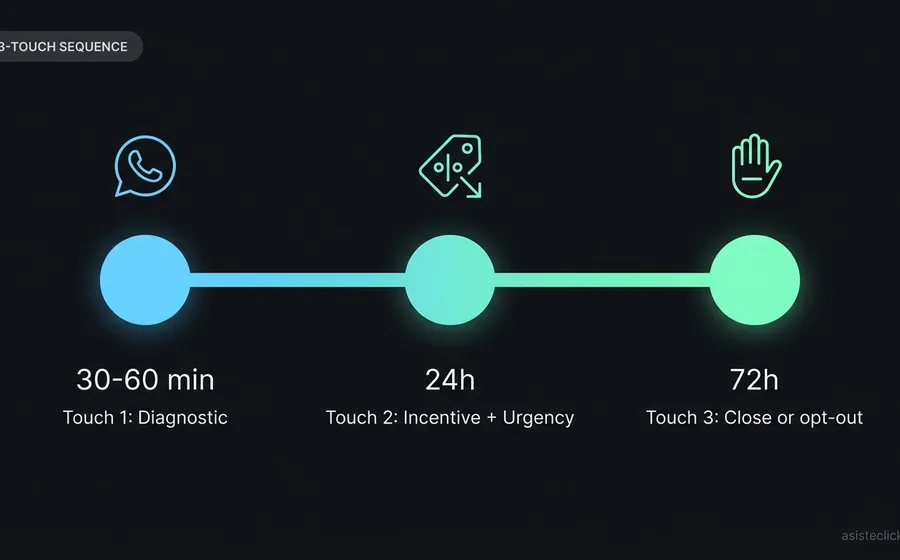
Trigger: minute 1-60 after abandonment. You have to be very precise here. The recovery window is maximal within the first 60 minutes, before the customer cools down or buys somewhere else. Don't wait 24h "to avoid being intrusive" — waiting means the competitor already closed the sale.
Message 1: open question, no discount. The first touch should NOT carry an economic incentive. If you train the customer to expect the discount by default, you'll destroy your margin. The first message asks if they had a technical problem ("did something fail with payment?", "did you have a question about shipping?"). This serves two functions: it rescues genuine operational problems (which are ~30% of abandonments) and opens conversation.
When they reply: in comes the AI Agent. This is where good and mediocre implementations separate. The customer's response shouldn't go to an unattended inbox or bounce against another template. It has to enter an AI Agent with your store's knowledge base — which knows stock, prices, shipping, payment methods — capable of resolving the real objection in less than a minute.
Message 2 (24h later if no response): incentive + urgency. Here you can add a discount or a benefit: free shipping, 10% off, gift. But only if the first message had no response. And always with honest urgency framing — real limited stock, not invented.
Message 3 (72h): closing or opt-out. The third touch is the last one. After that, the customer gets tired, blocks you, or reports you. Any of those outcomes degrades your WhatsApp Business API number's quality rating and puts the rest of your campaigns at risk.
The 4 anti-patterns we see every month
Here we enter the territory where our operational experience as a platform makes a difference versus theoretical content. These are the errors that repeat in real LATAM accounts:
Anti-pattern 1: WhatsApp as a one-way channel
The store sets up the outbound template, but when the customer responds, the message falls into an inbox without assigned agents or, worse, against a bot that only understands numbered menus. The customer writes "does it arrive before Friday in Buenos Aires?" and receives "Select an option: 1) Buy 2) Support 3) Info". The customer closes the conversation.
Solution: the WhatsApp receiving inbox must be tied to an AI Agent with store context or, at minimum, to a human team with response times under 10 minutes during business hours.
Anti-pattern 2: discount as the default response
The customer abandoned because they hesitated. The brand assumes they hesitated due to price. Sends 15% off. The customer buys at 15% less. The brand celebrates that they recovered the sale — but they just trained that customer and their social network to abandon the cart intentionally to force the discount. In 6 months, the behavior generalizes and structural margin drops.
Discount is a tactical tool to close real price objections, not the universal answer. The question before the discount ("did you have a doubt?") exists precisely to diagnose the real objection before spending margin.
Anti-pattern 3: same template for all carts
The store sends the same message to a USD 5 cart as to a USD 200 cart. The costs are different, customer expectations are different, and discount elasticity is different. A 10% discount on a USD 200 cart costs 10x what the same discount costs on a USD 20 cart.
The minimum segmentation we recommend:
- By cart value (low-ticket vs high-ticket)
- By product category (commodity vs desire)
- By customer recurrence (first purchase vs repeat customer)
- By payment method attempted (some methods fail more — there the real problem is operational, not marketing)
Anti-pattern 4: wrong timing out of fear of "being intrusive"
It's the most common internal objection. "I don't want to bother the customer". And we get it, but the data is conclusive: the customer who abandoned 60 minutes ago is still interested. The one who abandoned 24 hours ago has already dropped in priority. The one who abandoned a week ago probably bought somewhere else.
The operational rule: the first touch goes 30-60 minutes after abandonment. Not before (the customer is still active and may come back on their own), not after (the interest has migrated).
The real hybrid architecture
This is what we see working in production when a LATAM store achieves recovery rates above 20%. It's not theory — it's the concrete flow we have in active accounts of AsisteClick for Tiendanube, Shopify, and other platforms via API:
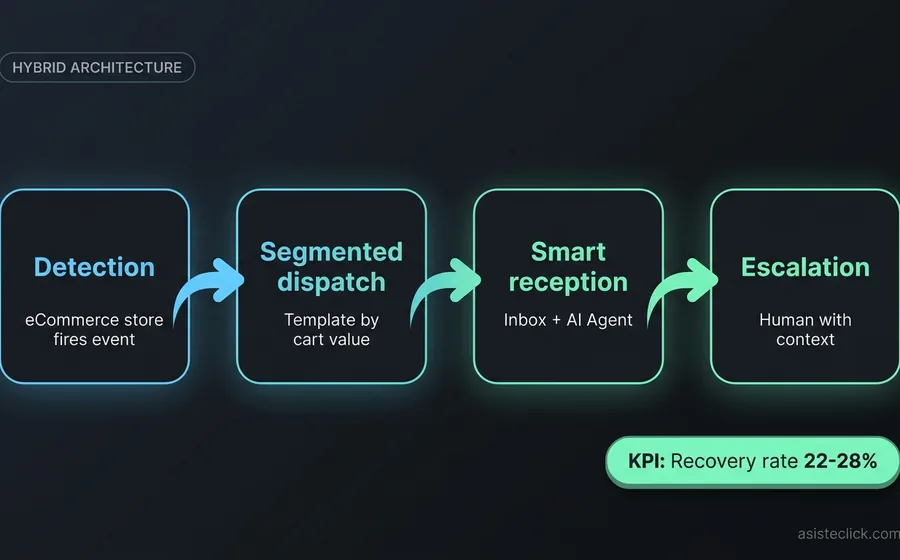
Layer 1 — Detection. The store integrates with AsisteClick (in Tiendanube's case, via the official app; in others, via REST API). The "abandoned cart" event is fired from the eCommerce platform to AsisteClick with all the data: customer, products, value, payment method attempted.
Layer 2 — Segmented dispatch. Once detected, Wadalio — the bulk send module — takes the event and fires the appropriate template based on segmentation (value, category, recurrence). This happens automatically without human intervention.
Layer 3 — Smart reception. When the customer responds to the template, their message enters AsisteChat — the omnichannel inbox — and the GPT-powered AI Agent answers the objection by consulting in real time stock, updated price, alternative payment methods, and shipping policies.
Layer 4 — Escalation. If the query is complex (for example, a return pending from a previous order, or a special request outside the catalog), the system routes to a human with all the context of the cart and the previous conversation. The human doesn't start from zero — they receive context and resolve.
This is what in practice produces recovery rates of 22-28%. Each layer separately yields less. What multiplies the result is the frictionless handoff between layers.
Templates that work (with real framing)
Here's a critical detail that gets overlooked: WhatsApp Business API templates have to be approved by Meta before being sent. If your template sounds too promotional or aggressive, it gets rejected. If it sounds transactional and useful, it gets approved as UTILITY category and they charge you less per message.
Three templates we approve repeatedly and that perform well in LATAM:
Touch 1 — diagnostic:
Hi {name}, we saw you left {product} in your cart a while ago. Did you have any issue with payment or wanted to ask about shipping? We're here to help.
No discount. No urgency. Genuine question. UTILITY category (cheaper).
Touch 2 — incentive + honest urgency (24h later if no response):
{name}, only {real_stock} units of {product} left. If you finish your purchase today, we'll ship free to your address. Here's the link to your cart: {link}
MARKETING category (more expensive, requires marketing opt-in). Only sent if the first touch had no response.
Touch 3 — closing + opt-out:
Hi {name}, last message about your cart. If you're still interested in {product}, we can help. If it's not the time, we'll leave you alone. For more info, reply to this message.
UTILITY category. It's the message of respect to the customer who doesn't want to be bothered anymore. Paradoxically, it's the one that rescues the most last-stage indecisives.
How much recovery is reasonable to expect
Not all eCommerce stores recover the same. The product structure, the ticket and the category affect the achievable recovery rate ceiling:
| Store type | Average ticket | Expected recovery rate | Why |
|---|---|---|---|
| Low ticket commodity | USD 10-30 | 25-35% | Low decision friction, impulse decision |
| Medium mixed ticket | USD 30-100 | 18-22% | Mix between impulse and consideration |
| High consideration ticket | USD 100-300 | 12-18% | High friction, comparison with competitors |
| Luxury / premium | USD 300+ | 8-12% | Emotional decision, long cycle, recovery via direct channel less effective |
| Recurring commodity products | Any | Up to 40% | The customer was already going to buy — we just remind them |
| Discretionary products | Any | -5 to -10pp from baseline | If they hesitated, they probably won't buy — lower expectations |
If your vertical falls into luxury or discretionary, don't expect the numbers of a food eCommerce or personal care products. The tactic works — but the ceiling is structurally lower.
Compliance and the risk of number blocking
There's a hidden cost that appears when a WhatsApp recovery operation scales poorly: the blocking of the WhatsApp Business API number by Meta.
Meta evaluates each number by its quality rating, a metric that combines:
- User block rate (customer who hits "Block")
- Report rate (customer who hits "Report Spam")
- Delivery error rate
- Template approval or rejection
When you send 200 templates a day and have a high block or report rate, your number goes from quality rating Green to Yellow. From there to Red. From there to banned for 24h. From there to banned permanently. And you lose the initial WABA investment + the conversational asset.
This happens more often than you think. The root cause is usually the combination of the anti-patterns we mentioned: wrong timing, discount as default, no segmentation, and inexistent response when the customer complains. The customer's complaint, that 1% bothered, is what kills the number.
At AsisteClick our team takes care of monitoring the quality rating in real time, adjusting send frequency and template category according to behavior, and resolving issues with Meta when they appear. This is part of what distinguishes a managed operation from a self-serve setup where responsibility lies entirely with the store.
Technical integration: REST API v2 for custom stores
For stores that don't use Tiendanube or Shopify — typical cases are VTEX, Magento, WooCommerce or eCommerce custom-built on Node/Laravel/Django — the integration is done against the AsisteClick REST API v2 (api.asisteclick.com/v2). The concrete flow we see in production has three steps.
Step 1 — Contact upsert. When the customer abandons the cart, your eCommerce platform fires a webhook to your own backend. From there, a POST /contacts call with phone, name and custom fields (cart_value, cart_products, last_cart_at). If the contact already exists (409), you continue with PUT /contacts/{id} to update the current cart data.
Step 2 — Outbound ticket creation. The key endpoint is POST /tickets with template_id, to_phone and params{} with the variables of the Meta-approved template (name, product, cart link, real stock). AsisteClick takes care of dispatching the template through WhatsApp Business API and opening the conversational ticket ready to receive responses.
Step 3 — Reception and routing. When the customer responds, the ticket enters the inbox with all the context (contact custom fields, history). The AI Agent — configured with your knowledge base of products, prices and policies — answers the first line. If the case is complex, it automatically escalates to the human department you've configured.
For high-volume stores (more than 1,000 abandoned carts per month), we recommend adding POST /tasks to generate internal follow-ups on high-ticket carts that require proactive human attention — the sales team automatically receives the task with all the customer's context.
The rate limit is 120 requests per minute per account, sufficient to process the volume of most LATAM eCommerce. If your operation exceeds it, there's an enterprise tier with higher limits.
Where to start if your store doesn't have this yet
The minimum viable stack to start recovering carts via WhatsApp:
- Verified WhatsApp Business API account via a reliable BSP (Business Solution Provider). If you have no idea what that is, we recommend reading the complete WhatsApp Business API chatbot implementation guide.
- Store integration with the conversational platform. If you use Tiendanube, AsisteClick has official integration from the app store — installation in minutes. For Shopify and others, it's via REST API.
- Three Meta-approved templates: touch 1 diagnostic, touch 2 incentive, touch 3 closing.
- An AI Agent with your store's knowledge base — products, prices, shipping, returns. This is the "invisible work" that makes the system scale: if it's not there, you'll have a human responding to every conversation, which is not viable beyond a certain volume.
- Tracking metrics: recovery rate per touch, recovery rate per segment, number's quality rating, average response time to inbound messages.
If you want us to evaluate your current setup or get an implementation proposal, check out the AsisteClick plans or request a free demo — in a 30-minute call we can diagnose your current funnel and project the recovery rate that's reasonable to expect for your vertical.
Frequently asked questions
Is it legal to send WhatsApp messages to someone who didn't explicitly give me their WhatsApp?
Yes, as long as the customer completed a purchase or checkout process in your store and left their phone number with the implicit commercial context. Tacit opt-in by purchase is valid in LATAM and recognized by Meta. What you cannot do is buy databases or scrape numbers and send them templates — that's a violation of the terms of use and grounds for number blocking.
How much does it cost to send one of these templates via WhatsApp Business API?
The cost varies by country and category. In Argentina and Mexico, a UTILITY template costs between USD 0.005 and USD 0.015 per message sent. A MARKETING template costs between USD 0.03 and USD 0.07. If your recovery rate is 20% on a USD 60 cart, you recover USD 12 per closed conversation — the message cost is marginal compared to the ROI.
Does it work if my store is not on Tiendanube?
Yes. The Tiendanube integration is the simplest because there's an official app, but AsisteClick connects via REST API with any eCommerce platform: Shopify, WooCommerce, VTEX, Magento, custom-built. The detection of the "abandoned cart" event is configured from your platform to fire the corresponding webhook.
How long until I see results from such an implementation?
The first recoveries start coming within 24-48 hours of having templates approved and the flow active. To have a stable benchmark of recovery rate, you need at least 30 days of operation with sufficient volume — a minimum of 200-300 abandoned carts processed by the sequence. Stores with lower volume take longer to stabilize the metric.
How do I avoid making my customers feel intruded on?
Three rules: respect the schedule (don't send templates outside 9-21 customer's local time), limit frequency (maximum 3 touches per cart, never more than one message per day), and honor opt-out (if the customer responds "stop" or asks not to receive more, take them off the lists). Stores that respect these three rules have complaint rates below 0.5% and maintain the number's Green quality rating indefinitely.
Do I need a human always available to respond to incoming messages?
Not 24/7, but yes during extended business hours. A well-trained AI Agent with your store's knowledge base can resolve between 70% and 85% of incoming queries without human intervention — questions about stock, shipping, prices, payment methods. The remaining 15-30% requires escalation to human, generally for returns, exchanges or special orders. With that proportion, a store processing 500 abandoned carts per month needs about 15-20 hours of human attention per week, not a full-time agent.
Conclusion
Recovering abandoned carts via WhatsApp with AI is not a marginal optimization — it's the difference between leaving 70% of potential demand unattended or capturing between 18% and 25% of that lost volume. In a store billing USD 50,000 per month, that difference is USD 6,000-9,000 monthly in additional revenue that doesn't require new traffic, just recovering what already came through the site.
But the difference between an operation yielding 25% and one yielding 8% is not the channel — it's the architecture. Detection → segmented dispatch → AI-powered response → human escalation. With frictionless handoffs and honest tracking metrics. With Meta-approved templates and respect for opt-out. With a team monitoring the number's quality rating and adjusting before the problem appears.
That's what we do every day with LATAM eCommerce accounts running on AsisteClick. If you want to see how this looks applied to your specific vertical, request a demo or ask us about the integration with your current platform.
Keep reading
- Chatbot WhatsApp Business API: complete 2026 implementation guide — the technical setup that supports everything above
- 7 reasons why Meta rejects your WhatsApp templates — so your recovery touches don't die in approval
- Klarna laid off 700 humans for AI. Today it's hiring them back. — case study on the limits of the "all AI, no human" model