
Roughly 1 in 3 WhatsApp Business API templates is rejected on the first review. It's not that Meta is arbitrary: it rejects based on concrete rules — some have always been there, others arrived in the last 12 months and still surprise teams that have been operating WABA for years.
As a Gupshup partner, AsisteClick manages hundreds of active templates across customer accounts in LATAM. We see rejections every day and have already cataloged the patterns that trigger them. This guide documents the 7 most common errors we'll see in 2026, with concrete examples of what gets rejected, why, and how to write the version that does pass.
Before the 7 errors, a clarification on the context that changed: since April 9, 2025, the field allow_category_change became default behavior. That means if you submit a template as UTILITY and Meta detects promotional tone, it automatically reclassifies it to MARKETING — and the per-message cost rises between 5× and 7× depending on the country. Approval is preserved, but your operation runs in a category you didn't choose.
On top of this come the new hard rules — a 550-character cap on the body, max 10 emojis, ban on duplicate templates — which reject automatically without human review. Knowing these rules before drafting is what separates an operation that approves 5 templates in a day from one that spends a week iterating with appeals.
How template approval works in 2026
Each template goes through two layers of review:
- Automated review — checks formatting (variables, length, characters, emojis), declared category vs detected content, language, and hard prohibitions. This layer rejects in seconds. It's where 70% of the rejections we see happen.
- Human or ML-assisted review — checks context, subtle promotional language, message intent, placeholder abuse. Takes between 2 minutes and 24-48 hours.
Once approved, the template is not bulletproof. Meta keeps evaluating how users receive each send. If the block or report rate goes up, the template can enter PAUSEDstate, then a longer pause, and finally end up DISABLED permanently. We come back to this at the end.
Reason 1: wrong category (UTILITY vs MARKETING)
This is the #1 reason we see today. Until early 2025, you could "negotiate" the category: tag a technically promotional message as UTILITY to pay the cheaper rate. Since April 2025, that shortcut closed.
What changed: the field allow_category_change is now default on every submission. If you declare UTILITY but the text contains promotion, discount, product recommendation or persuasive language, Meta approves the template but moves it to MARKETING. You pay the marketing rate without having chosen that consciously.
What qualifies as UTILITY (strict):
- It's a response to a user action (purchase, booking, registration, payment initiated)
- It's essential information about the account (status change, security alert, invoice issued)
- It has no persuasive language: doesn't propose a purchase, suggest a product, or invite a promotion
Example that gets reclassified to MARKETING:
Hi Juan, your order #1234 has shipped. Get 20% off your next purchase with code RETURN20. Arrives in 48h.
The first sentence is pure UTILITY. The second contains an offer. Meta detects the cross-sell and reclassifies the entire template.
Version that gets approved as UTILITY:
Hi Juan, your order #1234 shipped on 04/30 at 14:32. Arrives in 48h. Track it here: {{1}}.
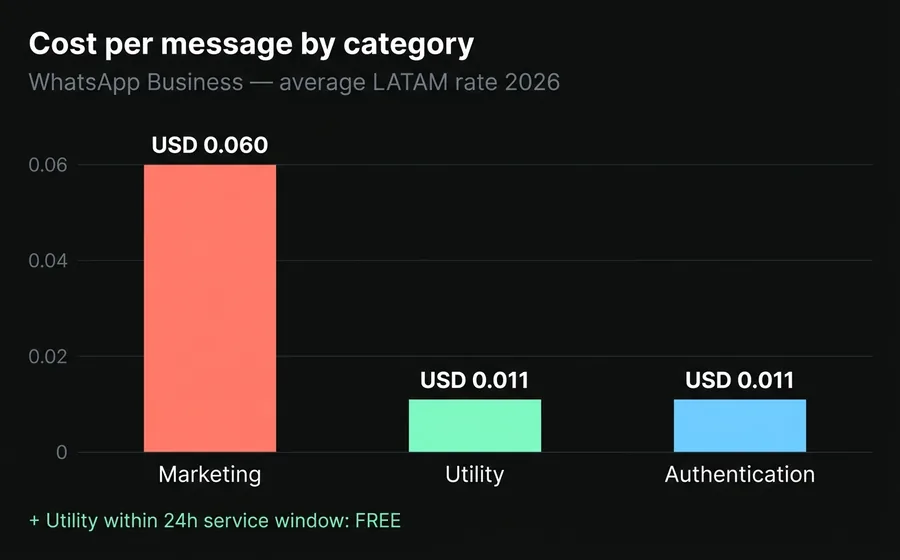
What about cost? In April 2026 rates, the difference is tangible: a MARKETING template in Argentina costs around USD 0.061 per message, while UTILITY runs around USD 0.011 — and if it falls within the 24-hour service window (after a user message), a UTILITY is free. At 50,000 monthly sends, that's the difference between USD 3,050 and USD 0.
Reason 2: badly formatted variables
This reason rejects in the automated layer, which is why it's one of the most frustrating — the system doesn't explain the detail, it just says INVALID_FORMAT.
The concrete rules:
- Variables are named
{{1}},{{2}},{{3}}and must be sequential without skips. Skipping from{{1}}a{{3}}is automatic rejection. - They cannot be at the start or end of the message. A template that starts with
{{1}}, tu pedido…or ends with…tu link es {{1}}doesn't get approved. - They cannot be glued together.
{{1}}{{2}}is rejection. - No special characters inside:
{{0}},{{01}},{{1.}},{{ 1 }}are all invalid. - Minimum context density: each variable needs roughly 3 words of text around it. A template with 5 variables and 10 words of text gets rejected for "abuse potential".
Example of rejection due to low density:
Hi {{1}}, your order {{2}} arrives {{3}} at {{4}} with code {{5}}.
Too many variables for too little context. Meta interprets that the template can be used for generic spam by changing the values.
Version that does pass:
Hi {{1}}, your order number {{2}} arrives on {{3}}. It goes to the registered address and the courier will call the phone we have on file. Tracking code: {{4}}.
Five words per variable, clear context, no placeholder at the start or end.
Reason 3: vague or spam-reusable content
The second big filter in the human review is "clear intent". A template that works for anything — so generic that a spammer could reuse it just by swapping variables — gets rejected for "lacks context" or "vague content".
Examples of templates that get rejected:
Recordatorio: {{1}}— too generic.Hola {{1}}, te tenemos noticias— no declared purpose.{{1}}, hacé click acá: {{2}}— classic phishing pattern.
How to fix it: give enough context that the purpose is unambiguous before reading the variable.
- ❌
Recordatorio: {{1}} - ✅
Hola {{1}}, te recordamos que tu turno con el doctor {{2}} es mañana a las {{3}} en nuestra sede de {{4}}.
The mental rule we use when drafting: if a template can serve a bank, a clinic and an eCommerce without changes, it's too generic.
Reason 4: aggressive promotional language
The human review layer penalizes the classic spam tone. It's not enough that the content is factually promotional (that's covered by the MARKETING category) — the language also has to be proportional.
Phrases that trigger rejection or reclassification:
- "Last chance!" — false urgency.
- "You can't miss it." — exaggeration.
- "If you don't reply in 24 hours you lose the benefit." — threat.
- "Click NOW before it ends." — coercion.
- "The CRAZIEST offer of the year." — unsupported claim.
- "Just for you, exclusive." — combined with generic discounts.
- Sustained block-uppercase.
OFERTA EXCLUSIVA HOYgets rejected.
How to write approvable marketing:
- Mention the concrete discount without pressure: "20% off your next purchase until 05/15."
- Identify the recipient by their real relationship, not flattery: "As a {{1}} customer, you get…"
- Say what the promotion offers and let the user decide, without threats or inflated urgency.
Meta is fairly consistent here: a sober MARKETING template with a concrete discount and clear opt-out passes on the first try. One with three exclamation marks and "last chance" goes to human review and comes back rejected.
Reason 5: prohibited or suspicious links
This reason is underestimated. Meta has a blacklist of link patterns that don't get approved — not because of the domain itself but because of the pattern.
Links that get rejected:
- Shorteners: bit.ly, tinyurl, t.co, goo.gl, any public shortener. Meta cannot inspect the final destination.
wa.me/...: links that open a WhatsApp chat. Loses meaning inside the channel itself and is associated with bot-to-bot schemes.- Off-brand domains: if the account is
restaurantelagaviota.com.arand the link goes totracking-supercheap.io, it's rejected for mismatch. - Direct IP links (
http://190.43.x.x/...): unsafe. - Suspicious subdomains:
secure-login-banco.comis rejected even if it technically exists.
How to fix it:
- Always use the official brand domain, no shorteners. If you need click metrics, set up your own redirect (e.g.,
tienda.com/r/abc123) — that's valid. - The link must be HTTPS.
- Avoid mixing 2-3 different domains in the same template.
Reason 6: requesting sensitive data
Per Meta policy and regional compliance (LGPD in Brazil, Habeas Data in Argentina, data protection laws in Mexico), a template cannot request sensitive data directly. The template can inform — not collect.
Data prohibited in the body of a template:
- Full credit or debit card number.
- Security code (CVV).
- Passwords or PINs.
- Full bank account number, CBU, IBAN.
- Full national ID (DNI, CURP, RFC, RUT) — asking for the last 4 digits is allowed in some verticals.
- Sensitive medical data outside a clinical context.
Patterns that get auto-rejected:
- "Reply to this message with your full national ID and date of birth."
- "To confirm the transaction, send the 16 digits of your card."
- "Tell us your current password so we can help you."
How to solve it: the template can take the user to a secure channel (the app, a link to your own HTTPS form, a call with an agent). Never request the data inside the chat.
Reason 7: hard new rules from 2026
This group covers the rules that got tighter in the last 12 months and still cause rejections through unfamiliarity.
The ones we see reject the most in customer accounts:
- Marketing or Utility body >550 characters → automatic rejection. The previous rule tolerated up to 1,024. Today a 600-character template doesn't reach review, it's rejected outright.
- More than 10 emojis in the body → rejection. The limit used to be informal; in 2026 it's hard.
- More than 4 consecutive spaces, tabs, multiple blank lines → rejection for formatting. If you copied the copy from a PDF, it almost certainly has invisible characters.
- Duplicate templates → any template with the same body or footer as another approved template in the account is rejected, except AUTHENTICATION ones. This breaks operations that had "the same template" in different templates by style.
- Language mismatch: declaring the template in
es_ARbut writing the body in Portuguese → rejectionTAG_CONTENT_MISMATCH. - Missing sample values in templates with media (image, video, document). Without a valid sample uploaded, approval is impossible.
These rules, except those related to duplicates, are not announced 30 days in advance. Meta applies them with the API update and the accounts that hit them find out the hard way. The official policy is at developers.facebook.com.
Once approved, the template can still fall
Passing the initial approval is only half the work. Meta evaluates each template in production against how users receive it. The relevant metrics are blocks, spam reports, read rate (healthy target: 65-80%) and replies. When quality drops, the template goes through an escalating progression:
| Status | Duration | What happens |
|---|---|---|
| PAUSED (1st time) | 3 hours | You can't send it; the rest of the account stays normal |
| PAUSED (2nd time) | 6 hours | Same restriction, doubled window |
| DISABLED (3rd time) | Permanent | The template is dead; you have to create a different one |
At the account level, if the phone number's Quality Rating drops to Low for a sustained period, the number enters FLAGGED state and gets blocked from upgrading messaging tier. You cannot scale to 10K or 100K messages/day until the rating recovers.
The way to prevent this isn't to write a "perfect" template but to monitor Quality Rating daily, segment audiences, and archive low-engagement templates before they're punished. We covered this in depth in WhatsApp Business API: 9 errors that degrade your number.
Special case: the U.S. block is still active
If your audience includes U.S. numbers, there's an additional restriction that's been active since April 1, 2025 and remains in effect in April 2026 with no reactivation date: Meta paused the delivery of MARKETING templates to U.S. numbers.
What still goes through to the U.S.:
- UTILITY templates (notifications, alerts, status updates).
- AUTHENTICATION templates (OTP, verification).
- Messages within the 24-hour service window.
- Click-to-WhatsApp Ads (the conversation starts with explicit engagement).
If your campaign was targeting the U.S., the operational option is to reframe the use case as honest utility or move the promotional send to other channels. There's no valid workaround; trying to push marketing to the U.S. anyway generates mass blocks and degrades the number.
How we manage this at AsisteClick
We operate WABA accounts all day as a Gupshup partner. For customers who want to delegate management, AsisteChat includes template drafting, submission to Meta, appeal management and daily Quality Rating monitoring. For mass campaigns, Wadalio runs the send with audience segmentation and internal rate limiting that respects your tier without you having to think about it.
What our team does concretely:
- Writes the template in the right category before submitting, avoiding automatic reclassification.
- Reviews formatting (variables, links, length, emojis) against the hard-rules list.
- Monitors daily Quality Rating and archives low-engagement templates before they go PAUSED.
- Manages appeals when a legitimate template falls due to an arbitrary call from human review — and in LATAM that happens.
If you want to try it, you can start from the Business plan at USD 20/month, which includes WABA integration with an assigned bot builder. For high-volume accounts that need generative language, the IA Plus plan adds AsisteGPT y AsisteCopilot on the same account.
Frequently asked questions
How long does template approval take in 2026?
Between 1 minute and 48 hours depending on complexity and Meta's review queue. Most UTILITY and AUTHENTICATION templates pass in under 5 minutes. MARKETING ones take between 30 minutes and 24 hours. If it went to human review, assume 48 hours. Auto-rejected ones bounce back in seconds.
What do I do if a template I consider correct gets rejected?
You have two paths: (1) use the "Request Review" button in Meta Business Manager to appeal — works when Meta misclassified and the template meets the rules; (2) rewrite and resubmit. In practice, rewriting is faster. Appealing makes sense when you're going to submit hundreds of similar templates and want to set precedent.
Can I send the same template in multiple languages?
Yes, but as languages within the same template name, not as separate templates. Create a single template with the language es_AR for Argentina and pt_BR for Brazil within the same name. If you create two separate templates with the same body, Meta rejects the second one as duplicate.
Why does Meta sometimes approve a template and pause it the next day?
Because the initial approval covers formatting and category, not behavior in production. If the first thousand sends have a high block or report rate, the system goes to PAUSED. It happens with legitimate templates if the audience didn't expect the message (poorly segmented list or unclear opt-in).
Do AUTHENTICATION templates have different rules?
Yes. AUTHENTICATION templates are the only ones that can have an almost empty body ({{1}} es tu código de verificación), can be duplicated across templates and have a specific rate. In exchange, they cannot include links, cannot personalize beyond the code, and can only be used for real verification — using them for promotions is a policy violation.
Does switching BSP help if I have rejected templates?
No. Templates live in the Meta Business Manager account + WABA number, not in the BSP. Switching BSP doesn't reset or improve approval. What does change is the quality of support during the appeal: a BSP with a good operational relationship with Meta has better response times than one without direct contact.
Keep reading
- WhatsApp Business API: 9 errors that degrade your number — what Meta does after approving the template
- How to qualify leads on WhatsApp with an AI Agent — upstream segmentation to improve engagement
- Why 70% of WhatsApp leads are lost before reaching a salesperson — the real cost of a poorly designed template
- WhatsApp Chatbot: pricing and features for businesses 2026 — Meta's per-message pricing and how to calculate total cost