
80% of SMBs that open a WhatsApp Business API account in LATAM don't know Meta evaluates the quality of every message they send and can degrade their number. There's no clear warning. No alert email. Just a silent drop in reach, rate limits appearing overnight, and the feeling that "something stopped working".
What stopped working is the Quality Rating — an internal Meta score that decides how much your number can grow, how many messages you can send per day, and what kind of content you're allowed to keep sending.
This post documents the 9 concrete operational mistakes that — based on our experience managing hundreds of active accounts in LATAM — are responsible for the vast majority of degradations. Each one is cross-checked against Meta's official documentation and paired with the mitigation that actually works.
It also covers: what the Blue Tick is (spoiler: the Green Tick no longer exists), why the "24h onboarding" some BSPs promise is marketing, how to recover a degraded number, and the operational checklists we use internally.
What is the Quality Rating and why it decides your reach
Every number registered in WhatsApp Business API has a Quality Rating that Meta assigns based on how users interact with your messages. It's not an obscure internal metric: it's visible in WhatsApp Manager → Account Tools → Phone Numbers in the Meta Business Manager.
Meta checks the Quality Rating every time you initiate a new conversation with a unique user. The rating reflects how your templates were received in the last 24 hours, with three possible states:
| State | What it signals | Consequence |
|---|---|---|
| 🟢 High | Messages well received, few reports | Normal operation; you can move up a tier |
| 🟡 Medium | Mixed signals, some reports | Degraded rating (no immediate restrictions) |
| 🔴 Low | High flag/block rate | If sustained 7 days → tier drops |
In parallel, the number has a Messaging Limit Tier that caps the number of business-initiated conversations you can start in a rolling 24-hour period. A business-initiated conversation starts when the first template reaches the recipient and lasts 24 hours.
| Tier | New conversations / 24h | How to access |
|---|---|---|
| Unverified | 250 | New number without Business verification |
| Tier 1 | 1,000 | Verified Business Manager approved |
| Tier 2 | 10,000 | 2× volume sustained for 7 days + High quality |
| Tier 3 | 100,000 | Same, next tier up |
| Tier 4 | Unlimited | Enterprise operations |
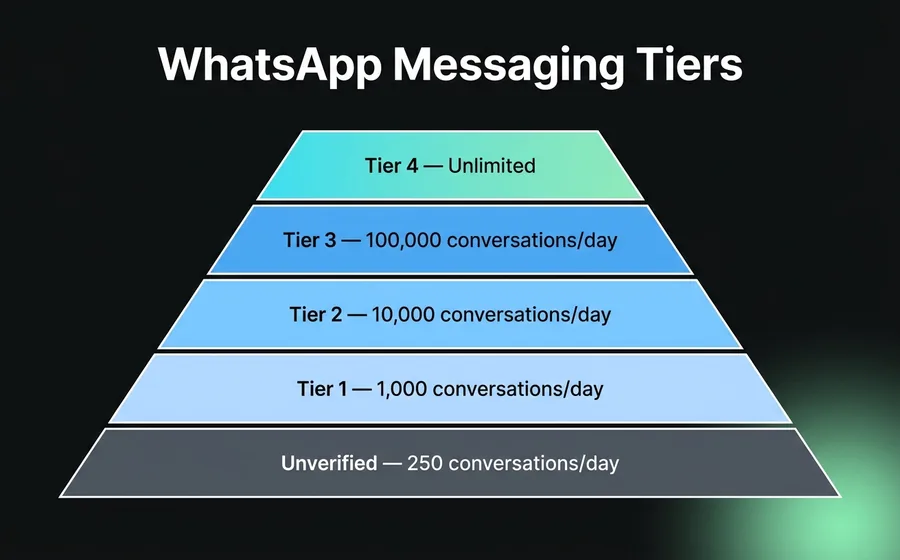
To move up a tier, Meta requires the cumulative volume of users contacted in 7 days to equal or exceed twice the current tier, with quality sustained at High throughout. If quality stays at Low for the last 7 consecutive days, the tier automatically drops to the next lower level.
All of this is officially documented in Messaging limits — Meta for Developers and About Your WhatsApp Business Phone Number's Quality Rating. Worth keeping both open while running your number in production.
The operational question then isn't "how do I scale?" — it's "how do I not degrade what I already have?".
The 9 mistakes that make Meta degrade your number
1. Mixing marketing and utility in the same template
Meta assigns each template a category: Utility, Marketing, or Authentication. Each has distinct approval policies, pricing, and quality thresholds.
The classic mistake is sending a message that combines two functions — for example, an appointment reminder (utility) ending with a promotion ("book today and get 20% OFF!"). Per Meta's official policy, if a template mixes utility + marketing elements, Meta classifies it as marketing automatically — you pay more per message and the audit is stricter.
Worse still: since April 9, 2025, Meta activated an operational rule where if you pick a category and their system detects the template should be another, it auto-recategorizes without notifying you. A template you believed was utility becomes marketing with the corresponding pricing, no alert email.
Mitigation: one template, one function. Pure reminders go separately from promos. If you need to promote something post-appointment, send it as a service message within the 24h window (free), not as a new template.
2. Templates with copy Meta flags
Some words and patterns get flagged as spam by Meta even after template approval. The most common we see trigger rejections and secondary flags:
- Excessive uppercase in the body: "BUY NOW", "LAST CHANCE"
- Repeated emojis at the start: 🔥🔥🔥 or ⚡⚡⚡
- Urgent calls without legitimate context: "OFFER EXPIRES IN 1 HOUR"
- Shortened links without preview:
bit.ly/xxxx,tinyurl.com/xxxx - Aggressive combined promises: "free + now + last hours"
- Mixed caps within the same word: "BuY NoW"
Mitigation: conversational tone, sentence case (capital only at the start of sentences), emojis with purpose (no more than 1-2 per message), full links with preview (asisteclick.com/pricing, not bit.ly/abc).
3. Miscategorized templates
When you create a template, Meta asks you to pick between Utility, Marketing, and Authentication. A frequent mistake is labeling a marketing template as utility to pay less — because utility is about 3× cheaper than marketing in LATAM.
With the auto-recategorization rule active since April 2025, Meta doesn't just recategorize: it can also lower approvals for templates en masse when it detects systematic miscategorization. The result: all templates for the number go under manual review and operations run without channels until the review ends (5-10 business days).
Mitigation: work with the client and the BSP on categories BEFORE uploading templates. If a template is borderline (a promo arriving through something transactional), categorize it as marketing from the start — you pay more per message but avoid the operational block.
4. Forcing templates inside the 24-hour window
When a user messages you, you open a 24-hour service window where you can reply with any free content (no template, no per-message charge). Some operations send templates within that window because the bot is misconfigured and doesn't properly track conversation state.
Meta still charges for that template (even though within the window you should be replying free) and — more damaging — counts it as a business-initiated message. This raises the ratio of business-initiated messages and increases Quality Rating exposure with no operational benefit.
Mitigation: the bot builder should track window state per contact. If the last user message arrived <24h ago, reply with free text. Only use templates when the window is closed.
5. Outbound velocity without reciprocal engagement
If your number sends 5,000 templates in 1 hour but only 2% of users respond, Meta reads that signal as "mass send to non-engaged audience" — exactly the pattern it most penalizes.
The metric Meta watches: response + block rate in the first hours post-send. If recipients don't respond, don't open, or block, Quality Rating starts dropping within the next 24 hours.
Mitigation: tight segmentation before sending. Send in staggered batches, not all at once. If a campaign shows <3% response in the first hour, cut it and review the audience. Platforms for mass WhatsApp sending like Wadalio let you schedule staggered sends and automatically cut if engagement drops below the threshold.
6. Not replying within the channel's SLA
WhatsApp as a channel carries an implicit expectation of fast reply. When a user writes you and your operation doesn't respond within 2-4 hours, the probability of them reporting the number as "spam" or "no reply" rises significantly vs. replies in <15 minutes.
This is especially critical outside business hours: with no bot or automated presence reply, the user feels ignored. The first action of an ignored user is often to report the conversation — and that directly feeds the flag rate.
Mitigation: always have a presence bot outside business hours ("Hi, we'll read you tomorrow from 9am, meanwhile you can..."). For 24/7 operations, automate initial replies that break the silence in <30 seconds. Related post: Why 70% of WhatsApp leads are lost goes deeper on response time impact.
7. High rate of reports and blocks
Every time a user blocks your number or marks your message as "unwanted", that event enters the Quality Rating scoring. Meta doesn't publish the exact numeric thresholds, but in our operational experience a block rate above 1.5% per 1,000 messages is an early warning signal. Above 3% we see immediate degradation to Low.
Most frequent causes of spikes in blocks: purchased contact lists, confusing opt-in (a hidden checkbox at checkout), or using the business number to contact users who only interacted once 6+ months ago with no prior notice.
Mitigation: explicit and verifiable opt-in (non-pre-checked checkbox, clear copy about the type of messages they'll receive). Warm-up for reactivating old contacts: first a utility recognition message, then promos.
8. Identical repetitive content between messages
Sending the exact same template with no dynamic variable to a large list is the easiest pattern for an anti-spam system to detect. Meta uses content signatures — if the same text hash is sent 500 times in 10 minutes, a heuristic filter triggers.
Mitigation: templates with at least one dynamic variable (name, amount, date, order number, branch). Not to dodge the filter, but because variable-containing messages see 40-60% higher engagement — which lowers flag rate as a natural consequence.
9. Volume on purchased lists or without explicit opt-in
This is the cardinal sin, and the one that degrades the most. If you send 10,000 messages to a purchased list, Meta detects it in under 24 hours. Combined signals Meta sees:
- Extremely high "User has no WhatsApp" rate (invalid numbers from purchased list)
- Block rate spike during the first hours
- Spontaneous reports ("I didn't subscribe to this")
- Near-zero response rate
A single campaign with a non-opt-in list is enough to take a number from High to Low, and if the pattern persists for 7 days, drop it a tier — losing 80%+ daily reach for weeks.
Mitigation: never. There is no operational mitigation. If you buy a list, Meta catches you and all prior reputation-building is lost.
Running with these 9 rules in mind isn't something an SMB handles with a bot builder working 2 hours a week. Each one involves technical decisions (template categories, opt-in design, bot setup, handoff SLAs, Meta dashboard monitoring) that need to be made before sending the first mass message. Our team at AsisteClick manages templates, quality, and Meta/Gupshup relationships for hundreds of active LATAM accounts and sees in real time which of these 9 mistakes appears first in which type of operation. What follows is what we do when a number has already entered Medium or Low.
Operational framework: what utility/marketing ratio makes sense by business type
Meta doesn't publish an official recommended ratio of utility vs marketing messages. It's an operational decision per business. But that decision shouldn't be arbitrary: business type determines what mix Meta tolerates without degrading quality.
Based on what we see running active LATAM accounts, this is the internal framework we apply as a starting point (not an official standard; it's AsisteClick operational):
| Business type | Utility / Marketing ratio | Dominant templates |
|---|---|---|
| Fintech / collections | 85 / 15 | Payment reminders, confirmation, extension requests |
| eCommerce | 60 / 40 | Order confirmation, shipping status + post-purchase offers |
| Healthcare / clinics | 90 / 10 | Appointment reminders, confirmation, pre-visit instructions |
| Education | 75 / 25 | Payments, calendar, results + course updates |
| Travel / hospitality | 70 / 30 | Booking confirmation, check-in + service upsells |
| ISP / telecommunications | 80 / 20 | Outage reports, billing + upgrades |
| B2B SaaS | 65 / 35 | Billing, usage alerts + onboarding/webinars |
Derived rules:
- Marketing ratio >50% in any vertical → high risk of Quality drop
- Utility ratio <50% for more than 30 days → Meta starts treating you as a "pure promotional" account
- Hybrid templates forbidden: a utility template should never close with a commercial offer (see Mistake #1)
3 examples of approved vs rejected templates
Case 1 — Order confirmation (Utility)
✅ Approved:
Hi {{1}}, your order #{{2}} has been confirmed. Total: ${{3}}. You'll receive tracking when the package leaves our warehouse. Thanks for trusting us.
❌ Rejected:
🔥🔥🔥 Hi {{1}}, your order #{{2}} has been confirmed! 🎉🎉 Total: ${{3}}. GET 20% OFF your next purchase using code WELCOME20 — LAST HOURS! 🛒
Rejection reasons: repeated emojis at the start, urgent uppercase without context, hybrid (confirmation + promo), aggressive CTA unrelated to the order.
Case 2 — Medical appointment reminder (Utility)
✅ Approved:
Hi {{1}}, this is a reminder for your appointment with {{2}} on {{3}} at {{4}}. If you need to reschedule, reply to this message. 123 Main St, Anytown.
❌ Rejected:
Appointment reminder with {{1}} on {{2}}. Reply YES to confirm or NO to cancel.
Rejection reasons: no greeting context, uses variables as CTA without real body, missing address/service info, overly brief making it look auto-generated spam.
Case 3 — Seasonal promotion (Marketing)
✅ Approved:
{{1}}, we just launched our fall/winter 2026 collection. Visit {{2}} to see it first. Free shipping nationwide until May 15.
❌ Rejected:
{{1}}!! UNMISSABLE OFFER!! New collection NOW available! Click HERE NOW: {{2}} - Discounts up to 50% OFF - Last units!!!
Rejection reasons: excessive uppercase, multiple exclamations, aggressive urgency, flag words ("UNMISSABLE", "NOW", "HERE"), variables without greeting context.
Full list of official rejection reasons documented at WhatsApp Template Approval Checklist and Template Compliance — Infobip.
How to recover a degraded number
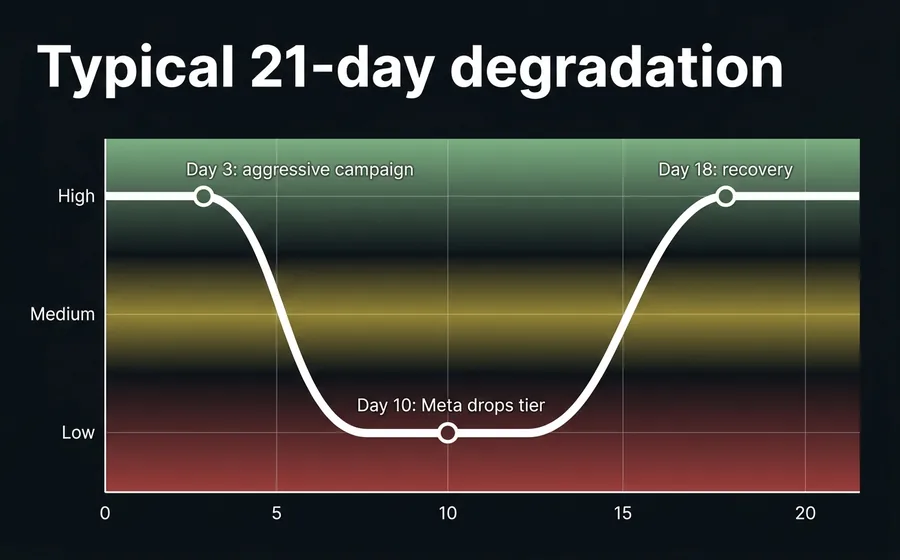
There is no "reset quality" button. Recovery is a process that takes between 7 and 21 days depending on the degree of degradation. The operational flow we use:
- Identify the trigger event. Check WhatsApp Manager → Phone Numbers → Quality Rating. Cross-reference dates with sent campaigns. If it was a single campaign, isolate it.
- Lower business-initiated volume. Suspend mass marketing sends for 7-10 days. Keep only utility/authentication.
- Increase user-initiated conversation ratio. The higher the percentage of chats where the user writes first, the faster Quality rebuilds. This can mean reactivating webchat FAQ bots that route to WhatsApp.
- Respond with short SLA. All new conversations must be handled in <15 minutes during the recovery period.
- Review active templates. Archive low-engagement ones, redesign those with spam-flagged copy (see Mistake #2), suspend miscategorized ones.
- If the number is Low: contact Meta support via BSP. The BSP (Gupshup in our case) can open a ticket explaining the context. Meta sometimes accelerates recovery when it sees a legitimate operation trying to comply.
What doesn't work: opening a new number and migrating there. Meta cross-references metadata and inherits bad reputation from Business Manager to Business Manager. Changing BSPs doesn't work either — Quality Rating is tied to the phone number and Business Manager, not the BSP.
What BSPs won't tell you
As Gupshup BSP partner and running this for LATAM clients for years, there are three truths that rarely appear in vendor marketing:
The "24-hour onboarding" is marketing
Meta's official documentation and operational experience agree: the complete process of getting a productive number doesn't go below 5-10 business days. The breakdown:
- Verified Business Manager: 1-7 days (if documents are correct; longer with observations).
- WABA approval: 2-7 business days (up to 14 if manual review).
- Embedded Signup: lets you register a number in 10-15 minutes, but final approval still depends on the previous steps.
When a BSP promises "24-hour onboarding", what they're accelerating is their part of the process (number technical provisioning + webhook configuration), not Meta's timeline. In our case, from when the client delivers complete documentation to when the number is serving messages in production, the operational average is 3-7 business days — depending on how Meta reacts to each specific documentation set.
The "Green Tick" no longer exists (and the Blue Tick is harder than they tell you)
Since 2024, Meta retired the Green Tick and replaced it with the unified Blue Tick (Meta Verified Badge) across Facebook, Instagram, and WhatsApp. Two paths to obtain it:
Path 1 — Official Business Account (OBA) via API — free but restrictive:
- Verified Business Manager with legal documents (certificate of incorporation, business license)
- 3-5 organic press articles in relevant outlets (paid articles, advertorials, press releases don't count)
- Eligible industry (excludes alcohol, drugs, weapons, tobacco, gambling, pharma)
- If rejected, 30-day cooldown before reapplying
Path 2 — Meta Verified Subscription — paid, more accessible:
- Monthly subscription for businesses on WhatsApp Business App (Standard, Plus, Premium, Max tiers)
- Doesn't require press coverage
- Applies to SMBs not using the API
Any BSP that promises "we'll get you the Green Tick in X days for USD Y" is selling smoke: the Green Tick is no longer requestable, and the Blue Tick via OBA is granted by Meta on its own criteria, for free. What a good BSP does is advise you on documentation to maximize approval probability — not sell you an "upgrade" you technically can't buy.
Changing BSPs doesn't clean your reputation
When a number enters Low Quality, some companies try migrating to another BSP thinking Quality Rating resets. It doesn't: Quality Rating is associated with the phone number + Meta Business Manager account, not the BSP. Changing BSPs can be reasonable for cost, support SLA, or functionality — but it doesn't solve the problem of an already-degraded number.
Worse: the migration itself between BSPs carries operational risk. If during the transfer the number stays unresponsive for 24-48h (because the new BSP's webhook isn't configured yet), Meta reads it as "forced silence" and quality drops further.
Pre-launch WhatsApp Business API checklist
This is the checklist we use internally before enabling a client in production. If you can't check everything, you're not ready to send the first mass message.
- ☐ Meta Business Manager verified (official documentation approved)
- ☐ WABA Account created and number approved
- ☐ BSP with Phone Number Quality Dashboard access configured
- ☐ At least 5 approved templates covering critical flows (not 1-2 generic ones)
- ☐ Templates with dynamic variables, not static text
- ☐ Template categories correctly declared (no marketing labeled as utility)
- ☐ Opt-in documented and verifiable (clear copy + non-pre-checked checkbox)
- ☐ Contact list with at least one organic interaction in the last 6 months
- ☐ Presence bot configured for out-of-hours
- ☐ Response SLA defined (ideally <15 min in-hours, <30 min out-of-hours)
- ☐ Human escalation configured (bot → agent handoff)
- ☐ Functional opt-out flow (user can unsubscribe)
- ☐ First send batch <1,000 messages for Unverified tier / <2,000 for Tier 1
- ☐ Quality Rating monitoring with daily alerts
- ☐ Team trained on Meta's Commerce Policy and Business Policy
- ☐ Contingency plan documented for Medium/Low drops
Monthly audit checklist
Monthly review to keep quality high:
- ☐ Each number's Quality Rating over the last 30 days (detect trend)
- ☐ Real utility/marketing ratio vs vertical target
- ☐ Templates with <25% engagement → candidates to review or archive
- ☐ Templates with report rate >1% → review copy and audience
- ☐ Templates approved but not used in 60 days → archive
- ☐ Overall response rate per conversation (target >30%)
- ☐ Block/report rate per 1,000 messages (target <0.5%)
- ☐ Conversations with SLA >1h → investigate why
- ☐ Changes in Meta policies last 30 days (developers.facebook.com newsletter)
- ☐ Monthly report to commercial team with impact on sales pipeline
How AsisteClick runs this for you
If you're about to migrate to WhatsApp Business API, or you already have the number and see it falling in quality without knowing why, the problem isn't a missing panel — it's that monitoring the 9 variables above in real time and reacting fast requires a team with Meta policy experience, BSP-level operational access, and knowledge of exact numbers per vertical.
Our team at AsisteClick handles the complete onboarding with Meta (Business Manager verification, number registration, Blue Tick application advisory when applicable), designs approvable templates based on the categories of messages you'll actually send, monitors Quality Rating daily, and reacts to drops before restrictions hit you. When an AsisteClick client enters Medium, they usually exit before they can notice a commercial effect.
If your operation is already on another platform and you want to migrate without losing the number, you can start with us from the Business plan at USD 20/month, which includes WABA integration with Gupshup and support with an assigned bot builder. For operations with high commercial volume, the IA Plus plan adds generative AI Agents on the same account — closing the "reply fast + reply well" loop that keeps Quality Rating High.
Frequently asked questions
How long does Meta take to degrade a number after a mistake?
Fast signals (volume to purchased list, templates marked as spam) can move Quality Rating to Medium in 6-24 hours. Dropping a tier requires the rating stays at Low for 7 consecutive days, per Meta's official documentation. The drop to the lower tier is automatic once that condition is met.
If I have Quality Rating Low, do I lose the number forever?
No. Quality Rating recovers in 7-21 days following the correct process: lower volume, prioritize utility, review templates, respond fast to user-initiated conversations. The key is not to insist on the cause of degradation during the recovery period. If the rating returns to High for 7 sustained days, the tier moves up again under normal escalation conditions.
Can I still get the Green Tick?
No. Meta retired the Green Tick in 2024 and unified it with the Blue Tick across all platforms. The Blue Tick via Official Business Account (OBA) is free but requires verified Business Manager, 3-5 organic press articles, and eligible industry. Alternatively, there's a paid Meta Verified subscription for SMBs using the WhatsApp Business App (not API).
How long does realistic WhatsApp Business API onboarding take?
Per official documentation and our operational experience, the complete process is 5-10 business days if documentation is in order: 1-7 days for Business Manager verification plus 2-7 days for WABA approval. The "24-hour onboarding" some BSPs promise refers to the technical part (number provisioning, webhooks) — not Meta's full timeline.
Can degradation be prevented automatically?
Partially. Automatable: correct template category, dynamic variables, internal rate limits, functional opt-out, presence bot. Requires human judgment: what copy Meta approves per industry, when to suspend a live campaign, how to design opt-in without friction, how to respond when Meta audits. That's why mixed automated + team management is the pattern that scales.
What's the difference between an approved and an active template?
An approved template passed Meta's initial review. An active template is approved AND in use without users over-flagging it. Meta can move a template from active to "under review" even while approved, if report rate exceeds a certain threshold. WhatsApp Manager shows both states.
Does changing BSPs clean my Quality Rating?
No. Quality Rating is tied to the phone number + Meta Business Manager account. Changing BSPs can be valid for cost, support SLA, or functionality — but doesn't reset reputation. Migrating with a Low-rated number is also operationally risky: if the new webhook takes time to configure and the number stays unresponsive 24-48h, Meta reads it as "forced silence" and quality drops further.
Keep reading
- Chatbot WhatsApp: prices and features for businesses 2026 — Meta's per-message pricing and how to calculate total real WABA cost
- Why 70% of WhatsApp leads are lost before reaching a salesperson — impact of response time on Quality Rating and conversion
- How to qualify WhatsApp leads with an AI Agent — qualification that lowers raw volume and raises engagement
- WhatsApp collections chatbot for fintech — vertical case with optimal utility/marketing ratio