
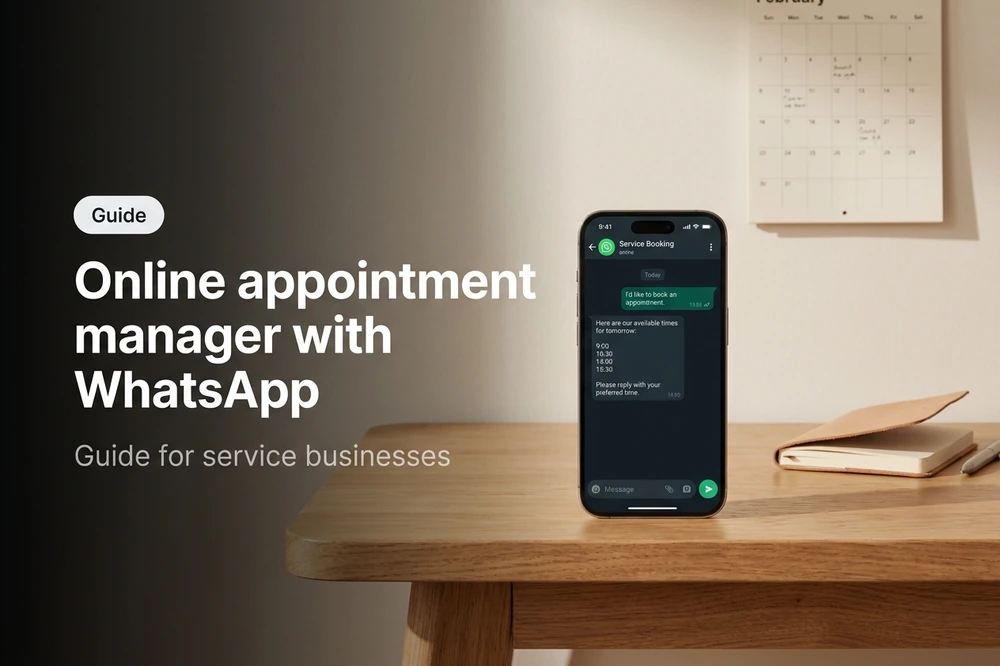
An appointment manager modern is no longer a calendar with checkboxes. It's the channel where your customers book, confirm, reschedule, and cancel — without calling you, without downloading an app, and without getting lost in your service hours. And in LATAM, that channel is called WhatsApp.
96% of smartphones in the region have WhatsApp installed (Statista, 2025), and patients, students, members, and clients expect to be able to book an appointment where they already chat with their friends, their bank, and their dentist. The question isn't "do I need an appointment manager?". It's "why is my appointment manager still hidden behind a web form that my customers abandon after 30 seconds?".
This guide is for owners and operational managers of service businesses — hair salons, law firms, auto repair shops, consulting firms, veterinary clinics, real estate agencies, fitness centers, spas — who are evaluating incorporating or changing their scheduling system. You will find what a modern appointment manager does, what a conversational flow looks like, 7 essential features, concrete examples by industry, and the most common mistakes when implementing it.
What is an online appointment manager with WhatsApp
An online appointment manager is software that connects your calendar (proprietary, Google Calendar, an internal database) with a channel where your customers book, confirm, and cancel appointments without human intervention. An appointment manager with WhatsApp moves that channel to where your customers already are: the same thread where you send them a receipt, a reminder, or a promotion.
It's not the same as a booking portal. In a portal, the customer navigates to the site, searches for the service, chooses a time, fills out a form, and waits for confirmation. In a conversational manager, the customer types "I want an appointment" and an AI Agent shows them available times in the same chat window. The completion rate rises from 33% (web forms, according to Baymard Institute) to 85-90% in guided conversations.
The technical difference also matters. To operate at scale, the appointment manager needs to be connected to the WhatsApp Business API — not the personal app, nor the free version of WhatsApp Business. The API enables Meta-approved reminder templates, management of unlimited simultaneous conversations, integration with your CRM, and multi-agent from a single number.
The result: your schedule is open 24/7, customers book in less than 2 minutes, and your team stops acting as a phone receptionist to focus on what pays your bills.
5 signs you need to automate your scheduling
Not all businesses need an appointment manager right now. But if you find yourself in 2 or more of these situations, the ROI is probably already waiting for you.
- Your receptionist says "I'll call you to confirm" more than 10 times a day. Each manual confirmation costs 2-5 minutes and an average of 1 USD in staff cost. At 10 confirmations/day, that's 200+ USD/month that no customer perceives.
- You lose appointments outside office hours. If your schedule lives in an Excel spreadsheet or a calendar that only your team edits, any appointment someone tries to request at 9 PM or on a Saturday is lost. In B2C service businesses, 40% of appointment requests arrive outside business hours (Accenture, 2024).
- Your no-show rate exceeds 20%. Without automatic reminders, 1 out of every 4-5 appointments results in a no-show. Each no-show costs the revenue from the lost appointment plus the opportunity cost of the unfilled slot.
- You use 3 different tools for scheduling, WhatsApp, and customer database. When the customer's phone number lives in Excel, their history in the WhatsApp chat, and the appointment in Google Calendar, things fall through the cracks. Consolidating into a conversational CRM reduces errors and makes it visible who is a new, recurring, or dormant customer.
- You've scaled and no longer know all your customers. If you opened a branch, added professionals, or quadrupled your appointment volume, manual management begins to fail. Manual systems work for up to 50-100 appointments/week. Exceed that, and confusion grows exponentially.
If none of these apply — say, a coach working 5 hours/week with 2 recurring clients — a shared Google Calendar is probably sufficient. The rest of the article is for those who have already surpassed that scale.
How the step-by-step flow works
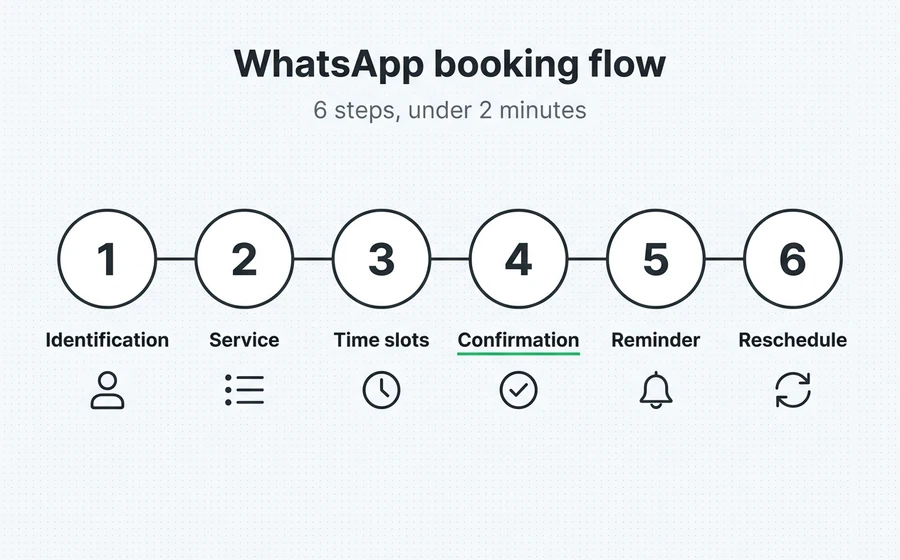
The conversational appointment scheduling flow has a proven structure. It can have more or fewer steps depending on the service's complexity, but these 6 are the foundation.
Step 1: Client Identification
The client messages the business's WhatsApp number. The bot detects if it's a known number (recurring client) or a new one. If new, it requests minimal data: name and, depending on the vertical, DNI, email, or membership number. If recurring, it skips directly to Step 2.
Step 2: Service and Professional Selection
The bot displays a list of services (general consultation, haircut, technical review, 30-min legal advice). When the business has multiple professionals, it adds a second selector: "Who would you like to be attended by?". The list can be filtered by specialty or show "next available".
Step 3: Available Time Slots
It consults the professional/service's real-time calendar and displays the next 3-5 available slots. This is critical: showing too many time slots flattens the decision. Showing a few well-curated ones increases the booking rate from 62% to 85% (AsisteClick internal benchmark, 2025).
Step 4: Instant Confirmation
The client chooses a time slot. The bot creates the appointment in the calendar, confirms with name, date, time, professional, and address (or video consultation link if applicable), and saves the appointment in the CRM. If the business requires advance payment, this is the moment to send a payment link (Mercado Pago, Stripe, PayPal).
Step 5: Automatic Reminders
The bot schedules 1-3 reminders depending on the service type:
- Standard reminder: 24 hours prior with the question "Do you confirm your appointment?". If the client replies "no", it automatically frees up the slot.
- Short reminder: 2 hours prior if the service is in-person.
- Link reminder: 15 minutes prior if it's a video consultation.
Step 6: Rescheduling and Cancellation
If the client messages "I want to reschedule" or "I won't be able to make it", the bot frees up the appointment, offers new time slots, and closes the loop. No crossed emails, no calls, no lost calendar space.
This flow covers 90% of cases. The remaining ones (out-of-flow inquiries, special requests) are routed to a human agent with full conversation context, so the human doesn't start from scratch.
WhatsApp vs. Web Portal vs. Call: Comparison
The channel decision defines 50% of your appointment manager's success. This table summarizes the practical differences with data from public benchmarks and real operations.
| Criterion | WhatsApp + chatbot | Web Portal / Form | Phone Call | Proprietary App |
|---|---|---|---|---|
| Availability | 24/7 | 24/7 | Office hours | 24/7 |
| User adoption | 96% already has it | Requires navigating to the site | 100% has a phone | 12% download business apps |
| Completion rate | 85-90% | 33% (forms) | 55% (abandoned calls) | 78% post-download |
| Time per turn | <2 min | 3-5 min | 3-5 min | 1-2 min |
| Operational cost per turn | ~0.05 USD | ~0.01 USD | 2-5 USD | 0 USD (post-investment) |
| Initial investment | SaaS subscription + onboarding | SaaS subscription | Staff only | 15,000-50,000 USD |
| Automatic reminders | Native | Separate email or SMS | Manual | Push notifications |
| Integration with customer history | Native (same thread) | Requires separate CRM | Manual | Depends on development |
Sources: Baymard Institute (form abandonment rate), Statista (WhatsApp penetration LATAM), GSMA Mobile Intelligence 2025 (business app adoption), internal AsisteClick benchmarks 2024-2025.
Quick take: WhatsApp leads in adoption (nobody downloads an app to book a physical therapy session) and in operational cost. A web portal remains useful as a complement — some corporate segments prefer to fill out a form. Phone calls are still relevant only for complex cases requiring human interaction (surgeries, B2B contracts). A proprietary app rarely makes sense for SMEs: the development cost and download friction make the payback take years.
7 features your appointment manager must have
Not all appointment managers are created equal. These are the features that differentiate a "functional" system from one that will continue to serve you when you double your operation.
1. Multi-resource calendar
Your system must handle multiple professionals, multiple services, and, if applicable, multiple branches — in parallel. A hairdresser with 3 stylists and 2 manicurists needs 5 simultaneous schedules with their own durations (haircut: 30 min, manicure: 45 min, haircut + beard: 60 min). Consider: Does it support schedules with different rules per professional? Does it allow blocking time slots for lunch or surgeries?
2. Synchronization with Google Calendar or Outlook
Your professionals live by their personal calendars. If the manager does not synchronize in both directions (the appointment appears in their Google Calendar and, if the professional blocks a time slot in their calendar, the manager marks it as occupied), double booking is inevitable.
3. Reminders with actionable response
Sending a reminder that only says "We remind you of your appointment tomorrow" is not effective. A useful reminder includes a "Confirm" button and a "Reschedule" button within the same WhatsApp message. If the client does not confirm within 2 hours, the system frees up the time slot and notifies the waiting list. This mechanism alone reduces no-shows by 30-40% in health and beauty verticals.
4. Integration with payments and deposits
For services where no-shows are costly (doctors, psychologists, lawyers), charging a deposit upon booking reduces no-shows to 3-5%. The manager must integrate with payment processors and automatically send the link after step 4 of the flow.
5. Automatic waiting list
When a client cancels their appointment at the last minute, the manager should offer that time slot to the next 3 clients on the waiting list via WhatsApp, without human intervention. The first one to confirm gets the appointment. This "simple" feature recovers 15-20% of appointments that would otherwise remain empty.
6. Unified inbox for escalated cases
Not all appointments fit into the automatic flow. Someone will ask something off-script: "I have a question about my coverage", "I need to reschedule 3 sessions together". The manager must have a omnichannel inbox where a human agent can see the complete conversation and respond without asking the client to repeat their name.
7. Native metrics
How many appointments were booked by the bot vs a human agent. What confirmation rate do reminders have. Which day and time have the highest demand. Which professional has the highest no-show rate. Without native metrics, you're flying blind and cannot optimize or demonstrate ROI when the business owner asks "Was this worth it?".
These 7 features are not all "nice to have". They are the minimum threshold for the manager to survive the first year of scaled operation.
Cases by vertical: 6 businesses, 6 configurations
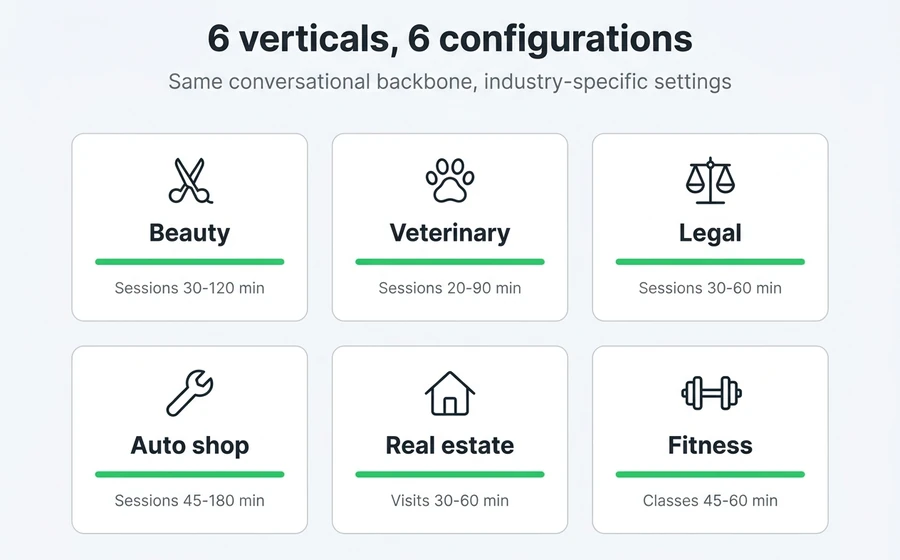
The same appointment manager is configured differently depending on the business. These are 6 real cases with their specific adjustments.
Beauty and hairdressing
- Typical Services: haircut (30 min), coloring (120 min), manicure (45 min), haircut+beard combo (60 min).
- Reminders: 24 h and 2 h before. Remember to bring a reference photo if it's for coloring.
- Deposit: 20-30% for long services (coloring, straightening) where a no-show leaves 2 dead hours.
- Long-tail SEO: "hairdresser appointments WhatsApp", "book beauty salon appointment online".
Veterinary Clinic
- Typical Services: clinical consultation (20 min), vaccination (15 min), surgery (60+ min), dog grooming and bathing (90 min).
- Reminders: 24 h before with specific instructions ("come on an empty stomach", "bring health booklet").
- Integration: automatic sending of study results via WhatsApp after the consultation.
- Long-tail SEO: "veterinary appointment online", "book veterinary consultation WhatsApp".
Law Firm
- Typical Services: initial consultation (30 min, free or low-cost), follow-up meeting (60 min), virtual hearing.
- Reminders: 24 h before with video call link + documents to have ready.
- Deposit: recommended for paid consultations — lawyers lose a lot of time with "free consultations" that never convert.
- Long-tail SEO: "schedule consultation with lawyer online", "lawyer appointment WhatsApp".
Auto Repair Shop
- Typical Services: general inspection (60 min), alignment (45 min), service (180 min), electronic diagnosis (30 min).
- Reminders: 24 h before + instructions ("bring vehicle registration", "estimated time").
- Key feature: the bot asks for model, year, and license plate when booking to prepare spare parts.
- Long-tail SEO: "book car repair shop appointment", "schedule car service online".
Real Estate (property viewings)
- Typical services: property viewing (30 min), appraisal (60 min), signing of preliminary agreement.
- Reminders: 24 h and 1 h before with address + Google Maps link.
- Key feature: automatic assignment to the agent responsible for the listing. If the listing has exclusivity, only that agent can assist.
- Long-tail SEO: "schedule apartment viewing", "property appraisal appointment WhatsApp".
Fitness center / personal training
- Typical services: group class (45 min), individual session (60 min), initial assessment (45 min).
- Reminders: 2 h before with the question "Are you coming?" — group classes depend on having a minimum number of people.
- Key feature: waiting list when the class is full + configurable class capacity.
- Long-tail SEO: "book gym class WhatsApp", "personal trainer appointment online".
The common pattern: each vertical has its own configuration for duration, reminders, deposits, and integrations, but all benefit from the same conversational backbone. A separate manager is not required per industry — a configurable manager is needed.
Frequent errors when automating appointments
Error 1: Starting with a 15-step flow
The temptation is to replicate the entire manual form in the bot: name, surname, ID, address, health insurance, reason for consultation, observations... The result: the client abandons at step 6. The rule: ask for the minimum data to confirm the appointment (3-4 fields). The rest is completed later, during the service.
Error 2: Showing too many available times
A list of 20 times for the next 10 days paralyzes the client. Showing 3-5 curated times, with a "see more" option for those who want to explore, boosts the booking rate. And show real times, not ghost slots: if you offer 10:30 and it doesn't exist, you lose trust.
Error 3: Not having a human handover flow
The bot resolved 90% of cases. Good. But when someone writes something off-script, the bot responds "I didn't understand, can you repeat?" 3 times and the customer leaves. The flow must escalate to a human with one click, and the human must see the entire conversation. This is where a Copilot for agents, which suggests answers and accelerates escalated support.
Error 4: Reminders without context
A reminder that says "You have an appointment tomorrow" is useful. One that says "Hello María, you have your dental check-up with Dr. García tomorrow at 2:30 PM at Av. Rivadavia 1200. Bring your health insurance card. Do you confirm?" is useful AND reduces no-shows because it speaks to the real person.
Error 5: Not measuring anything during the first 90 days
Without a baseline of how many appointments were scheduled before, what percentage were no-shows, and how much time staff spent confirming manually, you won't be able to demonstrate ROI. Before launching the manager, record the metrics from the previous month. After launch, compare month by month. If you want a specific formula for calculating the return, check out How to measure the ROI of a chatbot.
Frequently asked questions
What is an online appointment manager with WhatsApp?
An online appointment manager with WhatsApp is software that connects your calendar with a conversational bot that books, confirms, reschedules, and cancels appointments from the same WhatsApp window where your customer already communicates with you. It replaces the web form or phone call with a 2-minute conversation that works 24/7 without human intervention.
How much does it cost to implement an appointment manager via WhatsApp?
Most SaaS WhatsApp scheduling platforms in LATAM cost between 20 and 150 USD/month depending on features and appointment volume. You must add the cost of the WhatsApp Business API (~0.05 USD per business-initiated template message). For a business with 300-500 appointments/month, the total cost is around 50-100 USD per month — less than the cost of 1 hour/day of a receptionist.
Does it work without anyone on the team having to monitor WhatsApp?
Yes, 24/7 and unsupervised. The bot handles the complete booking, confirmation, and reminder flow. Only out-of-flow inquiries (specific questions, special requests, complaints) escalate to a human agent, and these can be addressed during office hours without losing the customer's appointment — the bot still takes the appointment and leaves the inquiry pending for the team.
Does it integrate with Google Calendar or other calendars?
Modern managers synchronize bi-directionally with Google Calendar, Outlook, and proprietary management calendars. This means that if a professional blocks an hour for a personal meeting in their Google Calendar, the manager will not offer that time slot to a client. This is key to avoiding double bookings.
How long does it take to see results after implementation?
Most businesses that automate their appointment management see an impact in the first 2-4 weeks: an increase in appointments booked outside business hours, a decrease in team management time, and a reduction in no-shows thanks to reminders. Full ROI (including team adjustment to new processes) usually materializes in 60-90 days.
Conclusion
Choosing an appointment manager is no longer choosing a calendar — it's choosing a channel, a conversational experience, and a system that frees up hours for your team. WhatsApp wins the channel battle in LATAM due to adoption, booking speed, and continuity of thread with the customer. The 7 critical features (multi-resource, synchronization, actionable reminders, payments, waiting list, unified inbox, metrics) are the threshold for the system to continue serving as you scale.
The concrete task to get started: take your current month's metrics (appointments booked, no-show rate, team time spent on manual management), choose a manager that covers the 7 features, and compare yourself after 60 days. If the number hasn't improved, you switch. If it has improved, you scale.
If you want to see how this is implemented in practice, AsisteClick's appointment scheduling platform covers the 7 features, connects to the WhatsApp Business API in 3 business days, and has plans starting from USD 20/mes. You can try it in minutes without local installation.
Read more: