
The most common mistake when building an AI Agent is not choosing the wrong model or channel. It's putting everything in the same place.
It always happens: someone sets up an AI Agent for customer service and starts putting return policies, product catalogs, collection flows, tone manuals, escalation cases, the list of ERP integrations, historical FAQs, and three different versions of how to greet based on the channel into the main prompt. The prompt ends up with 8,000 words. The Agent becomes slow, confuses contexts, responds with information that doesn't apply to the case, and costs twice as much in tokens.
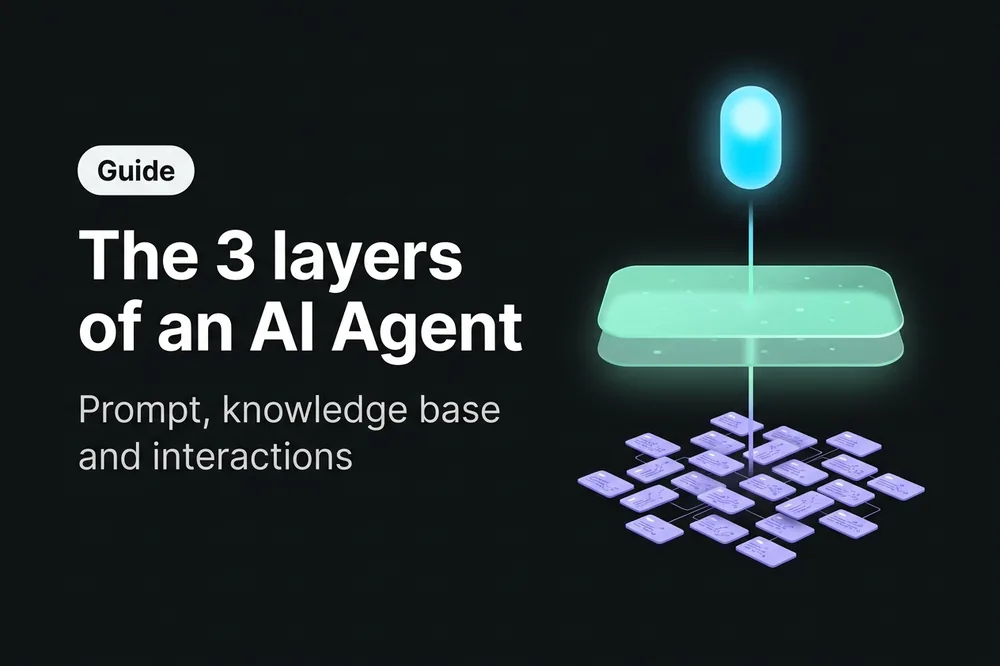
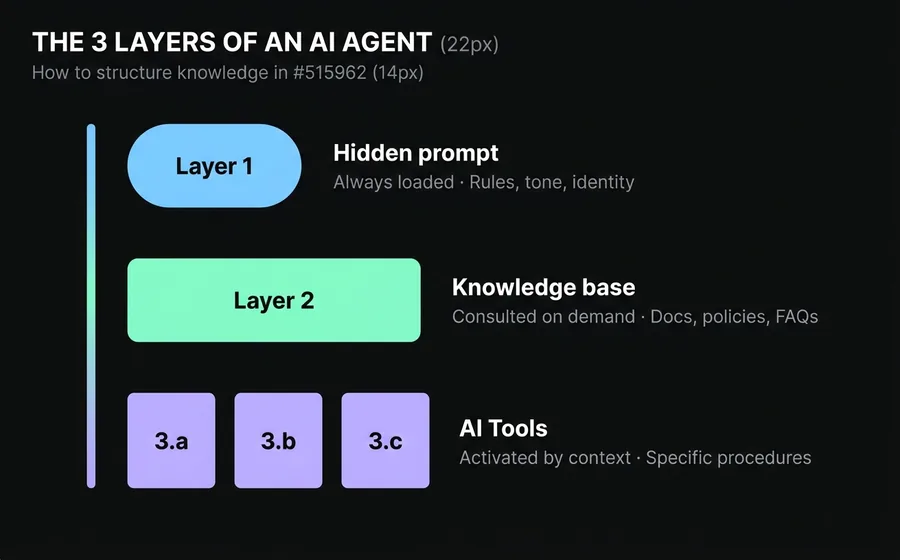
The solution is not "writing a better prompt." It's understanding that a professional AI Agent has three well-differentiated layers of knowledge, and each type of information resides in a distinct layer.
This guide explains what these three layers are, what goes into each, and how to map them to the real tools you use in the bot builder. In the end, you'll be able to look at any block of instructions and say with certainty: "this goes here."
Table of Contents
- Why an AI Agent is Not an Encyclopedia
- Layer 1: The Hidden Prompt — What the Agent Always Knows
- Layer 2: The Knowledge Base — What the Agent Consults When Needed
- Layer 3: Specific Interactions — What the Agent Loads Only in Context
- How to Decide Which Layer Each Item Belongs To
- Common Mistakes When Structuring Knowledge
- Frequently Asked Questions
Why an AI Agent is Not an Encyclopedia
Imagine you hire someone new for customer service. How do you train them?
You don't dump the entire 500-page manual on them on the first day. Nor do you leave all printed procedures on their desk for them to read aloud on every call. What you do is something else:
- You teach them the basic, evergreen rules: how to greet, the brand's tone, what they can and cannot promise, whom to escalate to if they run out of answers. Little text, high impact. It's their short, memorable induction manual.
- You show them where to look when they need specific information: the internal wiki, the product manual, the updated price list. They don't memorize it; they know it exists and consult it when a specific question arises.
- You explain specific procedures when the case arises: if a customer requests a return, that day you tell them the 12 steps of the return flow. You don't load them with all the procedures for returns, exchanges, cancellations, complaints, and new registrations all at once before they start assisting.
A professional AI Agent works the same way. It has three layers of knowledge that fulfill these three distinct functions. What changes compared to a human employee is that in a poorly structured AI Agent, layer 1 ends up cluttered with information that should be in layer 2 or 3And that's where disaster strikes.
Layer 1: the hidden prompt — what the Agent always knows
The hidden prompt is the set of instructions that the AI Agent receives in every conversation, before seeing the customer's message. It is always loaded, consumes tokens in every turn, and defines the framework within which the Agent will operate.
Therefore, what you put here must meet two conditions:
- Applies to all conversations. If something only applies to a specific flow, it doesn't go here.
- It is compact and stable. If it changes frequently, it doesn't go here (it forces you to redeploy).
What goes in the hidden prompt
- Agent Identity: who it is, who it works for, what its role is. "You are the virtual assistant of [company], a [industry] in [country]."
- Tone and language: formal, informal, using 'tú', using 'usted', neutral. Forbidden words. Emojis yes or no.
- Strict business rules: "never promise exact delivery dates", "do not reveal product prices without confirming availability", "if the customer asks to speak with a human, transfer without asking".
- Escalation criteria: when to transfer to a human, to which team, with what context.
- Default response format: short messages, use of bullet points, use of emojis if applicable.
What does NOT go in the hidden prompt
- Complete product catalogs.
- Extensive policies (privacy, returns, legal terms).
- Step-by-step procedures that only apply to specific cases.
- Changing price lists.
- Long FAQs.
Practical rule: if your hidden prompt exceeds 1,000 words, something is wrong
A well-thought-out hidden prompt for customer service should not exceed 500 to 800 words. If yours has 3,000, you are almost certainly mixing layer 1 with layer 2 and layer 3. The model gets distracted, quality decreases, and cost increases.
In AsisteGPT, the hidden prompt is configured per bot and is editable from the interface. You don't need to touch code.
Layer 2: the knowledge base — what the Agent consults when needed
The knowledge base is the set of documents, policies, manuals, catalogs, and FAQs that the Agent can consult on demand. The key difference from layer 1 is that this is not loaded in every conversation. The Agent consults the knowledge base only when it detects that it needs information from it to respond.
The technology that makes this possible is called RAG (Retrieval-Augmented Generation). In practice, it works like this:
- You upload your documents to the Agent's knowledge base.
- The platform breaks them into fragments and indexes them with semantic search.
- When the customer asks something, the Agent searches for relevant fragments and uses them to construct the response.
- Optionally, the Agent can cite where it obtained the information.
What goes into the knowledge base
- Complete policies: returns, exchanges, warranties, privacy, terms and conditions.
- Product or service catalogs: technical data sheets, prices, specifications.
- Manuals and user guides for the product.
- Extensive FAQs: the 200 most common questions with their official answers.
- Website content: the key pages that describe what you do and how.
- Records of previous conversations that the platform uses as a reference to respond just like a trained human.
What does NOT go into the knowledge base
- Strict step-by-step procedures (they go in layer 3). If a customer asks to initiate a return, you don't want the Agent to search through loose fragments of the manual — you want them to follow the exact procedure, in order.
- Hard business rules (they go in layer 1). "Never promise dates" cannot depend on the Agent finding the correct fragment; they must always know it.
- Outdated or contradictory documents. If you upload two PDFs that say different things about the same topic, the Agent will cite the one they find first, and the quality of the response becomes unpredictable.
Practical rule: curation matters more than volume
Three updated and clean manuals perform better than 100 old, poorly scanned PDFs with overlapping information. The knowledge base is an asset that is maintained, not a dump for leftovers.
Layer 3: specific interactions — what the Agent loads only in context
Here is the most underestimated layer — and the one that makes the difference between an amateur AI Agent and a professional one.
There is a type of knowledge that is not generic (does not go in layer 1) nor searchable (does not go in layer 2): these are specific procedures that only make sense when a particular case arises..
Examples:
- The product return flow: 12 strict steps in order, with mandatory questions, validations, and branching.
- The collection process for a 30-day delinquency: specific tone, payment plan options, escalation to the legal department if no agreement is reached.
- Scheduling a medical appointment: ask for health insurance, specialty, location, offer available times, confirm data, generate reminder.
- The formal complaint procedure: register case number, generate ticket, assign to team, offer response time.
If you put all 4 procedures in the hidden prompt, the prompt grows to 5,000 words and the Agent gets lost. If you leave them in the knowledge base, the Agent consults them incompletely (RAG performs poorly with ordered instructions because it splits the document into chunks and mixes steps).
The correct solution is to load the complete procedure only when the case arises. And the tool to do it is the IA Tool.
How this is implemented in practice: IA Tools
In the AsisteGPT module, in addition to the hidden prompt and the knowledge base, the AI Agent can have IA Tools: capabilities that the Agent itself decides to invoke when it detects that the case warrants it.
An IA Tool is not a rigid flow node. It is an action that the Agent knows exists (because it sees it listed with its description) and executes when the conversation context justifies it. When executed, the tool responds with a block of text that is injected as context, and the Agent drafts the response to the customer using that information.
There are two ways to use IA Tools to solve layer 3:
Option A: AI Tool mono-skill (the simplest)
One tool per procedure. Examples:
- Tool "iniciar_devolucion" → when the Agent detects that the customer wants to return something, they invoke this tool. The tool responds with the 12 steps of the return procedure. The Agent follows those steps in the conversation.
- Tool "consultar_plan_pago" → when the customer asks for payment options, the tool returns the available installments, criteria, and suggested scripts.
- Tool "agendar_turno" → when the customer wants an appointment, the tool returns the data capture procedure and the calendar query.
Advantage: simple, clear, each tool does one thing. The Agent decides when to use each one based on its description.
Disadvantage: if you have many procedures, your list of tools gets full and the base context grows (even if slowly, each description takes up space).
Option B: AI Tool dispatcher (a single tool with a classifier parameter)
A single tool, for example "cargar_procedimiento", that receives a parameter type Bot Question that classifies which procedure to retrieve. The parameter has an enum with the available options ("return", "exchange", "collection", "cancellation", "new_registration", etc.).
When the Agent detects a case that requires a specific procedure, they invoke the tool with the correct parameter value, the tool responds with the prompt of the corresponding procedure, and the Agent follows that procedure.
Advantage: scales to many procedures without filling the list of tools. One tool, many destinations.
Disadvantage: requires careful thought about the classifier parameter and its enum. If the options are not well-defined, the Agent may invoke with the wrong value.
Which to choose
- Up to 5 procedures: mono-skill. It is more transparent and easier to iterate.
- More than 5 procedures: dispatcher with a classifier parameter. Scales better.
- Mix: you can have some mono-skill tools for the most critical procedures (where you want fine control over when they are activated) and a dispatcher tool for the rest.
What goes into specific interactions (whether mono-skill or dispatcher)
- Long operational flows with steps in strict order.
- Procedures with mandatory questions and validations.
- Flows with conditional branches ("if the amount is greater than X, offer a payment plan; otherwise, request a single payment").
- Processes that require calls to external APIs (ERP, CRM, calendar) as part of the flow — in this case, the tool can, in addition to returning text, trigger the API call.
- Dense knowledge that only makes sense in a specific context.
Practical rule: one procedure = one tool (or a dispatcher option)
If something can be described as "when the client asks for X, I do Y, Z, W in order", it's a candidate for layer 3. Do not put it in the hidden prompt. Create an IA Tool (mono-skill or dispatcher) for that case.
How to decide which layer each item belongs to
When you have an instruction or content and don't know where to put it, apply this decision tree:
| Question | If the answer is... | Belongs in... |
|---|---|---|
| Does it apply to all conversations? | Yes | Layer 1 (hidden prompt) |
| Is it a short and immutable rule? | Yes | Layer 1 (hidden prompt) |
| Is it an extensive document, catalog, policy, or FAQ? | Yes | Layer 2 (knowledge base) |
| Does the Agent need to search for the relevant fragment? | Yes | Layer 2 (knowledge base) |
| Is it a step-by-step procedure with a strict order? | Yes | Layer 3 (IA Tool) |
| Does it only apply when the client expresses a specific intention? | Yes | Layer 3 (IA Tool) |
| Does it require calls to external APIs during the flow? | Yes | Layer 3 (IA Tool) |
Practical examples
Case 1: "Our business hours are from 9 AM to 6 PM, Monday to Friday."
→ Layer 1. It's short, immutable information, always applicable. The hidden prompt can mention it so the Agent responds immediately without consulting anything.
Case 2: "We have 340 products in the catalog with their prices and stock."
→ Layer 2. It's high volume; the Agent only consults when the customer asks about a specific product.
Case 3: "The process to unsubscribe has 8 mandatory steps and requires validating the account holder's identity."
→ Layer 3. It's a strict procedure, only applicable when the customer expresses the intention to unsubscribe.
Case 4: "Our return policy allows 30 days from purchase if the product is unopened."
→ Layer 2. It's part of the policy; the Agent consults it when the customer asks about returns. If the customer also wants to initiate a return, that triggers a Layer 3 flow.
Case 5: "Never offer discounts on your own initiative."
→ Layer 1. It's a hard business rule, always applicable.
Common Errors in Knowledge Structuring
Error 1: Putting the entire catalog in the hidden prompt
The typical case: an e-commerce with 500 products loads everything into the general prompt "so the bot knows". Result: inflated tokens, slower responses, and the Agent still gets confused because it doesn't distinguish between the product being asked about and the 499 that are not. Where it goes: Layer 2. Upload the catalog as a structured document to the knowledge base.
Error 2: Writing each procedure within the hidden prompt
Example: "If the customer requests a return, ask for the order number, validate the date, offer a credit note or refund...". If you have 10 such procedures, your hidden prompt will explode. Where it goes: Layer 3. Each procedure is its own IA Tool (mono-skill) or an option of a tool dispatcher.
Error 3: Uploading any PDF to the knowledge base without curation
Scanned manuals with poor OCR, duplicate documents, old versions that contradict new ones. The Agent cites what it finds first, and the quality of responses becomes unpredictable. How to fix it: Curate the base as if it were a public manual. Less quantity, more quality.
Error 4: Vague IA Tool descriptions
You build a perfect return tool, but its description says "manages returns". The customer writes "I want to return the phone" and the Agent doesn't invoke it because it wasn't clear when to do so. How to fix it: the description of each IA Tool must precisely explain when it should be invoked, with examples. E.g.: "Invoke when the customer asks to return, send back, refund, or exchange a purchased product. Typical keywords: return, refund, it didn't work for me, I want to exchange". If you use a dispatcher, the same applies to the classifier parameter.
Error 5: mixing tone between layers
The hidden prompt says "formal tone with informal address", but the knowledge base has documents written using "formal address". The Agent copies the tone from the document it cites and sounds inconsistent. How to fix it: the tone is the responsibility of layer 1 and must override what comes from layer 2. Explicitly instruct the Agent: "Always respond using informal address, even if the reference documents use formal address".
Error 6: not auditing the prompt after adding functionalities
Every time a new case is added, someone adds a line to the general prompt. After six months, the prompt has 40 rules that contradict each other. How to fix it: quarterly review of the hidden prompt. Move everything that is not essential to layer 2 or 3, and deprecate obsolete rules.
Frequently Asked Questions
How long should my hidden prompt be?
Between 200 and 800 words is healthy for most customer service cases. If it exceeds 1,000, it's a sign that some things should be in layer 2 or layer 3. Longer is not better: the model distributes attention over everything it reads, and an inflated prompt dilutes important rules.
What documents should be uploaded to the knowledge base?
High priority: official policies, updated product manuals, extensive FAQs, technical data sheets, website content. Low priority: commercial presentations, internal documents without public format, contracts (unless it's a legal Agent). General rule: only upload what you would give to a new customer so they understand how you work.
When do I create an IA Tool instead of adding it to the hidden prompt?
When it meets two conditions: (1) it has more than 4 or 5 steps in order, and (2) it only applies when the customer expresses a specific intent. If it meets only one, review: if it's short and always applies, it goes in layer 1. If it's long but consultable in fragments, it goes in layer 2. If it's long and activated by the conversation context, it's layer 3.
How do I know if my AI Agent is poorly structured?
Four signs: (1) the hidden prompt exceeds 1,500 words, (2) responses take longer than expected, (3) the Agent mixes contexts (responds about returns when asked about schedules), (4) the cost per conversation is higher than projected. If you see two or more of these signs, it's time to redistribute knowledge among the three layers.
Can I move knowledge from one layer to another later?
Yes, and you should do it every time the Agent grows. Typically: you start with everything in layer 1 because it's fast to iterate. When you pass a certain size, you migrate documents to layer 2 and long procedures to layer 3 as IA Tools. It's not refactoring, it's product maturity. The hidden prompt should shrink over time, not grow.
How does the Agent decide when to invoke an IA Tool?
Based on the description you provide for each tool (or each option of the dispatcher parameter) and the conversation context. It is the Agent itself that decides, in real-time, if the case warrants invoking the tool. That's why the description is critical: it must precisely describe when it should be used. A good format: "Invoke when [specific situation]. Keywords: [list]. Examples: [2-3 typical customer phrases]".
Conclusion
An AI Agent is not a brain you throw information at until it learns. It is a system with well-differentiated layers, and the bot builder who understands this builds Agents that scale. Those who don't understand it build giant prompts that no one can maintain.
The simple rule: hidden prompt for what always applies, knowledge base for what is consulted, IA Tools for what is activated by context. If your Agent respects that separation, you will be able to continue adding functionality without each new rule breaking the previous ones.
If you want to measure the impact of properly structuring your Agent, we put together a guide for calculate the ROI of a chatbot with real numbers. And if you are building an AI Agent from scratch or want to take yours to the next level, you can see how the hidden prompt, knowledge base, and IA Tools are configured in the AsisteGPT module.
Continue reading
- Prompt engineering for chatbots: 7 techniques for your AI bot to respond like an expert — to delve deeper into how to better write Layer 1
- How to measure the ROI of a chatbot (with the formula used by companies that renew) — to quantify the impact of a well-structured Agent
- GPT-5.4 mini vs nano vs default: how to choose the model for your AI Agent — to combine the 3 layers with the appropriate model