
María messages you via WhatsApp on Tuesday at 10 AM asking about pricing. Carlos, your salesperson, replies. On Friday she writes again, but this time on Instagram. Lucía handles her, not knowing it's the same person or that she already asked for a quote. She sends a catalog from scratch. María gets tired and doesn't respond. Two weeks later, you see the forgotten quote in a WhatsApp note and realize you lost a USD 4,000 sale. Not because of price: because of not knowing who was messaging you. That sequence repeats every day in most LATAM businesses, and it's exactly what a conversational CRM comes to solve.
In this guide you'll understand what a conversational CRM is (and why traditional CRMs break when you try to support via WhatsApp), what its real anatomy is, how it takes a deal from the first message to the close, what role AI plays in each stage and what metrics the sales teams already operating this way track. Operational focus, not marketing.
What a conversational CRM is
A conversational CRM is a customer relationship management system designed to live inside the conversation channel, not in a separate tab. When a customer messages you via WhatsApp, Instagram, email or webchat, their full profile automatically appears next to the chat: conversation history, past purchases, open opportunities, team notes, lifetime value. The salesperson or agent doesn't have to leave the conversation to look up context — the context comes to the conversation.
The difference from a traditional CRM is in three points:
- The native channel is the conversation, not the form. A classic CRM is filled with data someone types by hand after talking with the customer. A conversational CRM captures the data during the conversation, automatically.
- The activity log is the conversation itself, not a separate note. The contact's timeline is the thread of exchanged messages, enriched with business events (purchases, payments, claims, pipeline stages).
- It follows the customer across channels without losing identity. When María messages you on WhatsApp and then on Instagram, the system understands it's the same person and unifies the history. In a traditional CRM, that correlation is an expensive integration project.
That difference seems subtle but it defines the business: with a conversational CRM, the sales team spends more time selling and less typing data. And customers don't have to repeat their problem every time they switch channels, which we already covered in depth in omnichannel customer support.
Why the traditional CRM breaks when you handle support via WhatsApp
Most sales teams in LATAM today use an awkward combination: the CRM on one side, WhatsApp on another, Instagram and Facebook in their own apps, and email separately. The operational result is predictable and looks the same everywhere:
Four things broken simultaneously. First, the data is fragmented: the conversation is in WhatsApp but the deal is in the CRM, and nobody syncs. Second, salespeople do tab switching all day — they spend more time copying data between systems than selling. Third, two salespeople can handle the same customer without realizing it, because María on WhatsApp and María on Instagram are two different contacts in the systems handling them. Fourth, when a salesperson leaves, their WhatsApp goes with them and customers keep messaging a number nobody attends anymore.
The concrete cost in dollars. A team of five salespeople that spends 90 minutes per day updating the CRM by hand (conservative estimate) loses 25 salesperson-hours per week. At a typical loaded cost of USD 12 per hour, that's USD 1,300 monthly — plus everything those salespeople didn't sell during those hours, which is usually a multiple of the direct cost.
The friction for the customer. When the customer has to repeat their problem every time they switch channel or salesperson, they perceive they're talking to disconnected "departments". That destroys trust, especially in high-ticket purchases where the relationship matters more than the price.
A conversational CRM closes all four problems at once: unified data because the conversation is the data, no tab switching because everything lives on the same screen, unique contact identity across channels, and customers remain the business's when a salesperson leaves. It's not a "feature": it's an architectural change.
The anatomy of a conversational CRM
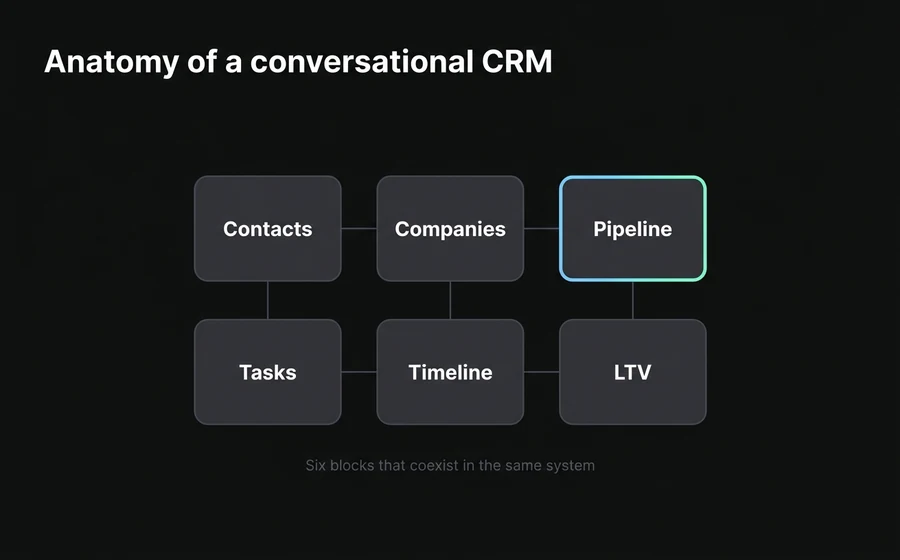
A serious conversational CRM has six blocks that work together. Looked at separately they seem like the same as a traditional CRM; looked at together, they're what defines the system as working inside the chat.
1. Automatic contacts with native dedup. Every person that messages you automatically becomes a contact, regardless of the channel. If the same person messages you on WhatsApp and then on Instagram with the same name or phone, the system detects the duplicate and merges them without losing information. In AsisteCRM, a contact has 36 configurable fields and supports bulk import up to 50,000 records — for the day you decide to migrate your old database.
2. Companies grouped by context. When María and Juan message you from the same corporate email domain, they are different people who belong to the same company. The CRM groups them automatically, which lets you see all the activity of a consolidated account — who runs it, who decides, who operates, what they ordered together. In B2B this is indispensable: companies make purchases, people have conversations.
3. Opportunity pipeline (deals) with kanban. Every conversation with commercial potential becomes an opportunity associated with the contact and the company. The visual pipeline (kanban) shows all opportunities by stage: new, qualified, proposal sent, in negotiation, won, lost. Each opportunity carries amount, probability, estimated close date and the exchanged messages as history.
4. Tasks with customer context. Tasks in a conversational CRM are not "items on a list": they're actions linked to a specific contact, company or opportunity. "Call María on Friday" appears on the salesperson's agenda with a direct click to María's conversation, without having to look her up.
5. Unified customer timeline. For any contact, you can see in chronological order every interaction they had with your business: messages across all channels, purchases, open and closed claims, past opportunities, team notes. It's the "institutional memory" of the relationship.
6. Lifetime value calculated automatically. You sum up how much each contact has bought over their history, and the system shows it next to the chat. This changes how the team prioritizes: a query from a customer with USD 15,000 LTV shouldn't wait the same as one from a new walk-in. Without visible LTV, everyone has the same priority — which is the same as saying nobody does.
Those six blocks are what make a CRM "conversational" and not just "chat-compatible". It's the combination that moves the needle, not each piece in isolation.
From lead to close: the conversational pipeline step by step
A sale on WhatsApp with a well-built conversational CRM follows a six-stage sequence. Each one has a clear objective, an advancement criterion and its own metrics. This table summarizes the journey:
| Stage | Trigger | Typical action | Output |
|---|---|---|---|
| 1. Entry | Customer writes | Bot receives, creates contact, identifies intent | New lead in the system |
| 2. Qualification | Conversation starts | AI asks 4-6 BANT/MEDDIC questions | Lead disqualified or qualified |
| 3. Assignment | Qualified lead | System assigns the salesperson per rules | Salesperson receives lead with context |
| 4. Proposal | Salesperson + AI | Generates quote, sends to customer | Proposal sent, deal in pipeline |
| 5. Negotiation | Customer responds | Human salesperson closes, AI assists | Deal won or lost |
| 6. Post-sale | Purchase closed | Bot handles follow-up, onboarding, support | Customer activated |
The difference between a team that runs this flow in five minutes per lead and one that takes 48 hours is not the salespeople's skill: it's whether stages 1, 2, 3 and 6 are automated or human work. When AI absorbs entry, qualification, assignment and post-sale follow-up, the human salesperson only comes in when they add real judgment — stages 4 and 5.
This has an important side effect: the sales team can handle 3 to 5 times more volume without hiring. Not because it works faster; because it stops doing administrative work and focuses on closing.
Smart qualification: only the ready leads reach the salesperson
The most expensive stage of a sales process is the human salesperson's time. And the most common way to waste it is to have senior salespeople talking to leads with no budget, no authority or that never buy. A conversational CRM with AI qualifies before the lead reaches the salesperson.
Classic frameworks — BANT (Budget, Authority, Need, Timeline) or MEDDIC (Metrics, Economic buyer, Decision criteria, Decision process, Identify pain, Champion) — translate very well to a WhatsApp conversation because they're a sequence of natural questions. A well-configured AI agent asks them in the flow of the chat, without the customer feeling "interrogated" — because the questions are interleaved with useful answers.
When the lead passes the qualification threshold, the conversation is assigned to the salesperson with all the context loaded: customer's answers, qualification score, pre-created deal, suggested next action. The salesperson opens the chat and already knows who they are, what they want, how much they can spend and when they decide. No prior briefing, no "let me review the case".
The exact mechanics of qualification — what to ask, in what order, how not to sound robotic, how to train AI to detect signals — lives in a dedicated guide: how to qualify WhatsApp leads with an AI agent. What matters for this CRM guide is that qualification is what keeps the pipeline from inflating with junk.
How a deal travels through the pipeline: kanban, stages, conversations, tasks
When a lead passes qualification, it becomes a deal (opportunity) in the pipeline. From there, the deal travels through the kanban stages until it closes — won or lost. That journey is where the conversational CRM most differentiates itself from the traditional one, because every move of the deal is tied to the real conversation.
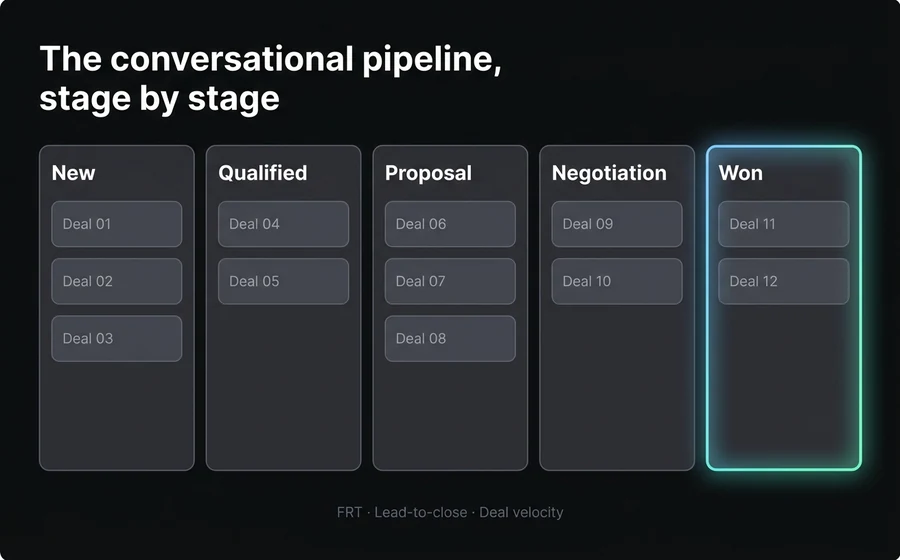
Stages as kanban columns. Each company configures its stages according to its sales process. A typical example for a consultative B2B sale in LATAM: New → Qualified → Proposal sent → In negotiation → Closed won / Closed lost. The team sees the board and understands at a glance how many deals are in each stage, which ones have been stalled too long and where the bottleneck is.
Deal movement is triggered by the conversation. When the salesperson sends the proposal via WhatsApp, the system can automatically move the deal to "Proposal sent" — without the salesperson having to update the CRM by hand. When the customer responds with questions, the deal moves to "In negotiation". When they say "I'll buy it", to "Won". The conversation is the event; the CRM just records it.
Tasks travel with the deal. If a deal enters "Proposal sent", the system can automatically create a "Follow up in 48 hours" task assigned to the salesperson who sent the quote. If a week passes without a customer response, another "Reactivate conversation" task. Each deal carries its attached task list, with clear due dates and owners.
Multiple pipelines for different processes. Not all deals travel through the same flow. A B2B consultative sales process (8 stages, weeks or months) is not the same as an ecommerce sale (3 stages, minutes). A well-designed conversational CRM lets you configure different pipelines by business type or team, and keep each one with its own configuration of stages and rules.
For ecommerce specifically, that short pipeline lives very well inside the same CRM, connected to conversations and inventory. We develop this in ecommerce chatbot on WhatsApp, which covers what it looks like when the "deal" is a cart in progress.
Integration with external data: when the conversational CRM is not the only system
Most companies in LATAM already have some data system prior to adding a conversational CRM — a management ERP, an online store (Tiendanube, Shopify, VTEX), an enterprise CRM or custom builds. The right question is not "do I replace everything?", but "how do I integrate?".
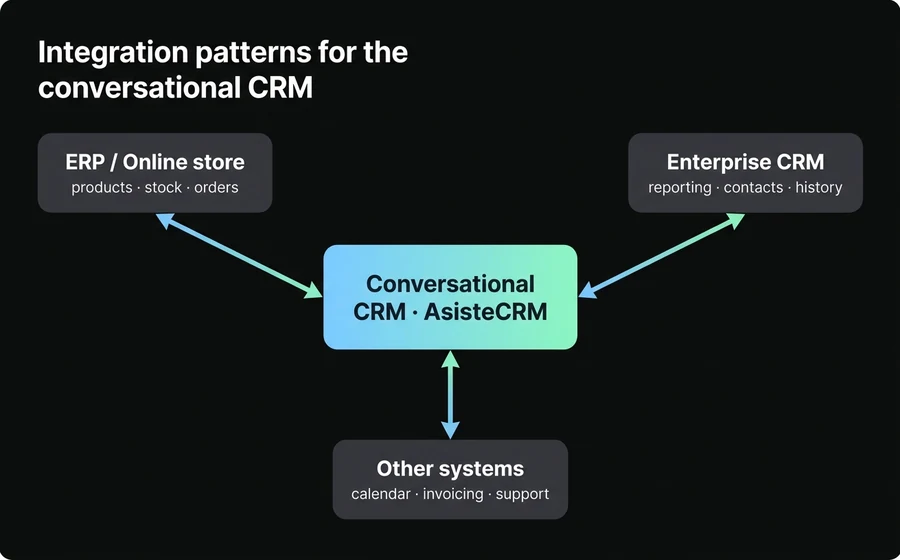
The operational answer is AsisteAPI: AsisteClick's REST API that enables bidirectional exchange with any external system. Three typical usage patterns:
Pattern 1: the ERP is the source of truth for products and stock. When the customer asks about a product, the bot queries the ERP in real time (not an outdated copy in the conversational CRM) to respond with real stock, updated price and delivery time. When the customer buys, the order is created in the ERP. The conversational CRM records the opportunity and the contact; the ERP is the owner of the product and the order.
Pattern 2: coexistence with an enterprise CRM. If your organization already has a corporate CRM and won't change it, AsisteAPI syncs contacts and opportunities in both directions. Salespeople keep seeing everything in their historical CRM; AsisteCRM adds the conversational layer and keeps data in sync without double entry. This is typical in large companies with legacy processes.
Pattern 3: automation between systems with conversations as trigger. A customer asks via WhatsApp for you to schedule a technical visit → the bot creates the event in your Google Calendar and notifies the technician via their internal channel → when the technician confirms, the bot sends the customer the confirmation with address and time. Three systems working together, a single conversation visible to the customer.
The setup details of AsisteAPI and the integration cases live on the official landing page. What matters strategically is that a modern conversational CRM doesn't require replacing what you have — it requires connecting to what you have and living where the conversation happens.
The role of AI at each stage of the CRM
AI in a conversational CRM is not an add-on module: it's at every stage of the flow, doing different things. Looked at together, they're what makes operationally scalable what would otherwise be manual work.
At entry, AI creates and enriches contacts. When someone messages you, the bot automatically extracts data from the message (name, email if left, company if mentioned), detects duplicates, and creates the enriched contact. No forms, no "leave me your email".
In qualification, AI asks the questions and scores. The AI agent talks with the lead, captures BANT/MEDDIC answers and computes a qualification score. Only leads above the threshold move on to the human salesperson.
In the proposal, AI drafts the first version. When the salesperson decides to send a quote, AI generates the initial proposal based on the customer's history and the products discussed. The salesperson adjusts and sends — in minutes, not hours.
In negotiation, AI is copilot. While the salesperson replies to the customer, an AI copilot suggests responses in real time with the conversation context and the knowledge base. It speeds up response time by 15% to 30% without taking the human out of control.
In follow-up, AI maintains the relationship. When a deal gets stuck, the system can send automatic re-engagement messages at the right moment, without the salesperson having to remember.
In post-sale, AI handles the repetitive. Order status, product questions, simple actions — all absorbed by AI. The salesperson only steps in when they add judgment.
The operating rule is the same as the rest of the product: automate what's automatable, leave to humans what requires judgment, and design handoff points well so the customer doesn't perceive the AI-to-human switch as a loss of context.
The metrics that matter in a conversational pipeline
A well-built conversational CRM exposes metrics that a traditional CRM either doesn't measure or measures late. These are the ones that drive business decisions.
| Metric | What it measures | Why it matters |
|---|---|---|
| FRT (First Response Time) | Time to the first message to the lead | 78% of LATAM buyers choose the first business that responds |
| Lead-to-close time | Total time from lead to closed deal | Measures the efficiency of the entire pipeline |
| Conversion rate per stage | % that moves from one stage to the next | Detects where the pipeline drops off |
| Deal velocity | Average days a deal spends in each stage | Indicates operational bottlenecks |
| Conversational CAC | Acquisition cost via WhatsApp | Compares against other channels |
| LTV per channel | Lifetime value of customers acquired via WhatsApp | Measures channel quality over the long term |
| % of deals with follow-up up to date | Pipeline hygiene | Predicts future closings |
The most underrated metric is FRT — the time to the first message to the lead. We extensively documented why it matters so much in why WhatsApp leads are lost: an FRT greater than five minutes reduces conversion probability by 65%. Without a conversational CRM, reaching an FRT of minutes is very hard; with one, it's the default.
The most overrated is the number of open deals. A pipeline full of old opportunities, with no progress, is not a good pipeline — it's a graveyard. Better a smaller pipeline with deals that move than a big one of ghosts.
Reporting and dashboards: what a sales leader looks at every morning
A well-built conversational CRM delivers three views a sales leader should look at daily. First, the funnel by stage: how many deals are in each kanban column, with total amount and average age. That snapshot answers "how much pipeline do we have?" and "where is it stalling?". Second, the ranking by salesperson: open deals, deals closed in the last period, individual conversion rate, average FRT. That view detects both the saturated salesperson and the one who needs coaching. Third, the month forecast: sum of deals in negotiation × estimated probability × amount, compared against the period target. That predicts whether we'll hit the month's close or need to push more activity.
What differentiates a useful dashboard from a decorative one is drill-down: when you see that a salesperson has 12 stalled deals, you should be able to click and see those 12 deals with their latest conversations to understand what's happening. Reports without drill-down generate more questions than answers and become decorative fast.
When a conversational CRM is NOT worth it
Not all businesses need this. If your operation meets the following conditions, adding a conversational CRM may be over-engineering:
- Very low lead volume. If you receive fewer than 10 leads per month and handle them yourself, a Google Sheets spreadsheet plus WhatsApp Web is enough. The investment in a CRM is justified from 50-100 monthly leads upward.
- 100% in-person or very long B2B sales. If your sales cycle lasts 6-12 months, closes in physical meetings or formal email, and chat plays a minor role, a traditional enterprise CRM probably serves better.
- Zero messaging traffic. If your customers don't message you via WhatsApp/Instagram/web (because of industry, audience or product), there's nothing conversational to centralize. It's better to strengthen the channels where you do live before adding a new one.
The right question to decide is: "is my sales bottleneck in follow-up, in fast response or in cross-channel fragmentation?". If the answer is yes, a conversational CRM solves it. If the answer is no, the money is better spent elsewhere.
Common mistakes when implementing a conversational CRM
These are the most recurring missteps.
- Wanting to replace the existing CRM overnight. If your company has used an enterprise CRM for five years, don't turn it off suddenly. Start by coexisting: the conversational CRM lives where the conversation happens, the enterprise CRM where reporting happens. Sync via API and migrate gradually what makes sense.
- Buying a kanban pipeline with no integration to the conversation. A pretty kanban that still requires the salesperson to update statuses by hand doesn't solve the core problem. The deal-conversation integration is what matters; without it, it's just a more expensive Trello.
- Not qualifying before assigning to the salesperson. If all leads go straight to the sales team, the team burns out handling junk. AI qualification is the filter that makes the team productive.
- Forgetting post-sale. A conversational CRM that only covers lead to close is half the value. Post-sale follow-up, claims, renewals — all of that lives on the same platform. If you don't plan it, you lose retention.
- Treating AI as a replacement for the salesperson. The best results come from combining AI for the repetitive (qualification, follow-up, simple post-sale) with humans for what requires judgment (negotiation, large deals, sensitive cases). Replacing everything with bots lowers conversion.
- Not measuring lead-to-close. Many people look at "how many deals I opened" but few measure "how many days on average a deal takes to close". That second metric is the one that predicts whether your pipeline is healthy or stalled.
Frequently asked questions
What's the difference between a traditional CRM and a conversational CRM?
The difference is where it lives and how it gets filled. A traditional CRM lives in a separate tab and is filled with data someone types by hand after talking with the customer. A conversational CRM lives inside the conversation channel (WhatsApp, Instagram, email, webchat) and is filled automatically with data from the conversation itself — no forms, no double entry. This drastically reduces the sales team's administrative work and eliminates information fragmentation across channels.
Do I need to replace my current CRM to use AsisteCRM?
No. For companies that already have an enterprise CRM installed, AsisteCRM can coexist with it via AsisteAPI, syncing contacts and opportunities in both directions. The conversational CRM adds the conversation layer where the sales team lives daily; the enterprise CRM remains the corporate reporting system. Full migration can be done in stages as convenient.
How does automatic lead qualification on WhatsApp work?
An AI agent asks 4 to 6 structured questions in the natural flow of the conversation, capturing the data that defines whether the lead is ready for a salesperson: approximate budget, decision authority, concrete need, purchase timeline. The questions are interleaved with useful answers so it doesn't feel like an interrogation. At the end of the flow, the system assigns a qualification score and routes to the salesperson only the leads above the threshold. The disqualified ones remain in the CRM with their context, ready for future nurturing campaigns.
How much does adding a conversational CRM cost?
At AsisteClick, AsisteCRM is an add-on of USD 49 per month on top of any base plan (which starts from USD 16). It's not per user or per contact: it's a flat fee that covers the whole team. For a small to mid-sized company, that puts the conversational CRM well below the cost of a per-user enterprise CRM. For larger companies, the decision combines cost + integration with existing systems via AsisteAPI.
How is the loop closed between Meta Ads and the conversational CRM?
When a user clicks on a Meta Click-to-WhatsApp Ad, Meta injects a unique identifier (ctwa_clid) in the initial conversation. A well-designed conversational CRM captures that ID when creating the lead, associates it with the deal throughout the pipeline, and sends the conversion event back to Meta via the Conversions API when the deal closes. This allows Meta to correctly attribute the sale to the ad that originated it and optimize campaigns with real data. We cover this in detail in Click-to-WhatsApp Ads and conversion 2026.
Can AI make commercial decisions on my behalf?
No, and it shouldn't. AI's role in a conversational CRM is to assist, not to decide: it qualifies leads (scores, doesn't unilaterally disqualify), suggests responses to the salesperson (doesn't respond alone in negotiations), automates administrative tasks (doesn't close large deals). Commercial decisions that require judgment — discounts, special conditions, sensitive cases, high-value deals — remain with the human salesperson. Designing the AI-to-human handoff points well is what makes the model sustainable.
Conclusion
A conversational CRM for WhatsApp is not "yet another CRM with a chat plugin": it's an architectural change that puts the sales team where the customer lives (the conversation) and eliminates the administrative work that stole hours of their day. When contacts create themselves, deals move with the conversation, qualification is automated and AI assists the human in negotiation, the team sells more without hiring more.
The decision of when to add it doesn't depend on the size of your company, it depends on three symptoms: if your salespeople tell you "I don't know who's messaging me", if your team spends hours typing data between WhatsApp and the CRM, or if sales are lost because of not responding in time. If you recognize one or more, the conversational CRM pays back its cost in the first month.
If you want to see what a CRM that lives inside the chat looks like, with automatic dedup, kanban pipeline, lifetime value and AI assisting at every stage, check AsisteCRM o book a demo on your own sales flow. From USD 49 per month as an add-on, with no per-user fee.
Keep reading
- How to qualify WhatsApp leads with an AI agent — the detailed mechanics of the pre-salesperson filter
- Why WhatsApp leads are lost — the real cost of not responding in time
- Ecommerce chatbot on WhatsApp — when the "deal" is a cart and the cycle is short
- Omnichannel customer support — how the conversational CRM connects with the rest of the channels