
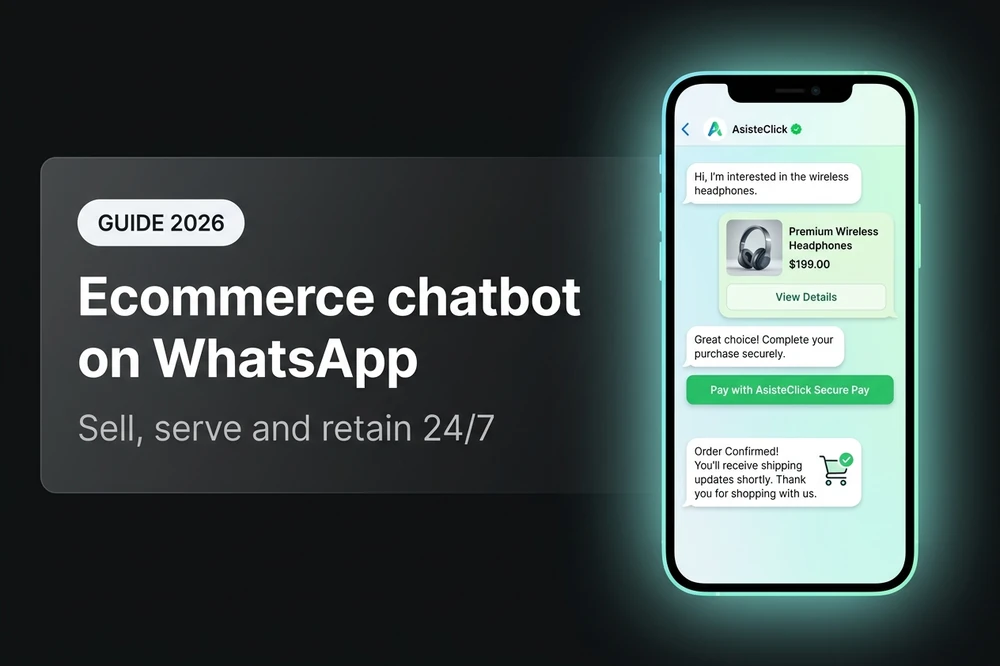
Your customer is browsing your store on their phone at 11:47 PM, adds a product to the cart, has a question about size, can't find the website chat and opens WhatsApp to ask you. If nobody answers within five minutes, they go to Instagram, find a similar store and buy there. That sequence repeats thousands of times per night in any LATAM ecommerce. An ecommerce chatbot on WhatsApp exists so that sale doesn't fall through: it answers the question instantly, follows the conversation through to closing, alerts you about new orders, and handles post-sale claims without requiring your team to be awake at two in the morning.
In this guide you'll understand what an ecommerce chatbot on WhatsApp really does (not the generic "answers FAQs" version), why WhatsApp is LATAM's most important sales channel, the six critical uses of the bot across the funnel, how it integrates with your online store (Tiendanube and others), and which metrics to watch to know whether it's performing.
What is an ecommerce chatbot on WhatsApp
An ecommerce chatbot on WhatsApp is an AI agent that talks with your buyers on their preferred messaging channel, connected in real time to your online store. It's not a menu with buttons that answers "hours" and "shipping". It's an agent that understands what the customer wants, queries your catalog, validates stock, generates a payment link, tracks the shipment, handles a return and alerts you when something needs human intervention.
The difference from a traditional chatbot is in three places:
- It speaks natural language, not menus. The customer can write "do you have that jacket in size M in blue?" and the agent understands the product, the attribute and the stock — without forcing them to navigate an option tree.
- It's connected to your store's real data. It reads the catalog, stock, orders and shipments live. When it replies "your order ships tomorrow", it's not a generic answer: it queried your system.
- It accompanies the entire cycle, not just pre-sale. It assists before, during and after the purchase — from the initial question to the return, through payment and tracking.
That combination is what differentiates an ecommerce chatbot from a conversational commerce agent. The latter is what moves the business needle.
Why WhatsApp is the sales channel in LATAM ecommerce
In Latin America, WhatsApp is not a support channel: it's a sales channel. Meta reports that more than 175 million people message businesses on WhatsApp every day globally, and the concentration is disproportionately high in countries like Argentina, Mexico, Brazil, Colombia and Chile, where the app is the main means of communication between customers and businesses. In ecommerce, this translates into three operational realities no serious player can ignore.
First: a significant portion of your organic and paid traffic ends up in a WhatsApp conversation before buying. The customer enters your site, sees a product they like, has a question about size, shipping or payment method, and instead of looking for the website chat, opens the business's WhatsApp. If your store has no presence on that channel or takes time to respond, that sale doesn't close where you can track it — it closes in another store.
Second: the windows of opportunity to close are short. 78% of Latin American consumers buy from the first business that responds, and a response time greater than five minutes reduces the probability of conversion by 65%. It's exactly the pattern we documented in why WhatsApp leads are lost. In ecommerce, where the customer compares four options simultaneously, this is brutal.
Third: WhatsApp is asynchronous, and that works for ecommerce. The customer asks at 11:47 PM, goes to sleep, comes back at 9 AM and the conversation continues where it left off. A synchronous channel (web chat, phone call) requires both the customer and the team to be available; an asynchronous channel lets AI handle things all night long and the conversation closes within the same "session" for the customer, regardless of how many hours passed.
That same asynchronous property lets a single human agent handle several conversations in parallel, and a well-designed AI automate 70% to 80% of frequent queries without touching the team. The combination of preferred channel + asynchronicity + automation is what makes WhatsApp the most efficient sales engine for ecommerce in the region.
The 6 critical uses of an ecommerce chatbot across the funnel
An ecommerce chatbot on WhatsApp is not one thing: it's six different things that coexist in the same agent, one for each moment in the funnel where the customer needs something. Taken together, they define what the bot must be able to do; taken separately, they're how you justify every dollar invested in automation.
| Moment | Use case | What the bot does | Typical impact |
|---|---|---|---|
| Pre-sale | Resolve product questions | Size, stock, color, features, comparison | +Initial conversion |
| Pre-sale | Recommend products | Suggests items based on preferences, history, search | +AOV (average order value) |
| Closing | Process the order and collect payment | Captures data, generates payment link, validates transfer | +Close rate |
| Post-sale | Order status and shipments | Queries and notifies each stage of dispatch | -Repeat tickets |
| Post-sale | Exchanges and returns | Handles claims, initiates returns, escalates complex cases | +CSAT |
| Retention | Cart recovery and re-engagement | Re-contacts those who didn't close | +Recovery rate |
For all six use cases, the operating rule is the same: the bot handles what's automatable (which in ecommerce is a lot), and escalates to humans what requires judgment (complex negotiations, sensitive claims, deep technical questions). In a typical LATAM ecommerce, well-designed automation absorbs between 60% and 80% of total message volume.
Below we get into each one with the level of detail an operator needs to implement it.
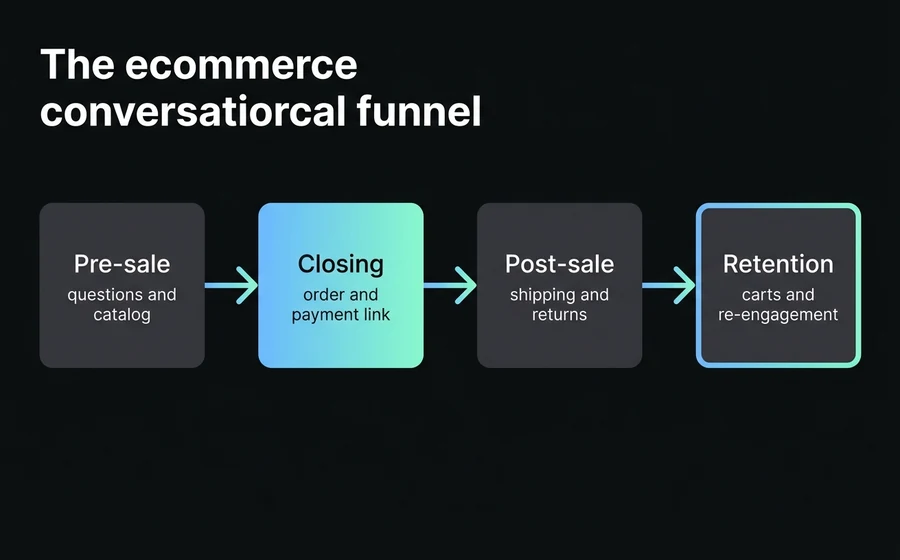
Pre-sale: catalog, recommendation and pre-purchase questions
Pre-sale is where most conversions are won or lost. The customer has purchase intent but lacks information — and in ecommerce that information almost always falls into three categories: product features, availability and policies (shipping, returns, payment methods).
A good AI agent in pre-sale must be able to, in a single conversation:
- Search products by natural description. "Show me white running shoes in size 39" should return three catalog options with photo, price and stock. Not a link to "view footwear category".
- Check stock in real time. If the product is out of stock, say so upfront and offer alternatives or a restock notification — don't send the customer to fill out a form.
- Answer specific questions using the product sheet. Material, sizes, warranty, dimensions. Whatever is on the product page, the bot knows it.
- Compare two options. "Which one do you recommend between these two?" is a typical ecommerce question. The bot should be able to make an honest comparison based on the attributes.
- Recommend cross-sell with judgment. "If you take this t-shirt, these pants match and come 15% cheaper as a bundle." Increases AOV without being pushy.
The quality of this layer depends on two things: that the bot is connected to the real catalog (not to a static FAQ database), and that it has a knowledge base about your business covering the questions the product sheet doesn't answer on its own. To understand how to separate what goes into the bot prompt, what goes into the knowledge base, and what gets queried in real time, our guide on the three knowledge layers of an AI agent.
Closing: order, payment link and collection via WhatsApp
Closing is where the ecommerce chatbot differentiates itself from a support chatbot. A support chatbot ends when it answers the question; an ecommerce one continues until the customer pays. The conversation becomes transactional.
The typical conversational closing flow has three stages. First, the bot builds the cart inside the conversation: confirms product, variant, quantity and shipping details. Second, it generates the payment link: integrates with your gateway (MercadoPago, Stripe, PayPal, dLocal or whichever you use) and sends the customer a direct link inside the chat. Third, it validates payment and confirms the order: when the gateway notifies that payment went through, the bot automatically sends the customer confirmation with order number and delivery timeframe.
That three-step sequence lowers friction compared to the standard alternative (sending the customer to the web checkout), because it eliminates the "leave WhatsApp, go to site, complete form, return to chat" step. Every step outside the chat is an opportunity for abandonment.
Two important operational considerations for closing:
The bot needs to know when NOT to close. If the conversation gets complex — the customer wants a volume discount, requests a B2B invoice with company name, negotiates payment terms — the bot escalates to the sales team with full context. Forcing automatic closing in cases that require judgment worsens the experience and the conversion rate.
Meta's 24-hour window matters. WhatsApp Business API allows free-form replies within 24 hours from the customer's last message. After that, to re-engage you need a Meta-approved template — and templates have strict rules. If closing takes more than a day, the bot needs to know when to "let go" of the conversation and when to re-engage with a well-crafted template. We cover the most common pitfalls in why Meta rejects WhatsApp templates.
Post-sale: order status, shipments, exchanges and returns
If pre-sale wins the sale, post-sale wins the customer for the next one. Post-sale is where an ecommerce receives the highest message volume and where the highest percentage can be automated — because questions are highly repetitive and all have an exact answer in your systems.
The four core use cases are:
Order status. "Where is my order?" is the most frequent ecommerce question. A well-integrated bot answers in two seconds with the real status, without a human having to open the panel and check. This alone, in a mid-sized ecommerce, absorbs between 30% and 40% of total support volume.
Shipment tracking. When the logistics gateway updates an event (dispatched, in transit, delivered), the bot can send the notification automatically to the customer without them asking. This reduces proactive messages from customers because they already receive the information before needing it.
Exchanges and returns. The customer received the wrong item, the size didn't fit, they changed their mind within the timeframe. The bot starts the process: asks for order details, offers the available options (exchange, return with refund, voucher) and creates the ticket in your system. Complex cases — the product arrived damaged, the customer is upset — escalate to the human with context loaded.
Claims and feedback. When the customer is dissatisfied, the bot listens, classifies the type of claim and routes it to the right team. When satisfied, the bot can ask for a review or structured feedback — which feeds your metrics and your reputation.
The golden rule of post-sale is that the customer should not have to repeat the order number three times. If the bot recognizes the customer by their phone number and brings the latest order to the front automatically, the conversation starts with context. That minimal friction is the difference between a post-sale that retains and one that loses customers.
The Tiendanube integration: AsisteClick official partner
For ecommerce stores running on Tiendanube — and in LATAM there are many — AsisteClick has a native integration as an official partner, available directly from the Tiendanube app store. Installation takes minutes and requires no development.
The setup flow is straightforward: from the Tiendanube panel, you add the AsisteClick app from the official store, authorize the secure connection, and configure the conversational button that appears in your store (customizable position, color and text to match your brand). At that point the integration is active and data starts flowing in both directions.
Once connected, the integration does four things that would be extremely expensive to implement manually:
Automatic real-time alerts. AsisteClick receives the key events from your Tiendanube and turns them into conversational triggers: when a new order comes in, when payment is confirmed, when it ships, when it's delivered, when the customer cancels. Each event can trigger a conversation or an automatic template to the customer — without anyone on the team having to check the panel.
Customer self-service over the real database. Your customers can check their order status, modify shipping details, initiate an exchange or cancel — all from WhatsApp, with the agent reading and writing on Tiendanube live. It's the difference between "an advisor will get back to you" and "your customer self-resolves in 30 seconds".
24/7 support with commercial context. The AI agent knows the products, categories, prices and active promotions. It's not a chatbot that responds outside hours with canned phrases — it's a digital sales advisor with the catalog in its head.
Unified commercial metrics. AsisteClick conversations and Tiendanube orders are linked, letting you see what percentage of your sales came from a conversation, which agent converts best, and which queries most often lead to purchase. Reports to optimize the business, not to fill out spreadsheets.
If your store runs on Tiendanube, this integration spins up a complete conversational ecommerce in hours, not weeks. Setup details live on the official Tiendanube + AsisteClick landing page.
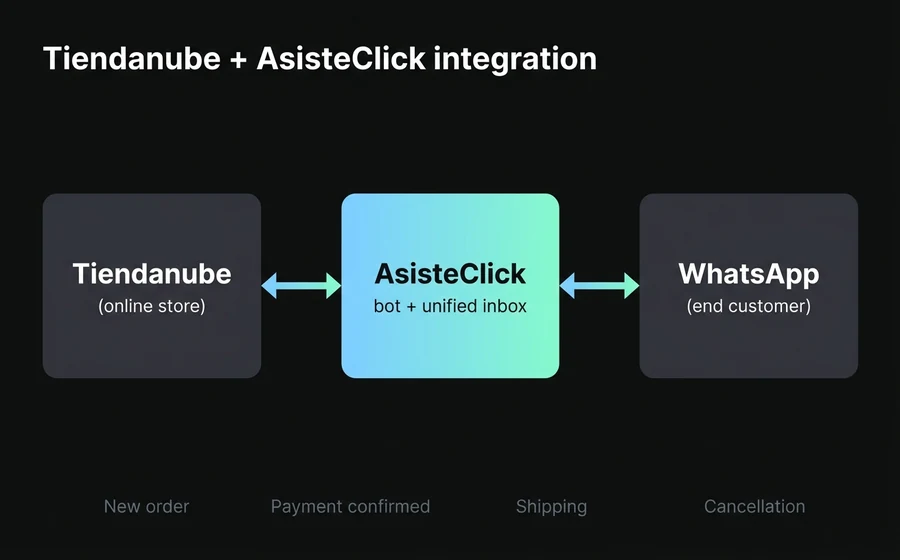
If your store runs on another platform: Shopify, VTEX, WooCommerce, custom
Tiendanube is the deepest native integration, but it's not the only ecommerce platform in LATAM. For businesses running on Shopify, VTEX, WooCommerce, Magento or custom builds, the connection is done via AsisteAPI: AsisteClick's REST API that lets you listen to events from your store (orders, payments, shipments) and query data in real time (catalog, stock, order status) from the bot. The technical effort is moderate — a developer with access to your store platform's API can get it working in a week — and the functional outcome is equivalent to the native Tiendanube one.
The important operating rule is that there is no conversational ecommerce without data integration. If the bot doesn't read your catalog, doesn't query your stock and doesn't write into your order system, you'll have "WhatsApp support" but not a sales channel. Whether through native integration (Tiendanube) or via custom API (everything else), that wiring is what separates a project that moves the commercial needle from one that just adds another channel for answering questions.
Recovering abandoned carts: the tactic with the highest immediate ROI
Among all the ecommerce chatbot use cases, there's one that typically pays back the investment in the first month: abandoned cart recovery. The industry metric says that between 65% and 75% of carts are abandoned before purchase — universal numbers that affect any store. A well-crafted WhatsApp recovery sequence can recover between 8% and 25% of those carts, with a marginal cost close to zero compared to email.
We won't develop the full mechanics here because there's a dedicated guide covering the optimal sequence, the anti-patterns we see in production, the templates that work and realistic benchmarks: recovering abandoned carts via WhatsApp. What is worth noting in the context of this pillar is that cart recovery is not a separate "campaign" — it's a continuous capability of the same chatbot that sells, supports and collects. When everything lives in the same agent, the customer experiences a single relationship with your brand, not three disconnected flows.
Multichannel: why WhatsApp alone is not enough in ecommerce
Even though WhatsApp is the dominant sales channel in LATAM ecommerce, almost no customer stays on a single channel. They buy after seeing a product on Instagram, ask via the website chat, receive confirmation by email, track the shipment on WhatsApp and file a claim on Messenger if something fails. If your team handles each channel separately, the customer has to repeat their problem every time they switch — and it feels like they're talking to five different companies, not one.
For ecommerce, the strategy that works is omnichannel with WhatsApp at the center: a single unified inbox for Instagram, Facebook Messenger, webchat, email and WhatsApp, with the human agent and the bot always seeing the customer's full history regardless of which channel they came through. This turns fragmented support into a single continuous conversation across the customer's lifetime. We develop this in detail in omnichannel customer support.
The concrete commercial effect is twofold: you raise the conversion rate (because no channel "drops"), and you raise retention (because the customer doesn't have to repeat themselves every time). In ecommerce, where acquisition cost rises every year and product differentiation gets harder, retaining well is the only thing that sustains the margin.
Metrics: how to know if your ecommerce chatbot is performing
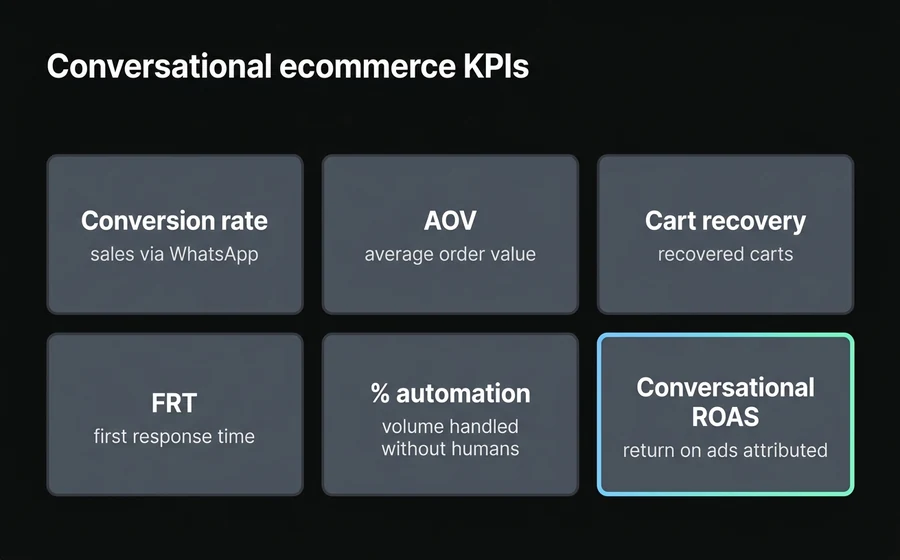
An ecommerce chatbot is not measured by "it answered 10,000 customers this month". It's measured with real commercial metrics that talk to the rest of your operation. These are the ones that matter.
| Metric | What it measures | Why it matters in ecommerce |
|---|---|---|
| Conversion rate on WhatsApp | % of conversations that end in a sale | Measures the direct commercial value of the channel |
| AOV (Average Order Value) | Average order value of bot-assisted sales | Detects whether the bot's cross-sell recommendation works |
| Cart recovery rate | % of abandoned carts recovered | The bot's most profitable KPI — it pays back the investment |
| FRT (First Response Time) | Time to the first message to the customer | Predicts conversion: every minute counts |
| % of automation | Volume resolved without touching humans | Measures real operating efficiency |
| Post-purchase CSAT | Customer satisfaction after buying | Predicts repeat purchase and word of mouth |
| Conversational ROAS | Return on ad spend attributed to the channel | Closes the loop of Meta Ads + WhatsApp + sale |
The two metrics that get overlooked the most and move the needle the most are cart recovery rate (because it's the cheapest lever) and post-purchase CSAT (because it predicts whether the customer comes back). The rest of the metrics are hygiene; these two are the business.
The most common trap when measuring is comparing the chatbot against the human team in isolation ("the bot converts at 4%, the human at 6%, so the human is better"). The correct comparison is to compare the unit cost of the sale — and there the bot, which runs 24/7 with near-zero margin per query, wins by an order of magnitude in any ecommerce with reasonable volume.
A metric that deserves its own section and that almost nobody closes is conversational ROAS: the return on ad spend attributed to the WhatsApp channel. Most ecommerce stores measure ROAS against web checkout, but when a significant portion of Meta Ads traffic ends up closing on WhatsApp, that close stays invisible in standard reports — and leads to shutting off campaigns that are actually working. The way to close the loop is to capture the ctwa_clid (the identifier Meta injects when a user reaches WhatsApp from a Click-to-WhatsApp Ad), tie it to the bot conversation, and send the conversion event back to Meta via the Conversions API when the order is completed. Done right, this typically reduces reported CPA by 60% to 90%, not because sales change but because they're finally attributed to the real channel. We cover this in detail in Click-to-WhatsApp Ads and conversion 2026.
Common mistakes when building an ecommerce chatbot
These are the most recurring missteps — and how to avoid them.
- Confusing an FAQ chatbot with an ecommerce chatbot. If your bot only answers "hours", "shipping" and "warranties", it's not an ecommerce chatbot — it's an FAQ on steroids. A serious ecommerce bot is connected to the catalog, stock, orders and payment. If any of those four is missing, the bot is crippled.
- Not integrating with the store. A bot that doesn't read your Tiendanube/Shopify/VTEX/custom system doesn't solve anything — it just generates extra manual validation work. If you're adding AI, integration with your store system is the investment that pays back first.
- Forcing automatic closing in every case. AI should not close sales where judgment is needed (negotiated discounts, B2B with special terms, sensitive cases). Doing so destroys margin and experience.
- Forgetting Meta's 24-hour window. Post-sale flows that extend more than a day without the customer writing first need approved templates. If your bot doesn't handle that, you'll see zombie tickets or costs from misused templates.
- Not measuring cart recovery rate. It's the most profitable metric and the one least watched. Without measuring it, you can't adjust the sequence and you leave literal money on the table.
- Treating WhatsApp as an isolated channel. In ecommerce, the customer enters via Instagram, asks via the web, closes via WhatsApp and files claims via Messenger. If each channel lives on its own island, you've lost the battle before starting.
Frequently asked questions
Is a WhatsApp chatbot useful for a small store that's just starting out?
Yes, especially for a small store. The bottleneck of an ecommerce that's starting out isn't lack of traffic, it's that the owner can't reply at 11 PM or on Saturdays. A well-configured chatbot responds 24/7 and frees the team from repetitive queries, which lets you scale without hiring prematurely. The initial investment is very low — from USD 16 per month with AsisteClick — and recovering a couple of extra sales per month already pays for the tool.
How much of my ecommerce can I automate with a chatbot?
In a typical LATAM ecommerce, a well-designed chatbot automates between 60% and 80% of total message volume. Queries about order status, stock, payment methods, shipping and returns are highly automatable; complex negotiations, sensitive claims and B2B sales require human intervention. The important thing is that the bot knows when to escalate to a human with context loaded, so the customer doesn't have to repeat their problem.
Is the Tiendanube integration complicated to set up?
No. AsisteClick is an official Tiendanube partner, which means the app installs directly from the Tiendanube app store in minutes, with no development. You authorize the integration, customize the conversational button (position, color, text) and the connection is active: the bot starts receiving alerts about orders, payments, shipments and cancellations automatically.
How does the chatbot connect with WhatsApp to sell?
Through WhatsApp Business API (Meta's official version for businesses), which lets multiple agents — human and bots — handle the same number, automate replies and send approved templates. The regular WhatsApp app on a phone is not suitable for ecommerce: it doesn't scale, doesn't integrate and doesn't allow automation. Migrating to WhatsApp Business API is the first technical step of any serious conversational ecommerce project.
How much does it cost and how long does it take to implement an ecommerce chatbot on WhatsApp?
Software cost starts from USD 16 per month on base plans (AsisteClick), and the average ticket for an ecommerce with real volume sits between USD 100 and USD 300 monthly depending on operators, channels and AI modules. Implementation time depends heavily on the stack: if your store runs on Tiendanube, the native integration gets a bot operational in hours (install from the app store, basic catalog configuration). If your store runs on Shopify, VTEX, WooCommerce or custom development, adding the API integration adds between one and two weeks of technical work. For migrating the WhatsApp number to WhatsApp Business API, add between two and five business days depending on the BSP provider.
What about data protection laws when using a chatbot?
WhatsApp Business API already complies with Meta's end-to-end encryption standards. To comply with the local regulation of each country (LGPD in Brazil, Law 25.326 in Argentina, Law 1581 in Colombia, etc.), what matters is: (1) having explicit consent from the customer to converse on the channel — which is obtained when the customer initiates the conversation, (2) informing the use of AI in support, and (3) handling opt-outs and data deletion requests according to local legislation. A good conversational ecommerce platform comes prepared for this.
Conclusion
An ecommerce chatbot on WhatsApp has stopped being a nice-to-have and has become basic commercial infrastructure in LATAM. Not because of fashion: because the channel where the customer wants to buy is WhatsApp, the response times defined by the competition are in minutes, and the unit cost of an AI-assisted sale is a fraction of the cost of a dedicated human agent.
What separates a project that performs from one that is just "implemented" are three concrete things: real integration with your store (catalog, stock, orders, payments), coverage of the entire cycle (pre-sale + closing + post-sale + recovery), and the combination of AI for what's automatable with humans for what requires judgment. If all three are right, the bot sells, supports and retains; if any one is missing, it's an expensive FAQ.
If your store runs on Tiendanube or you want to see what a conversational ecommerce with AI looks like, check the official AsisteClick landing page for ecommerce o book a demo and we'll show you how it looks running on your own catalog. From USD 16 per month.
Keep reading
- Recovering abandoned carts via WhatsApp — the tactic with the highest immediate ROI, with sequence and benchmarks
- Omnichannel customer support — how to unify WhatsApp + Instagram + webchat + email into a single inbox
- Why WhatsApp leads are lost — the real cost of not responding in time