
Most of the customer service platforms you've come across have a design flaw that only shows up when you scale: they treat the whole team as if everyone were the same. An "agent" is the bot, the new hire who started yesterday, the supervisor who reviews reports and the owner who configures the rules. Everyone can see everything, everyone can do everything, and no one is clear on where their responsibility ends. When your operation handles 200 chats a day, that works. When it handles 5,000, it breaks.
The model that works in real operations —the one we see in banking, ISP, retail and healthcare clients that process tens of thousands of conversations per month— distinguishes three operational roles with different responsibilities, permissions and metrics. Agents and collaborators are not synonyms, and the AI Agent isn't "just another agent" either. Each one comes in at a different point in the cycle, measures different things and costs different things.
In this post you'll learn:
- Why this 3 roles model exists and what problem it solves compared to traditional solutions where "everyone is an agent".
- When each role comes in during the lifecycle of a conversation.
- How to design the handoff between the AI Agent and the human without killing the bot's deflection rate.
- What metrics each role measures —because measuring response time for an AI Agent or deflection for a human makes no sense.
- How to configure this model step by step in AsisteClick.
- A real-world case of a regional ISP that went from 5 people handling chats during business hours to a 24/7 operation with 3 well-defined roles.
If you've been in customer service for a while, you probably intuit part of this. The idea here isn't to sell you the model —it's to give you the vocabulary and the architecture so your operation stops depending on your best agent's memory. Let's get started.
Why the 3 roles model exists (and what it replaces)
Tools that don't differentiate roles come from an era when "customer service" was a person on a phone. When that person moved to chat, the metaphor stuck: each chat is a call, each employee is an agent. That metaphor worked as long as the volume was manageable and as long as there was no generative AI in the mix.
Today there are two structural changes that break the old model:
- The AI Agent is no longer a menu of buttons. A generative AI with access to your knowledge base can resolve 60-75% of inquiries without human intervention, if it's well designed. Treating it as "just another channel" or as "a bot that precedes the human" underuses the investment.
- The human team is no longer homogeneous. You have people who only answer assigned chats (junior, third shift, external freelancer) and people who also supervise, configure the bot, review reports and reassign cases. Giving them the same permissions is an operational risk and an unnecessary cost.
The 3 operational roles model separates these three functions:
- The AI Agent handles inquiries first and absorbs the repetitive volume.
- The Collaborator handles the chats assigned to them, with no more permissions than they need.
- The Operator (or full human agent) supervises, configures, measures and operates the platform as an owner.
This separation isn't theory —it's what we see working in operations with more than 10,000 chats per month. And the difference between Operator and Collaborator, which is the one that confuses people most, is one of visibility and permissions, not of the ability to chat with a customer. Both can handle chats. Only one can see everything else.
What each one does: the 3 roles explained
The AI Agent: front line, 24/7, zero marginal cost
The AI Agent is the first point of contact your customer has when they start a conversation. It works 24/7, has no waiting queue, handles N conversations in parallel and never gets tired. What distinguishes a well-designed AI Agent from a rule-based chatbot is that it understands natural language and relies on a curated knowledge base —not just on a predefined decision tree.
In practice, a well-built AI Agent:
- Answers frequently asked questions with up-to-date information from your knowledge base (products, plans, hours, coverage, policies).
- Executes simple actions via integration with your CRM or backend (checking the status of an order, an invoice, a ticket).
- Asks the customer for the minimum information needed before escalating (ID, account number, reason).
- Knows when it doesn't know —and that's the most important part— and escalates to the right human without losing context.
If you're interested in understanding how to build the knowledge base that feeds an AI Agent, we cover it in depth in the three layers of knowledge of an AI Agent. And if you're wondering why many AI implementations fail, the most common answer —which we also analyze in why AI Agents fail in customer service— is almost never the model. It's the handoff design.
The Operator (full human agent): full visibility
The Operator is the human role with full access to the platform. It's the role of the shift supervisor, the team coordinator, the operation owner or the senior agent who, on top of handling chats, also manages.
An Operator can:
- Handle chats (like any human on the team).
- View the real-time monitor of all departments: how many chats in queue, how many in progress, how many unassigned.
- Reassign chats between agents and departments.
- Access historical reports and dashboards.
- Configure bots, departments, assignment rules and schedules.
- View the full conversation of any archived chat.
- Manage users and permissions.
In AsisteClick, each additional Operator costs US$15/month. This isn't an irrelevant pricing detail: it's the cost that filters how many Operators you actually need. If you're going to give someone permissions to reassign chats, review reports and configure bots, you probably want it to be a small group with clear responsibility. If you only need someone to handle chats, they don't need to be an Operator.
The Collaborator: limited access, clear responsibility
The Collaborator is the human role with restricted permissions. They only see the chats assigned to them and to the departments they belong to. They don't access reports, don't configure bots, don't see the global operation, can't reassign what isn't theirs.
A Collaborator can:
- Handle the chats automatically assigned to them or that they pick up from their department's queue.
- View the history of the customer they're chatting with.
- Mark the chat as resolved and archive it.
- Belong to one or several departments (for example, someone from Support who also helps in Sales during peak hours).
What a Collaborator cannot do:
- View chats that aren't theirs or their departments'.
- Access the operation's global monitor.
- View reports and dashboards.
- Configure anything on the platform.
- Manage users.
Collaborators come included in every AsisteClick plan: 3 in Business, 5 in Company, 7 in AI Plus. You don't pay extra for them. That pricing difference —the Operator costs, the Collaborator doesn't— reflects exactly the security principle of least privilege: we charge when there's more access surface.
Comparison table: Operator vs Collaborator
This is the table worth memorizing, because the confusion between these two roles is the number one source of configuration errors:
| Criterion | Operator (full human agent) | Collaborator |
|---|---|---|
| Chat with customers | Yes | Yes |
| View chats assigned to themselves | Yes | Yes |
| View chats from their department | Yes | Yes |
| View chats from other departments | Yes | No |
| Global real-time monitor | Yes | No |
| Reassign chats between agents | Yes | No |
| Reports and dashboards | Yes | No |
| Configure bots and integrations | Yes | No |
| Manage users | Yes | No |
| Access to full history | Yes | Only their own chats |
| Cost | US$15/month extra | Included in the plan |
| Typical role | Supervisor, coordinator, operation owner | Frontline support, external, junior |
If your question is "does this person need to see what others are doing?", the answer determines the role. If the answer is no, they're a Collaborator. If the answer is yes, they're an Operator.
The lifecycle of a conversation with 3 roles
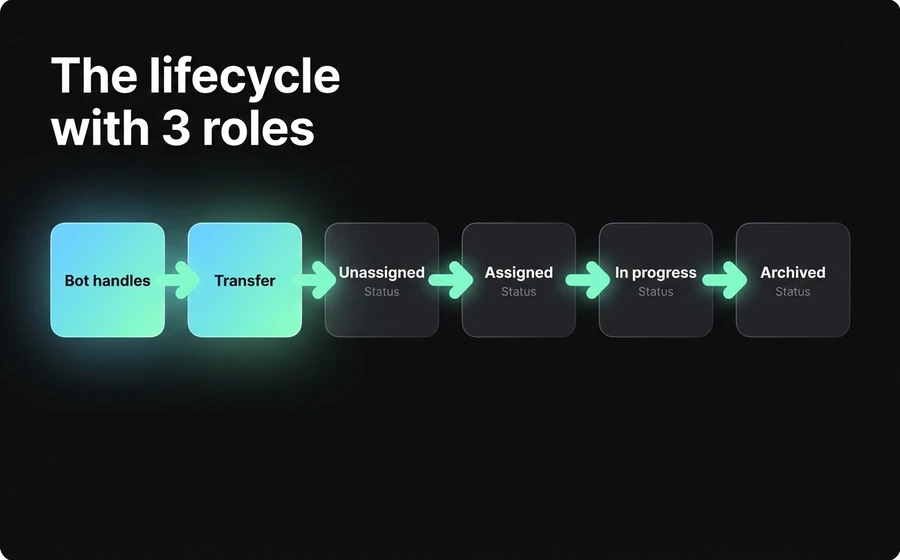
A conversation in AsisteChat —the omnichannel inbox where the 3 roles coexist— goes through 6 states. This matters because each state has a different "owner", and understanding who intervenes at what moment is what keeps chats from falling through the cracks. For a broader view of how a unified multichannel inbox works, you can check out omnichannel customer service.
Step 1 — Bot handles. The customer starts a conversation via WhatsApp, webchat, Instagram, Facebook, email or whatever channel. The AI Agent takes the conversation. It greets, identifies the customer if it can, understands the reason. If the inquiry is within its scope and it has enough confidence in its answer, it resolves it and archives the conversation. No human intervenes here.
Step 2 — Transfer. If the AI Agent detects that the inquiry exceeds its scope (out-of-scope intent, low confidence, negative sentiment, explicit request to talk to a human), it initiates the transfer. The transfer isn't "I'll pass you to a generic human" —it's "I'll pass you to the right department": Sales, Support, Collections, Retention. This is what keeps a customer with a billing complaint from landing in the queue of the first available human even if they're in Sales.
Step 3 — Unassigned. The chat lands in the "unassigned" queue of the corresponding department. This is where the supervising Operator can view the real-time monitor and react if the queue grows. The department's Collaborators also see this queue and can pick up chats manually.
Step 4 — Assigned. The chat is assigned to a specific agent. The assignment can be manual (an Operator assigns it, or a Collaborator picks it up from the queue) or automatic (by load, by rules, by rotation —we'll cover this below).
Step 5 — In progress. The assigned agent (Operator or Collaborator) is chatting with the customer. Here, if you have AsisteCopilot active, the human receives real-time suggestions: draft replies, knowledge base lookups, summaries of the prior conversation. This reduces handle time (AHT) especially for junior profiles. We go deeper into this in AsisteCopilot: real-time replies for AI agents.
Step 6 — Archived. The agent marks the conversation as resolved. The chat leaves the active inbox and enters the history: it stays available for search, feeds the reports and becomes part of the CSAT (if you activated a post-service survey).
In this cycle, the AI Agent intervenes in steps 1 and 2. The Operator intervenes in any step, especially in step 3 (supervising the queue) and step 4 (reassigning if needed). The Collaborator intervenes from step 4 to 6, within their department. Each one has their lane.
When the AI Agent escalates to the human
This is the most poorly answered question in AI implementations for customer service: when does the bot stop responding and hand off to the human? The intuitive answer —which is the wrong one— is "when we detect keywords for a complaint or claim". That logic is what kills the AI Agent's ROI, because it escalates inquiries the bot could resolve perfectly.
There are 4 real triggers that justify a handoff:
1. Low model confidence in its answer
The AI Agent doesn't just return an answer —it also returns a signal of how confident it is. If it's below a threshold (calibrated at setup), it doesn't respond with possibly incorrect information; it escalates. This avoids the worst-case scenario: the bot giving a made-up answer in a confident tone (hallucination). The way to lower the frequency of low confidence isn't to relax the threshold —it's to improve the knowledge base, which is where the AI Agent finds the facts. How to design a prompt and the base that feeds it is covered in prompt engineering for customer service chatbots.
2. Sustained negative sentiment
If the customer is frustrated, angry, or uses language that suggests the conversation is going off the rails, the AI Agent escalates. "Sustained" is the key word: an isolated strong word isn't a trigger. A pattern of several interventions with a negative tone is.
3. Out-of-scope intent
The customer asks for something the AI Agent wasn't trained to do. Example: your AI Agent covers product inquiries and technical support, but the customer asks about a service cancellation that requires validation with the back office. That's out-of-scope —and the right response isn't "try anyway", it's to escalate.
4. Explicit customer request
The customer says "I want to talk to a person", "put me through to a human", "the bot isn't helping me". Without negotiating, without insisting, without asking the customer to rephrase. You escalate. Insisting here erodes trust more than anything else.
Anti-pattern: escalating by keywords
Escalating by keywords ("claim", "complaint", "problem") seems intuitive and is the worst thing you can do. Why? Because a customer who asks "how do I file a claim?" can get the answer directly from the AI Agent if your knowledge base has the process. If you escalate that to a human, you spend 5-10 minutes of human time on an inquiry the bot resolves in 30 seconds. Do it at scale and you lose 50%+ of the AI implementation's potential savings.
The operational rule: the AI Agent escalates based on the state of the conversation, not on isolated message content.
Handoff anti-patterns that kill the operation
There are five patterns we see repeated in operations that later complain that "the AI doesn't work". It's not the AI —it's the handoff.
1. Escalating everything to the human by default. Configuring the bot to only greet and escalate. It kills the entire use case. If all the bot does is say "hi, I'll pass you to an agent", you don't need generative AI.
2. Escalating to a "general queue" with no department. The customer ends up in a single "customer service" queue and lands with the first available human, regardless of whether their inquiry is about Sales, Support or Collections. Result: the human has to re-qualify the inquiry and possibly reassign. You lose the context the bot already collected.
3. Losing context in the transfer. The human receives the chat without the summary of what the customer already told the bot. The customer repeats everything. This is trivial to solve: the handoff includes context. If your platform doesn't do it, it's a platform problem.
4. Not marking the difference between bot and human. The customer doesn't know whether they're talking to the AI or a human. When they find out, they feel deceived. The simple rule: when the handoff happens, the customer receives a clear message ("I'll pass you to María, from Support"). Transparency always.
5. Not measuring what happens after the handoff. If you don't measure how many chats are resolved after escalating to the human (resolution rate post-handoff), you don't know whether your handoff works or whether you're just moving the problem along. This metric tells you whether the bot is escalating well (solvable cases) or badly (impossible cases that get escalated again to the back office).
Governance metrics by role
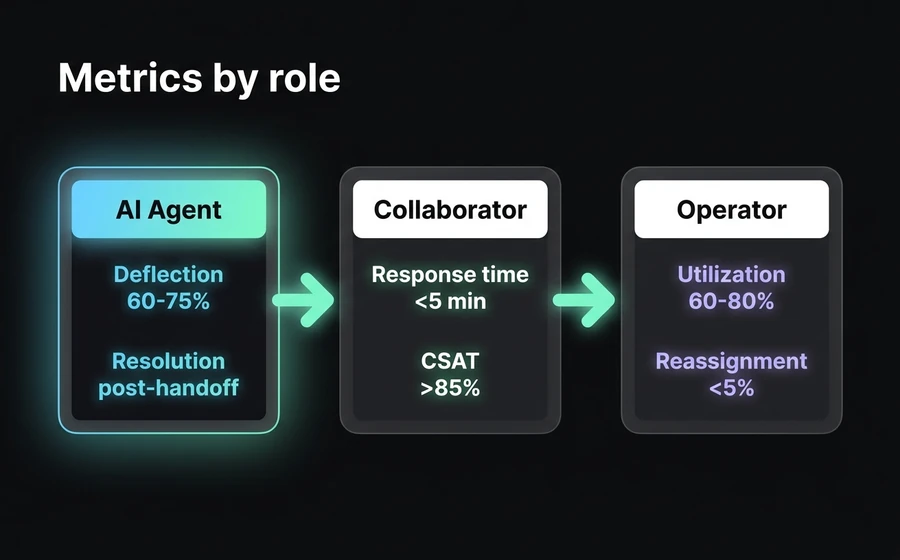
Once you have the 3 roles working, the question is what to measure. Each role measures different things —forcing the same metrics on all 3 is what leads to bad decisions (penalizing the AI Agent for response time, for example, when its real metric is deflection).
| Role | Key metric | Secondary metric | Healthy benchmark |
|---|---|---|---|
| AI Agent | Deflection rate (% of chats resolved without escalating to a human) | Resolution rate post-handoff (the ones it did escalate, were they resolved?) | 60-75% deflection in well-designed operations |
| Collaborator | Response time (first reply after assignment) | CSAT (customer satisfaction at close) | <5 min response time on WhatsApp; CSAT >85% |
| Operator | Utilization (% of active time handling chats or supervising) | Reassigned volume / total (signal of bad routing by the bot) | 60-80% utilization; reassignment <5% |
Three observations about this table:
The AI Agent is not measured by response time. It always responds in under 2 seconds. Measuring it is trivial and useless. What matters is how much it resolves on its own —deflection— and, of what it escalates, how much gets resolved afterward. If your AI Agent has 80% deflection but 50% of what it escalates gets sent back to the back office, it isn't working: it filtered badly.
The Collaborator is not measured by utilization. If you measure them by utilization, you incentivize them to drag out conversations to fill their time. What matters about the Collaborator is how long they take to respond (response time) and how satisfied the customer ends up (CSAT). The response time benchmark depends on the channel: on WhatsApp, under 5 minutes is the acceptable standard; on web chat, under 1 minute. We go deeper into this in AHT benchmarks on WhatsApp and how to lower handle time.
The Operator is not measured by individual response time. Their value is supervising and adjusting, not handling chats individually. If your Operator spends 100% of their time handling chats, they're acting as a Collaborator and wasting the permissions you're paying for. If they spend 0% handling chats, they're disconnected from the operation and will make bad configuration decisions. The healthy point is in the middle.
One cross-cutting metric worth watching: cost per resolved conversation (total cost of the operation divided by resolved conversations). It's the number that tells you whether your 3 roles model is really generating savings or just changing how you spend.
Step-by-step setup in AsisteClick
If you have an AsisteClick account and want to implement this 3 roles model, these are the steps. It's not an exhaustive guide —it's the minimum sequence to get the model running.
1. Create the departments your operation needs. Don't copy another company's departments. Think about what kind of conversations you receive and how you want to route them. Typical minimum: Sales, Support, Administration/Collections. If you have a technical product, split Support Level 1 and Support Level 2. If you do active prospecting, split Inbound Sales and Outbound Sales.
2. Create the users and assign them a role and departments. For each person on the team:
- Decide whether they're an Operator (needs to see everything) or a Collaborator (only their own).
- Assign them to one or several departments.
- Define specific permissions within the department (handle, archive, transfer).
An agent can belong to multiple departments —useful for peak hours, when someone from Support helps in Sales.
3. Configure the AI Agent with its knowledge base. Upload the documents the AI Agent will use to respond (product PDFs, internal FAQ, policies, manuals). In AsisteClick this is done in the AsisteGPT module, which uses OpenAI models (GPT-5.4 and GPT mini) on your curated knowledge base with RAG —Retrieval-Augmented Generation, a technique where the AI model consults your knowledge base before responding, instead of inventing answers. Define in the prompt what the bot's scope is (which topics it covers, which it doesn't) and what tone it uses.
4. Define the AI Agent's transfer rules to each department. Map it out: if the bot detects Sales intent, transfer to the Sales department. If it detects Technical Support, to Support. If it detects out-of-scope intent or sustained negative sentiment, transfer to a default department (typically General Support). This avoids the "general queue" anti-pattern.
5. Configure automatic assignment rules within each department. Three main modes:
- By load: the chat is assigned to the department agent with the fewest active chats.
- By rotation: round-robin, each chat goes to the next available agent.
- By rules: you define conditions (VIP customer → senior agent; English language → bilingual agent; Instagram channel → social media team).
Assignment by load is the most common and the one that works best with homogeneous teams.
6. Configure escalation rules. Define what happens if no one picks up the chat within X minutes: is it reassigned automatically? does it jump to a backup department? does it notify the supervising Operator? This avoids orphan chats —the worst enemy of CSAT.
7. Optional: activate AsisteCopilot for junior Collaborators. If your plan is AI Plus, you can activate AsisteCopilot, which assists the Collaborator in real time during the conversation: it suggests replies, consults the knowledge base, drafts responses. It's especially useful for reducing AHT (Average Handle Time) for new or third-shift profiles.
Once everything is configured, the flow runs on its own: the customer writes, the AI Agent handles it, escalates if needed, the Collaborators receive the chats that correspond to them, and the Operator supervises from the monitor. If you want to automate beyond service —for example, syncing contacts with your CRM or triggering actions in your backend when a chat closes— that's done via AsisteAPI.
Applied case: regional ISP with 24/7 service
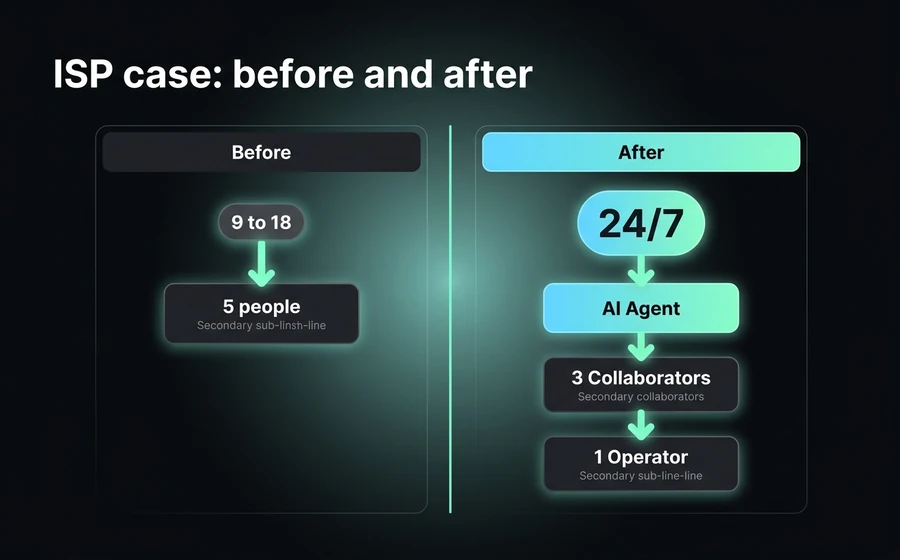
This is a real operation you'll recognize if you've worked in a regional ISP: 80,000 customers, residential fiber and wifi offering, 3 cities covered, a small business plan. Before implementing the 3 roles model, this is what the operation looked like:
Before:
- 5 people handling WhatsApp directly during business hours (9 to 18, Monday to Saturday).
- After hours: no one. The customer who wrote at 10 PM about a service outage got an answer the next day.
- All chats landed on a single number, uncategorized.
- Each agent handled whatever came in: sales inquiries, technical support, billing complaints, cancellation requests.
- No operational reports. The supervisor asked each agent for "the daily summary" over WhatsApp.
- CSAT not measured systematically. It was known through complaints on social media.
- Average first response time: 12-18 minutes during peak hours.
The operational problem wasn't a lack of people —it was a lack of architecture. The 5 agents spent so much time on repetitive inquiries ("what's the price of the 300 megas plan?", "when do I get activated?", "do you reach such-and-such neighborhood?") that they had no headspace for the real technical complaints. Technical complaints led to poor service, poor service led to cancellations. For the details of how to build an AI Agent specifically for ISPs, you can check out ISP chatbot for technical support.
After (implementation of the 3 roles model):
- AI Agent 24/7 trained on the ISP's knowledge base: plans and prices, coverage by neighborhood, activation process, account statements, basic fault diagnosis (router restart, light check, scheduling a technical visit).
- 1 supervising Operator, who is also the person who used to do everything manually. Now they supervise the real-time monitor, adjust assignment rules based on volume, review weekly reports and configure the bot.
- 3 Collaborators on the night shift (10 PM-6 AM) —subcontracted, external— who only see the chats that escalate from the bot during the night, within their departments (Technical Support and Customer Service). They don't see reports, don't configure anything, don't see day-shift chats.
- 4 Collaborators on the day shift (the same people who used to handle chats directly, now freed from the repetitive volume). They only see chats from their departments: 2 in Technical Support, 1 in Sales, 1 in Collections.
Departments created: Sales (sales inquiries and activations), Technical Support (service faults), Collections (billing, payment methods), Cancellations (retention process before canceling).
Results at 90 days:
- The AI Agent absorbed 72% of the total volume without escalating to a human. Most of it: sales inquiries (prices, coverage, plans) and basic fault diagnosis resolved with automated instructions.
- Average first response time dropped from 12-18 min to under 30 seconds (the AI Agent responds instantly and handles 72%; the remaining 28% that escalates to a human has a response time of 3-5 min during the day and 4-8 min on the night shift).
- Post-service CSAT rose from an unknown baseline to 87% measured systematically.
- Total monthly volume handled went from ~6,000 chats/month to ~14,000 chats/month (partly because there's now 24/7 coverage, partly because WhatsApp grew organically when customers discovered they got an instant response).
- Total operating cost: rose 35% (the 3 external night-shift Collaborators + platform cost + AI Agent cost), but the volume handled rose 130%. Cost per resolved conversation dropped 41%.
The supervisor —now an Operator, in the model's language— went from doing manual chat triage all day to operating with a real-time monitor and reviewing weekly reports. Her ability to respond to incidents (mass service outages in a neighborhood, for example) improved markedly because she was no longer in the day-to-day of the chat.
An important observation: they didn't hire 3 full-time people for the night shift. They hired 3 external Collaborators —who aren't even on the ISP's payroll— to cover the hours when the AI Agent escalated. Since Collaborators don't require additional licenses in AsisteClick (they come included in the plan), the marginal cost was just the hours paid. That's the difference between having a role architecture and not having one.
FAQ
I'm a 2-person team, do I need separate Operator and Collaborator roles?
No. In small teams both are Operators. The Operator/Collaborator distinction starts to matter when you have 4-5 people or more, or when you bring in external roles (freelancers, BPO, outsourced third shift). For a 2-person team, both can see everything, configure everything and handle chats —there's no significant operational risk. The practical rule: if you don't have someone you want to only handle chats and nothing else, you don't need differentiated Collaborators.
Does the AI Agent replace the human?
No, it complements them. The AI Agent absorbs the repetitive, low-complexity volume, which is typically 60-75% of inquiries in well-designed operations. The rest —complex complaints, sensitive cases, negotiations, retention— still belongs to the human. The idea of the 3 roles model isn't to replace humans; it's to free the human from the repetitive volume so they can focus where they add real value. It's the difference between having a team drowning in price inquiries and a team that closes sales and retains customers.
How many Collaborators do I need to handle 10K chats a month?
It depends on the AI Agent's deflection rate. With a well-designed bot (60-75% deflection), of those 10K chats only 2,500-4,000 reach the human. Considering that a full-time Collaborator handles 80 to 150 chats per day (~2,500 a month) depending on complexity and AHT, it's enough with 2-3 Collaborators to cover standard business hours. If you need 24/7, you add 1-2 more for unconventional shifts. AsisteClick's Company plan includes 5 Collaborators, which covers most operations at that volume.
What's the difference between Collaborator and Supervisor?
Supervisor isn't a role of its own in the model —it's a function the Operator performs. In AsisteClick there are two operational human roles (Operator and Collaborator), not three. "Supervision" (watching the monitor, reassigning, reviewing reports, adjusting configuration) is exactly what distinguishes the Operator. If someone needs to supervise, they're an Operator. If they only handle chats, they're a Collaborator. This is deliberate: adding a third human "Supervisor" role with intermediate permissions generates more confusion than clarity. The line is: does it need global visibility? Yes → Operator. No → Collaborator.
Does this model apply equally to B2B and B2C?
Yes, with a volume adjustment. In B2C the volume is high and inquiries are more repetitive, so the AI Agent contributes more (high deflection rate, strong operational savings). In B2B the volume is lower but inquiries are more complex and of higher value per interaction, so the AI Agent covers a smaller percentage (40-55% typical vs 60-75% in B2C) but frees up the human team for consultative conversations. The 3 roles model works in both; what changes is the proportion of load between the AI Agent and the humans. In B2B it's also more common to use AsisteCopilot, because inquiries require more elaborate answers and real-time assistance to the human contributes more than in transactional B2C.
Conclusion
Role architecture is what scales a customer service operation —not hiring more people. Tools that treat all team members as "agents" interchangeably work until the volume grows, and then they break: chaotic inboxes, overwhelmed supervisors, bots that escalate everything or nothing.
The 3 roles model —AI Agent first, Collaborators who handle what reaches their department, Operators who supervise and configure— solves this problem by separating responsibilities, permissions and metrics. It's not theory: it's the model we see working in real operations with tens of thousands of chats per month.
The key point: implementing the model doesn't require replacing your team or tripling your investment. It requires mapping who does what, configuring the departments correctly, designing the handoff between AI Agent and human well, and measuring what corresponds to each role.
If you want to see how this model is configured in your operation —or understand which plan fits your volume and your team— check out the AsisteClick plans or book a demo from AsisteChat. Our team helps you design the role architecture before implementing, which is where the project is won or lost.