
WhatsApp eats up the conversation in LATAM. You already know that. What you're probably not seeing is that while 70-80% of messaging volume comes in through WhatsApp, there's a 5-15% that lives on Telegram and that, in some niches, is the segment with the highest average ticket. B2B founders, IT teams at mid-sized companies, developer communities, fintech corporate clients, ISP operations engineers — all those people prefer Telegram. And if your service operation doesn't have a 24/7 Telegram chat up and running, you're keeping them waiting or, worse, you're forcing them to jump to a channel where they feel uncomfortable.
The usual trap is the following. A company realizes it "should" be on Telegram, opens a bot, connects it to a traditional tool separate from the rest, and ends up with two parallel operations: the WhatsApp team on one side, the Telegram team on the other, duplicate contacts, fragmented histories, metrics that don't consolidate. The customer who wrote yesterday on Telegram and today on WhatsApp has to explain everything from scratch again. The AI Agent on one channel doesn't know what the one on the other channel answered. And the "omnichannel strategy" ends up being two silos with a new label.
This post gets to the heart of how to avoid that. You'll understand why Telegram is still relevant in 2026 — not as a replacement for WhatsApp but as a strategic complement —, what technical architecture makes a Telegram bot with AI work for real, how to set it up step by step, and above all how to unify Telegram + WhatsApp (plus email, webchat, Instagram, Facebook, Teams) into a single inbox with a single AI Agent and a single history per contact. We close with four verticals where Telegram outperforms WhatsApp, real metrics, an applied case of a regional ISP, and an FAQ with the questions we get every week.
If you're running a serious operation — B2B tech, ISP, fintech, premium support, communities — and you still treat Telegram as "the odd channel", this post is for you.
Why Telegram in 2026 (and why it's worth offering it)
Telegram surpassed 900 million monthly active users globally in 2024 and keeps growing at double digits annually. In LATAM adoption varies quite a bit by country: in Argentina, Brazil and Colombia it's in the 10-15% range of the population active in messaging; in Mexico and Chile it's lower; among tech and corporate profiles it easily rises to 30-40%. It's not WhatsApp and never will be. But underestimating Telegram because "everyone is on WhatsApp" is the same mistake companies made five years ago when they ignored WhatsApp because "everyone was on Facebook Messenger".
There are three concrete reasons why it's worth offering professional service on Telegram, even if your volume there is small.
Specific reach into high-value profiles
Telegram users in LATAM are not a random sample of the population. They are systematically more technical, younger in the professional segment (25-45), with greater purchasing power and, above all, more inclined toward self-service. If your product is B2B SaaS, corporate fintech, infrastructure, telecommunications, cryptocurrencies or technical software, an important portion of your decision-makers and technicians live there. Offering them a channel where they feel comfortable isn't a cosmetic gesture — it's reducing friction in the account that bills you the most.
No template restrictions to start a conversation
Here there's a huge asymmetry with WhatsApp Cloud API that few people mention. On WhatsApp, if you want to start a conversation with a customer outside the 24-hour window, you need a Meta-approved template (HSM — Highly Structured Message). The approval process can take hours or days, templates have formatting restrictions, and there are categories Meta rejects without explanation. On Telegram that concept doesn't exist. Your bot can start a conversation with any user who has interacted with it at least once, at any time, without asking anyone's permission. This completely changes the dynamics of proactive notifications, technical alerts, B2B collection reminders and re-engagement campaigns. If you need a robust channel for transactional outbound without going through approvals, Telegram is structurally better than WhatsApp for that.
If you want to dig deeper into how templates and the 24-hour window are handled on the WhatsApp side, check out our complete WhatsApp Business API 2026 guide. The contrast with Telegram is easier to understand when you see the restrictions on the other side.
Better for long messages, heavy files and technical content
WhatsApp has an effective limit of 4096 characters per message and the visual format penalizes long texts. Telegram allows up to 4096 too, but the client is optimized for long reading: it supports inline Markdown and HTML, code blocks with syntax highlighting, files up to 2 GB without compression, messages with rich previews, post-send editing without marking the message as "intrusively edited". For technical support — where you send logs, commands, router configurations, error dumps, PDF manuals — Telegram is objectively the better tool. An ISP NOC technician doesn't want to debug a router via WhatsApp voice notes; they want to send a copy-paste with backticks and have it read well on the other side.
Telegram vs WhatsApp: when to use each one
It's not Telegram o WhatsApp. It's Telegram y WhatsApp, each one for what it's best at. The real operational question is: what kind of interactions are best suited to each channel and how do I assign them without losing my mind?
| Dimension | Telegram | |
|---|---|---|
| Typical LATAM volume | 70-85% of the total | 5-15% of the total |
| General penetration | Universal (mass B2C) | Selective (B2B tech, ISP, fintech, crypto) |
| Restriction to start a conversation | Approved template (HSM) outside the 24h window | None if the user interacted at least once |
| Cost per conversation | Yes, depending on Meta category | Free Bot API (rate limit 30 msg/sec) |
| Account approval | WABA + Meta verification | Create a bot with @BotFather (5 minutes) |
| Long messages / code | Mediocre, no native Markdown | Excellent, Markdown + code blocks |
| Files | Up to 100 MB | Up to 2 GB |
| Public groups | No (private only, up to 1024) | Yes, up to 200,000 members |
| Mass B2C (consumer, retail) | Unbeatable | Low fit |
| Technical / corporate B2B | Works | Best fit |
| Bot with generative AI | Yes (via API) | Yes (via Bot API) |
| Mandatory templates | Yes, for proactive outbound | No, in no case |
| Transactional notifications | Yes but with approved templates | Yes without templates |
| User identity verification | Phone number (high) | Username/ID (medium) |
The practical rule: WhatsApp is your default channel for everything mass-market, transactional to the end consumer and B2C customer service. Telegram is your channel for deep technical support, communication with key B2B accounts, automatic alerts without template restrictions, open communities with FAQ bots, and any audience where the profile is tech-friendly. The professional operation doesn't choose one — it runs them in parallel with the same service logic behind them.
Technical architecture: how a Telegram bot with AI works
Before getting into the setup it's worth understanding what's going on underneath. The architecture is simpler than WhatsApp Cloud API's and that's part of why Telegram is popular among developers.
Bot API: the entry point
Telegram exposes its Bot API at https://core.telegram.org/bots/api. It's a classic REST API: the bot has a token (a string like 123456789:ABCdefGHIjklMNOpqrsTUVwxyz), and with that token you can make HTTP calls to send messages, receive updates, handle inline keyboards, commands, files, locations, contacts. All the documentation is public and the API has been stable for years. There's no approval, no verification, no Meta review.
Webhook vs long polling: when each one
There are two ways to receive the messages that reach the bot.
Long polling means your server asks Telegram every X seconds "are there new messages?". Telegram responds with the pending queue or with a long timeout if there's nothing. It's the simplest to implement, doesn't require your server to be publicly accessible from the Internet, and works well for low volumes or development environments. The downside: you have a process permanently open polling, and latency can be in the seconds.
Webhook means you tell Telegram a public HTTPS URL and, every time a message reaches the bot, Telegram sends you a POST with the event. It's more efficient, sub-second latency, and it's what every serious operation uses in production. It requires a valid TLS certificate (Telegram requires HTTPS) and an accessible endpoint. If your customer service platform already exposes webhooks, this is invisible to you.
The rule: long polling for prototypes and testing, webhook for production. In AsisteClick we configure the webhook for you when you connect the channel — you just paste the token.
The complete end-to-end flow
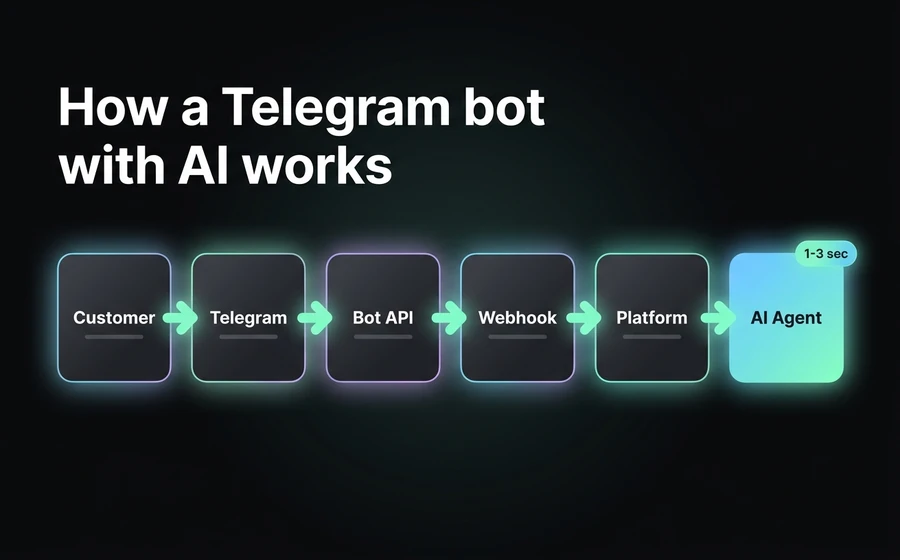
When a customer writes to your bot, this is what happens, in order:
- The customer sends a message to the bot from their Telegram (mobile, web or desktop app).
- Telegram receives the message and queues it for your bot.
- Telegram fires a POST to the configured webhook, sending the event JSON (text, file, location, command, whatever).
- Your customer service platform receives the webhook, normalizes it to the internal format common to all channels, associates it with the contact (matching by username or by chat_id) and opens or continues a conversation in the inbox.
- If you have an AI Agent connected, the platform sends the message to the AI engine along with the context: prior history, CRM data, knowledge base (RAG), Agent prompt.
- The AI Agent generates the response, the platform sends it back to Telegram via Bot API (
sendMessage). - Telegram delivers the message to the customer. Typical total latency: 1-3 seconds.
- If the Agent detects that it needs to escalate to a human — because the customer asked for it, because the inquiry falls outside its scope, or because it meets some handoff rule —, it marks the conversation as pending a human agent and assigns it according to the team's rules. We talk in detail about how to correctly design this handoff in why AI agents fail in customer service.
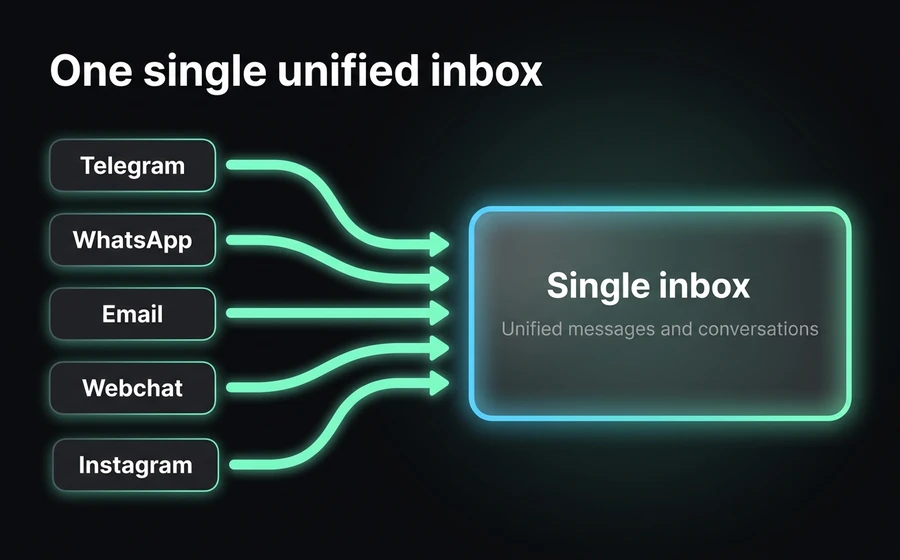
The important thing is that from step 4 onward everything is channel-agnostic. The normalization in step 4 means the AI Agent, the CRM, the assignment logic and the reports don't need to know whether the message came from Telegram, WhatsApp or webchat. This is what makes a real unified inbox possible.
Step-by-step setup
Here are the 7 steps to get your Telegram bot with AI into production. It applies to any serious platform; the AsisteClick-specific steps are marked explicitly.
Step 1: Create the bot with @BotFather
Open Telegram and search for the user @BotFather. It's Telegram's official bot for managing bots. Start a conversation, send /newbot and follow the instructions. It will ask you for:
- Bot name: how it appears in the chat (e.g., "AsisteClick Support"). You can change it later.
- Bot username: unique identifier, must end in
bot(e.g.,asisteclick_soporte_bot). It can't be easily changed afterward, so choose well.
If all goes well, @BotFather responds with the bot access token. Something like 7891234567:AAEabc...XYZ. This token is the full credential to operate your bot — treat it like a production password.
Step 2: Store the token securely
The token goes in environment variables or a secret manager, never committed to the repo, never in the frontend. If you leak it, anyone can impersonate your bot, read all future conversations and send messages to your users. If you suspect a leak, @BotFather has a command /revoke that regenerates the token and invalidates the old one.
Step 3: Configure the bot profile
Back in @BotFather, configure the bot's metadata. You do these commands just once:
/setdescription— the long text that appears when the user enters the chat for the first time (max 512 chars). It's your first impression, write it well./setabouttext— the short profile text (max 120 chars)./setuserpic— the bot's avatar. Upload your square logo./setcommands— the list of available commands that appears when the user types/. Recommended:/start - Iniciar conversación,/ayuda - Ver opciones,/humano - Hablar con un agente./setjoingroups— if you want the bot to be able to be added to groups. For 1:1 support it's best to disable it; for communities, enable it./setprivacy—Disabledso that in groups the bot sees all messages (recommended if you're going to use it as an FAQ in communities),Enabledso that it only sees direct mentions and commands.
Step 4: Configure the webhook
If your platform handles webhooks for you, skip this step. If you do it manually, the call is:
https://api.telegram.org/bot<TU_TOKEN>/setWebhook?url=https://tu-dominio.com/telegram/webhook
From there, every message the bot receives will be posted to that URL. Remember: it has to be HTTPS with a valid certificate. Telegram doesn't accept self-signed certificates without an explicit upload.
Step 5: Connect the bot to the omnichannel platform
In AsisteClick this step is literally pasting the token. You go to the channels module, choose "Telegram", paste the token @BotFather gave you, and the platform configures the webhook automatically. From that moment all the bot's messages arrive in the unified inbox AsisteChat together with WhatsApp, email, webchat and the rest of the channels.
Step 6: Train the AI Agent with your knowledge base
This is where most operations fall down. Connecting the channel is the easy part; the real value is in the AI Agent responding well. That requires a well-structured knowledge base (RAG) — documentation, FAQs, manuals, policies, product scripts —, a correctly designed Agent prompt, and clear rules for when to escalate to a human.
In AsisteClick the AsisteGPT AI Agent uses the same knowledge base regardless of the channel. You don't train one bot for Telegram and another for WhatsApp. The concept of the three layers of knowledge (prompt, RAG and real-time customer data) is explained in detail in the three layers of knowledge of an AI Agent. If your Agent responds just as well on Telegram as on WhatsApp it's because the knowledge is a single one, not because you duplicated work.
The Agent prompt can have small per-channel adaptations (for example, allowing Markdown on Telegram and disabling it on WhatsApp where it doesn't render well), but the logic and the knowledge are unique. To dig deeper into how this prompt is designed, check out prompt engineering for customer service chatbots.
Step 7: Test end-to-end with your team before opening
Don't open the bot to the public without first running it past an internal team of 5-10 people for at least 3 days. Things to verify:
- Does the bot respond in an acceptable time? (target: <3 seconds for simple answers, <8 for complex ones that require deep RAG).
- Is the answer quality good for the 20 most frequent cases you get on WhatsApp? (they should give equivalent or better answers).
- Do long files / code / Markdown render well?
- Does the handoff to a human work? Does the ticket reach the inbox with all the context?
- Does the contact's history unify if the same customer already interacted via WhatsApp?
- Are the metrics being recorded in the consolidated reports?
If something fails, you adjust the knowledge base or prompt, and iterate. Only when the team says "this is ready" do you publish it as an official channel.
How to unify Telegram + WhatsApp into a single inbox
This is the part that separates a professional operation from a pile of disconnected bots. If you have Telegram in one tool and WhatsApp in another, you don't have omnichannel — you have poorly built multichannel. The difference is enormous operationally and for the customer it's brutal: if a customer writes to you on Telegram, then on WhatsApp, and the agent handling them asks "what was your inquiry?", you lost the service battle before you even started.
These are the five pillars for the unification to work for real. If your current setup doesn't meet all five, you're not unified.
1. A single AI Agent with the same RAG base
The AI Agent is one. The knowledge base is one. The main prompt is one. The only thing that can vary per channel is the output format (Markdown on Telegram, plain text on WhatsApp, basic HTML in email) and eventually some minor tone adjustment. But the brain is a single one.
If you have to maintain two knowledge bases (one for Telegram, another for WhatsApp), every time you update a product, policy or price you have to sync manually — and it will get out of sync, guaranteed. The first customer who receives two contradictory answers on different channels will give you a hard time. In AsisteClick the Agent is trained once in AsisteGPT and serves all channels with the same knowledge.
2. A single history per contact in the CRM
When a contact writes to you on Telegram, the system has to recognize whether that contact already exists (because they wrote to you before via WhatsApp, email, web, whatever) and unify the conversation under the same contact in the CRM. This requires matching logic: by phone number when available, by email when they identified themselves, by Telegram username, or by explicitly asking the customer when there's no automatic way.
The contact's timeline in the CRM has to show all interactions, from all channels, in chronological order. The human agent who opens the contact sees "on 03/12 they wrote via WhatsApp, on 03/18 via Telegram, on 03/22 via email" effortlessly. This is what enables continuous context. If your CRM has a "WhatsApp contact" entity separate from a "Telegram contact", you're in the old model.
3. Assignment rules that respect the channel but unify the team
A well-built operation can have rules like: "Telegram tickets that go to a human go to the level 2 technical support team, mass WhatsApp ones go to the general support team". That's fine — it reflects that each channel has a different customer profile. But the teams are on the same platform, looking at the same inbox, with the same tools. A level 2 agent can look at the WhatsApp history of the customer who just wrote to them on Telegram without switching tabs or tools.
This is achieved with assignment rules parameterized by channel + customer data + inquiry type, all living on a single platform. If you have a different assignment because the tools are different, it's not a strategic decision — it's a technical limitation disguised as a process.
4. Consolidated reports, not separate ones
Your operations dashboard has to show you: aggregated response time across all channels, the AI Agent's deflection rate by channel (to detect if it performs worse on one), CSAT by channel, cost per conversation, sales conversions. And at the same time it has to let you filter to see Telegram in isolation when you need to.
KPIs that cross channels — like "average AHT of the level 2 team" — need to aggregate data from all sources. If your Telegram report comes from one tool and your WhatsApp one from another, you'll waste time building manual dashboards in a spreadsheet. If you want to dig deeper into how these operational benchmarks are handled, check out AHT on WhatsApp: benchmarks to lower handle time.
5. Handoff to a human works the same regardless of the channel
When the AI Agent decides to escalate — because the customer asked for it, because it detected frustration, because the inquiry requires human action — the process is identical on Telegram and on WhatsApp. The human receives the ticket with all the context: full history of the current conversation, prior history of the contact, CRM data, tags, priority. The continuity for the customer is invisible: they keep writing in the same Telegram chat, and a human responds instead of the Agent. There are no forced channel switches, no "I'll pass you to an advisor on WhatsApp", none of that.
This handoff logic is one of the most critical things in any AI operation, and we cover the conceptual basis in omnichannel customer service. Real omnichannel isn't "being on many channels" — it's the customer not perceiving where one ends and another begins.
Vertical use cases that work better on Telegram
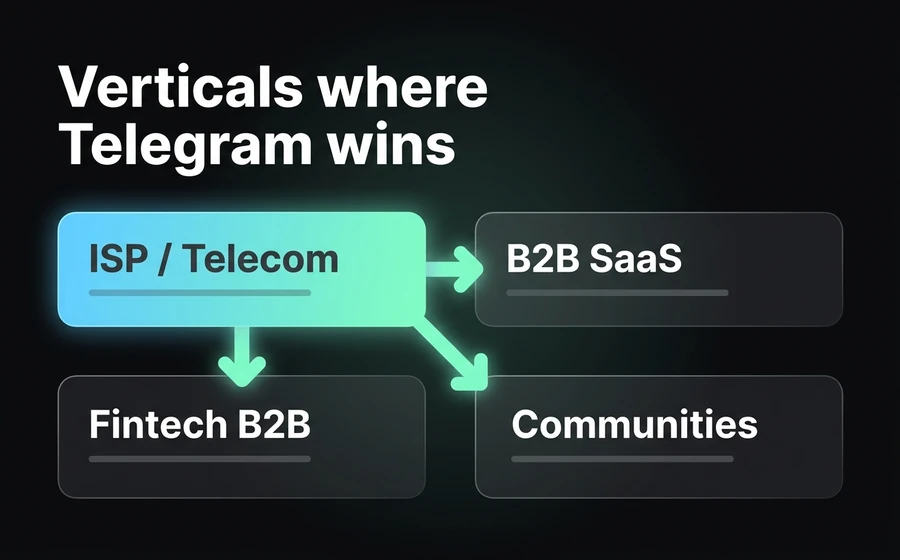
Four verticals where Telegram has a better fit than WhatsApp and where underestimating the channel costs you money.
ISP / Telecommunications
ISPs' technical customers — network administrators, IT managers at mid-sized companies, support technicians — use Telegram for everything. Support tickets involve logs, router configurations, connection dumps, panel screenshots, PDF manuals. Telegram handles all of that very well; WhatsApp chokes.
A well-trained AI Agent can resolve 60-70% of an ISP's typical tickets: service status, payment management, basic connection diagnosis, technical visit scheduling, plan changes. The rest escalates to NOC or level 2 support. We cover this vertical in depth in chatbot for ISPs: how to automate technical support.
B2B SaaS
Founders and technical teams of B2B SaaS live on Telegram. If your product is sold to startups, agencies, development teams, infrastructure — your decision-makers are there. Offering a premium support channel on Telegram for enterprise customers is a signal of seriousness that the mass WhatsApp audience doesn't get, but the B2B one does.
Typical cases: quota usage alerts, platform incident notifications, 1:1 support with a CS Manager, technical escalation to engineering. All of this works better with a Telegram bot than with WhatsApp, especially because technical alerts don't require approved templates — they're sent when needed.
B2B Fintech
Banks, cooperatives, lenders, payment gateways — when they have corporate customers or premium accounts, those customers use Telegram. The communications have auditability requirements, long messages with transaction details, attached files (receipts, statements), reasonable confidentiality. Telegram meets the basic requirements and also lets you build proactive notification flows without fighting with templates.
The AI Agent can resolve frequent inquiries (balances, latest movements, transaction status), generate receipts on demand, and escalate to a human executive for operations that require validation. The integration with the banking core via API is what closes the loop — in AsisteClick this is done with AsisteAPI.
Communities and open groups
Telegram is the native channel for large communities in LATAM: public product support groups, software user communities, technical discussion forums, crypto groups, developer communities. Here WhatsApp simply doesn't compete — its groups are capped at 1024 members and are private.
A professional operation in these contexts has a bot that acts as an FAQ in the group (answering frequent questions without the team having to be there 24/7) and escalates to 1:1 when someone needs individual attention. The customer leaves the group, goes to a 1:1 chat with the bot, and from there follows the normal flow up to a human if needed. The friction is minimal.
Metrics and benchmarks
The real numbers we see in operations with Telegram + WhatsApp unified with well-implemented AI.
| Metric | Telegram | Comment | |
|---|---|---|---|
| AI response time (first message) | 1-3 sec | 1-3 sec | Identical — the AI engine is the same |
| Human response time (acceptable asynchronous) | <5 min | <5 min | Similar expectation |
| AI Agent deflection rate | 60-75% | 65-80% | Telegram tends to be a bit higher: more self-sufficient user |
| Agent CSAT | 4.2/5 average | 4.3-4.5/5 average | Telegram a touch better due to better rendering |
| % escalation to human | 25-40% | 20-35% | Lower on Telegram due to a more technical profile |
| Pre-response abandonment rate | 3-8% | 2-6% | Lower on Telegram |
| Cost per conversation (without AI) | Variable depending on Meta | Zero (free Bot API) | Telegram structurally cheaper |
| Relative volume of the total | 70-85% | 5-15% | In B2B tech, Telegram can rise to 30-40% |
| Outbound response rate | 35-55% (with template) | 50-70% (no restrictions) | Telegram performs better on proactive |
These benchmarks are typical ranges based on operations we see. Your operation may vary depending on vertical, Agent quality, customer base and process maturity. The important thing is to measure them consistently from day 1 and review them every 30 days. If your Agent's deflection rate on Telegram is below 50%, there's something wrong with the knowledge base or the prompt — it's not a channel problem.
Applied case: regional ISP with Telegram + WhatsApp unified
An ISP operating in three provinces in central Argentina, with approximately 80,000 active customers between residential and corporate. Before unifying the operation, they had the following setup:
- WhatsApp Business: residential customer service (billing inquiries, basic support, sales). A team of 8 human agents + a basic rule-based bot that only responded with an options menu.
- Telegram: technical channel for corporate customers and network administrators. An open group where the ISP's technicians answered questions + a separate FAQ bot, in another tool.
Problems they had:
- A corporate customer who also had a residential account would write on Telegram about a technical issue and on WhatsApp about a billing issue. Each team handled them without knowing about the other. Frequent cross-complaints.
- The Telegram bot and the WhatsApp bot were maintained separately. A price change in plans → two places to update. After six months they were out of sync.
- They had no consolidated reports. The operations manager built a manual Excel every Monday with data from each tool.
- 24/7 coverage was costly: night shifts with a human on both channels, even though the nighttime volume was very low.
Migration (took 6 weeks):
- They connected the two channels to a single platform with an omnichannel inbox.
- They built a single RAG knowledge base with all the documentation: plans, cancellation policies, common technical procedures, FAQ, upselling scripts.
- They configured the AI Agent to serve both channels with the same knowledge. On Telegram they allowed Markdown so technical procedures rendered well; on WhatsApp they stuck with plain text.
- They configured assignment rules: escalated Telegram tickets with a "technical" tag go to the NOC team; WhatsApp tickets with a "billing" tag go to the collections team; the rest go to the general support team.
- They unified contacts in the CRM. The corporate customer now has a single timeline with all interactions from all channels.
Results at 90 days:
- AI Agent deflection rate: 68% overall, with a peak of 73% on Telegram (more self-sufficient profile).
- 24/7 coverage: 100% with no human agents during nighttime hours; the few tickets that come in overnight are resolved by the Agent or stay in queue for the morning with an SLA <2 hours.
- CSAT: rose from 3.9 to 4.3 out of 5. What customers mentioned most in the surveys: "now I don't have to explain everything all over again".
- Operating costs of the area: dropped 22% (without reducing headcount — the same team now absorbs more volume and serves better).
- Cross-complaints (a customer who complains because "I already wrote on the other channel and nobody knows"): from 12-15 monthly to 0-1 monthly.
The biggest change wasn't technological — it was a shift in mental model. They went from "we have a WhatsApp channel and a Telegram channel" to "we have a customer service operation that's exposed through several channels". Technology only makes that change possible; it doesn't cause it.
FAQ
Does Telegram make sense if all my customers are on WhatsApp?
Probably yes, but not for everyone. If your customer base is 100% mass B2C and you've never received a single support request via Telegram, don't rush to open it. But if you have any B2B, technical or corporate segment, or if you occasionally get "don't you have Telegram?", opening it is cheap (5 minutes and free) and gives you a channel where you can differentiate. The practical rule: if Telegram can represent at least 3% of your volume and that 3% has a higher average ticket than the rest, open it. If not, leave it for later.
Can the Telegram bot start a conversation without an approved template?
Yes, as long as the user has interacted with the bot at least once. Unlike WhatsApp Cloud API, Telegram doesn't have the concept of an approved template (HSM). Once a user has written /start or any message to your bot, you can send them notifications, alerts, reminders and proactive communications at any time, without asking anyone's permission. The only restriction is the Bot API rate limit (30 messages per second in general) and the common sense of not spamming — if the user blocks you, it's over.
How do I migrate an informal Telegram group to professional support?
Replace the "everyone asks, everyone answers in the group" flow with a dual flow: the group still exists as a community space, but a bot handles real support inquiries. The bot lives inside the group answering frequent questions via mentions or commands (automated FAQ), and for individual matters it escalates to a 1:1 chat with the customer outside the group. This gives you the best of both worlds: a living community + orderly support. Configure it with /setprivacy Disabled in @BotFather if you want the bot to see all the group's messages, or with Enabled if you only want it to respond to explicit mentions.
Does the AI Agent automatically tell whether the customer writes in Spanish, Portuguese or English?
Yes. A modern LLM-based AI Agent detects the language of the incoming message and responds in the same language with no need for per-channel configuration. This holds equally for Telegram, WhatsApp, email and all channels — because the AI engine is a single one. If you want to force a specific language (for example, serving only in Spanish even if the customer writes in English), that's configured in the Agent prompt, not in the channel.
What happens if Meta goes down or WhatsApp has an outage — does Telegram keep working?
Yes. Telegram and WhatsApp are independent infrastructures operated by different companies. When Meta had the historic October 2021 outage (WhatsApp, Instagram and Facebook down for 6 hours), Telegram kept working perfectly — in fact it gained 70 million users in those days. Having Telegram connected as a secondary channel is, beyond the commercial value, a real operational contingency for your customer service. If your whole business depends on a single channel, you're fragile; if you have two active channels with real traffic, you're resilient.
Closing
Telegram doesn't compete with WhatsApp in LATAM and probably never will in volume. That's not the point. The point is that there's a percentage of your customers — variable by vertical, but present in any B2B or tech operation — who prefer Telegram, and the difference between ignoring them and serving them professionally shows up in retention, CSAT and average ticket.
The hard part isn't opening the channel. Creating a bot with @BotFather takes five minutes. The hard part — and where serious operations stand out — is unifying Telegram with all the other channels under the same AI Agent, the same history per contact, the same assignment rules and the same reports. Poorly built multichannel is worse than having fewer channels. Real omnichannel is what makes the customer not perceive where one channel ends and another begins.
If you want to see how it works in practice, check out our Telegram landing page or the AsisteChat unified inbox. If you already have WhatsApp with us and want to add Telegram, it's literally pasting a token. And if you're evaluating starting from scratch with an AI-powered omnichannel operation, you can find the plans and volumes in pricing. Our team takes care of the setup, the integration and the Agent training — we don't leave you alone with the documentation.