
The 30% of SaaS support tickets are repetitive: the same onboarding question, the same "the reset email isn't arriving", the same "how do I change my plan" a hundred times a week. The Zendesk CX Trends Report 2024 says so, and anyone who has operated a support team for more than six months confirms it without needing a benchmark. If your Customer Success team spends more than four hours a day answering the same things, this post is for you.
But the important question is not how many tickets to lower. It is which ones, how, and without tanking CSAT in the process. Klarna automated the work of 700 agents in February 2024, announced it as a triumph, and a year later was hiring humans again. Poorly executed automation is worse than overload: it erodes customer trust and demoralizes the team that remains.
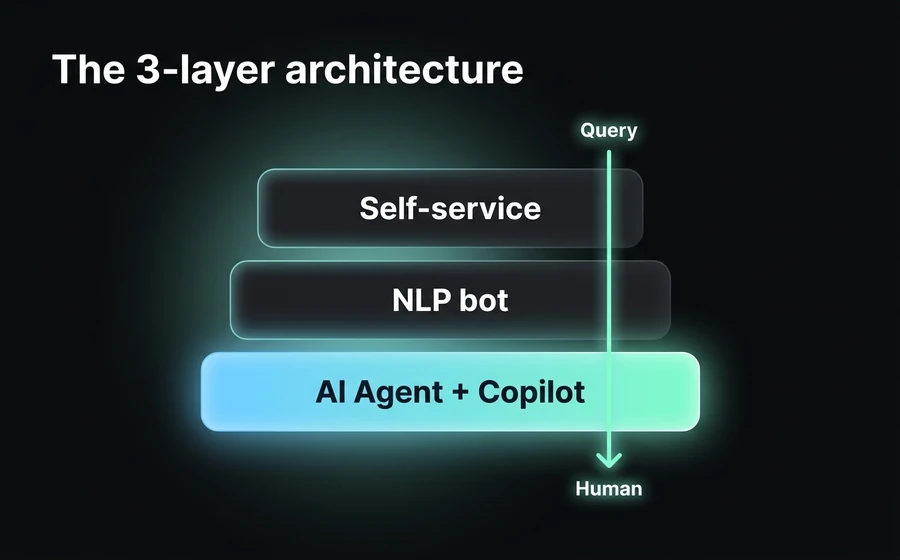
This guide proposes a different answer: a 3-layer architecture (structured self-service, conversational bot, and generative AI Agent with human Copilot) that, well implemented, lowers ticket volume between 40% and 60% in six months without sacrificing satisfaction. You'll find the full framework, industry benchmarks, the KPIs that matter, the four implementation phases, and the list of mistakes almost every SaaS company makes along the way.
Why ticket volume scales with SaaS (and why that's a problem)
Support in a B2B SaaS has a structural problem: it scales linearly with the customer base, but revenue doesn't always do the same. Each new customer brings between 0.5 and 3 tickets per month on average according to Intercom Customer Service Trends 2024, depending on product complexity and onboarding maturity. If you go from 200 to 1,000 customers, you don't need to multiply your support team by five, but you do need to multiply it by something. And that "something" is what defines whether the business scales or drowns.
The other problem is volume composition. The 80/20 rule applies violently in SaaS support: 20% of queries account for between 70% and 80% of total volume. Those queries aren't the complex ones, they're the repetitive ones. And they're the ones the human team solves worst when Friday afternoon fatigue hits.
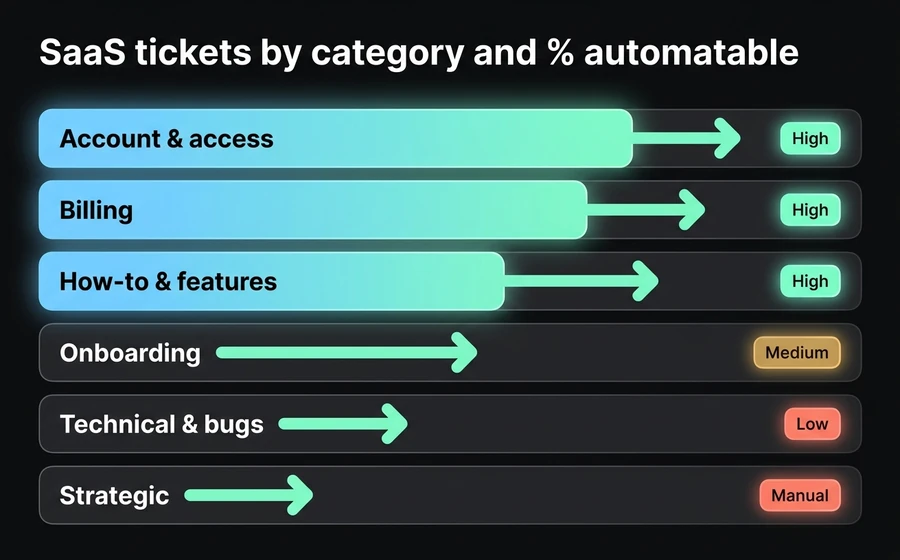
Typical B2B SaaS categories break down like this:
| Category | % of typical volume | Resolution type |
|---|---|---|
| Account & access (login, password reset, MFA, user invitations) | 18-25% | Almost 100% automatable |
| Billing & subscriptions (invoices, plan changes, payment methods) | 15-22% | 70-90% automatable |
| Onboarding & setup (first steps, initial configuration, integrations) | 12-18% | 40-60% automatable |
| How-to & features (how to do X, where is Y) | 20-30% | 60-80% automatable |
| Technical issues & bugs (real errors, unexpected behavior) | 15-25% | 10-30% automatable, the rest needs a human |
| Strategic & advisory (advanced usage queries, custom integrations) | 5-10% | Not automatable, MUST NOT be automated |
Source: typical composition observed in AsisteClick B2B SaaS customers, consistent with HubSpot Service Hub benchmarks 2024.
The operational conclusion is clear: there is a 50-65% of the volume that is reasonably automatable without sacrificing quality, as long as you differentiate the categories well. The most common mistake is trying to automate everything, including the strategic 5-10%, or not automating anything for fear of losing quality. Neither extreme works.
Before continuing, a vocabulary clarification. In the rest of the post you'll read two terms that are often confused: chatbot (rules-based, NLP, predefined intents) and AI Agent (generative model like GPT-5.4 with access to your knowledge base via RAG). They are not synonyms, and the difference matters for deflection rate. If you want to dive deeper into how to decide between one and the other, we have a dedicated post on chatbot NLP vs GPT vs hybrid.
Deflection rate: the metric that actually matters
If your monthly support report has "% tickets closed", "tickets received", and "average response time", you're measuring symptoms, not system health. The metric that connects automation, human team, and customer experience in a single number is the deflection rate.
What it is and how it's calculated
The deflection rate is the percentage of queries resolved without escalating to a human. The basic formula is:
Deflection Rate = (Tickets resueltos por self-service o IA / Tickets totales recibidos) × 100
But the operational definition has nuances that change everything. "Resolved" doesn't mean "the bot said something". It means the customer got the information they needed and didn't open a ticket about the same topic in the next 24-48 hours. That's the difference between honest deflection rate and vanity deflection rate.
There are two ways to measure it, and it's worth having both on the dashboard:
- Deflection rate per session: % of conversations with the bot/AI that end without "talk to a human" or reopening a ticket within 48h.
- Deflection rate per ticket: % of tickets the system closes automatically and the customer doesn't reopen.
The honest number is usually between 30% and 60% in mature SaaS. Reports showing 85% are generally counting "the bot replied" as deflection, which is cheating.
Benchmarks by industry
Data from Intercom Customer Service Trends 2024 and Zendesk CX Trends 2024 paint the following picture for B2B SaaS:
| Maturity stage | Typical deflection rate | Associated technology |
|---|---|---|
| Static FAQ only + knowledge base | 8-15% | Indexable Help Center |
| Trained NLP bot (top 20 intents) | 25-35% | Rules-based or NLP chatbot |
| NLP bot + smart handoff | 35-45% | Chatbot + prioritized queue |
| Generative AI Agent with RAG | 45-60% | LLM + connected knowledge base |
| AI Agent + Copilot for the human | 55-70% | LLM + agent assistant |
Source: aggregated composition of Intercom Customer Service Trends 2024, Zendesk CX Trends 2024, and HubSpot Service Hub benchmarks.
When someone tells you "we hit 80% deflection with AI", ask for the methodology before believing them. The realistic figure for well-implemented SaaS companies, measuring honestly, is between 45% and 60% one year into implementation.
Why deflection ≠ "automated response rate"
Here's the most common mistake. A company installs a bot, measures how many conversations touched the bot, and reports that as "80% automation". But if the bot says "I don't understand, write to me again" and the customer abandons or escalates manually, that's not deflection. It's automated frustration.
The operational difference: deflection is measured in resolution, not in response. The customer either solved their problem or they didn't. If they didn't, it counts as a ticket even if they didn't formally escalate.
That's why it must always be looked at alongside post-deflection CSAT (customer satisfaction after the interaction with the bot/AI, without escalation). If deflection goes up but post-deflection CSAT goes down, you're not improving, you're hiding the problem. We'll come back to this point in the KPIs section.
The 3-layer architecture to reduce tickets
Here comes the core of the post. The operational question is not "should I put a bot?", it's "what do I put in each layer so that volume drops without frustrating the customer?". The architecture we recommend —and that we apply with AsisteClick SaaS customers— has three layers that work in ascending order of complexity.
The key idea is that each layer absorbs what the previous one couldn't resolve, without the customer feeling the handoff. If structured self-service resolves it, done. If not, the conversational bot takes over. If the bot can't, the generative AI Agent comes into play. And if all that fails, the human receives the ticket with all the previous context, not from scratch.
Layer 1: Structured self-service
This is the most underestimated layer and the one that absorbs the most volume when done right. The customer doesn't want to chat with anyone, they want to find the answer fast. Structured self-service has three components:
- Help Center with functional search: a public knowledge base, indexable by Google, with a search engine that understands synonyms. The success metric here is "% of Help Center visits that DON'T end in a ticket opened in the next 24h". If your Help Center exists but deflection from it is low, it's not a content problem, it's a findability problem.
- Contextual FAQ inside the product: direct links to relevant articles at the exact moment the user gets stuck. If the user is on the webhook configuration screen, the help button should take them to the webhooks article, not the generic Help Center.
- System status and changelog: a public status page (uptime, active incidents) and a visible changelog. This absorbs the 5-10% of tickets that are "is something down?" or "when are you launching X feature?".
Expected deflection from this layer: 10-18% according to Intercom and our own benchmarks. It's the cheapest layer to implement and the most neglected.
This layer works because the customer prefers to solve it themselves. 67% of consumers prefer self-service over talking to a representative (HubSpot Service Hub data 2024). Layer 1 is not a "fallback", it's the first option for the modern customer.
Layer 2: NLP conversational bot
When self-service isn't enough —because the user doesn't find the article, or because the query requires parameters (a name, an ID, a date)— the conversational bot comes in. Here we're talking about an NLP-type bot: trained on intents (user intentions) that cover the top 20-30 frequent queries.
A well-trained NLP bot in SaaS typically covers:
- Password reset and user invitations.
- Billing status and invoice downloads.
- Plan change or payment method (with escalation to a human for closing).
- Account status queries (usage, limits, renewal date).
- Frequently asked questions with closed answers ("can you integrate with Salesforce?").
- Initial triage: capturing the problem and routing it to the right department.
The key thing about the NLP bot is that it is deterministic: given a recognized intent, the answer is always the same. This makes it predictable, auditable, and cheap to operate, but it limits it: if the customer asks something that's not in the trained intents, the bot has to say "I didn't understand" or route to a human. It doesn't improvise.
Expected deflection from this layer: 15-25% on top of the volume that made it this far. Added to Layer 1, you'll be at 25-40% total deflection.
The NLP bot is trained on real data. The common trap is to train it with theoretical intents ("users may ask X, Y, Z") instead of with the real ticket history. If you're going to train one, export the last 6 months of tickets, cluster them, and build the intents from the data. We have a full post on that at prompt engineering for customer service chatbots.
Layer 3: Generative AI Agent + Copilot for the human
This is where deflection rate math changes scale. A generative AI Agent (based on an LLM like GPT-5.4, connected via RAG to your knowledge base, product documentation, and optionally customer account data) doesn't need predefined intents. It reasons about the query, looks for context, and responds in natural language.
What an AI Agent does well that an NLP bot does not:
- Long and ambiguous queries: "Hi, I have a problem with the HubSpot integration, new contacts aren't coming in since yesterday, I already verified the API key, what do I do". An NLP bot gets lost. An AI Agent identifies the diagnostic steps, asks them one by one, and either resolves or escalates with full context.
- Combining several intents in a single query: "I want to change my plan and I also need to add three new users, how do I do it?". The AI Agent splits the query and resolves it in parts.
- Personalization with account data: if the AI Agent has access (via API) to the real state of the user's account, it can answer "your current plan is Pro until June 15, you can change it from Settings > Billing, here's the direct link" instead of the generic response.
But there's something even more important that defines the difference between a SaaS company that lowers tickets and one that lowers tickets without destroying CSAT: the Copilot for the human.
When a query escalates to the human team (because the AI decided to escalate, or because the customer explicitly asked for it), the human agent doesn't receive the ticket from scratch. They receive:
- The full history of the conversation with the AI.
- A summary of the problem generated by the AI Agent.
- Response suggestions based on the knowledge base.
- Customer account data already loaded (plan, signup date, usage, previous tickets).
This is called Copilot and reduces the human agent's AHT (Average Handle Time) by 25% to 40% according to McKinsey State of AI 2024. If you want to dive deeper into that, check Copilot: AI Agents with real-time responses.
Expected deflection from this layer: an additional 20-30%. Added to the previous ones, a well-implemented SaaS company reaches 50-65% total deflection.
If you're interested in the technical detail of how the knowledge base is built so Layer 3 works well (chunking, embeddings, RAG, refresh frequency), we have a complete post at the 3 knowledge layers of an AI Agent.
Comparison of the 3 layers
| Layer | Technology | When it applies | Typical deflection | Implementation complexity | Operating cost |
|---|---|---|---|---|---|
| 1. Self-service | Help Center + FAQ + status page | Queries with fixed, public answers | 10-18% | Low (1-2 weeks) | Low (docs maintenance) |
| 2. NLP bot | Trained intents + flows | Top 20-30 queries, requires parameters | 15-25% | Medium (4-6 weeks) | Medium (monthly retraining) |
| 3. AI Agent + Copilot | LLM + RAG + handoff with context | Long, ambiguous, personalized queries | 20-30% | High (8-12 weeks) | Medium-High (tokens + curation) |
The three layers together, operating in order, lead to a realistic cumulative deflection of 45-65% in six months. Beyond that, returns diminish quickly and you enter the Klarna risk zone: trying to automate what shouldn't be automated.
How NOT to do it: the Klarna case and other common mistakes
In February 2024, Klarna announced that its AI Agent was doing the equivalent work of 700 full-time human agents, with CSAT equal to humans and resolution 25% faster. The stock reacted, the tech press celebrated, and every SaaS company asked "how did they do it?".
A year later, in May 2025, Klarna was hiring humans again. CEO Sebastian Siemiatkowski admitted in interviews that quality had dropped, that customers wanted to talk to humans, and that AI coverage had been more a statement of intent than an operational reality. The lesson is not "AI doesn't work". The lesson is that automating the work of 700 people in a few months, without having the fallback architecture or the quality KPIs well measured, ends badly.
If you're interested in the detailed analysis, we wrote a complete post about what can be learned from the case at Klarna and the AI mistake in customer service. Here we summarize the most common anti-patterns that this case exemplifies and that we see repeated in new customers:
Replacing humans overnight
Klarna's mistake wasn't using AI, it was eliminating human capacity before validating AI coverage in real production. The right approach is the opposite: AI scales first, the human team is resized later, based on at least six months of data. Automation is not measured in "how many humans I removed", it's measured in "what percentage of volume I resolved well without escalating". The latter gives you the space to decide the former with data. The former without the latter is a time bomb.
Automating complex onboarding
New customers have a psychological need to talk to a human in the first two weeks. Not because the AI can't answer, but because they're evaluating whether the company "is there" for them. Automating onboarding before 14-30 days is one of the strongest predictors of early churn. The operational rule: onboarding is the last thing to automate, not the first. And when it is automated, always with easy escalation to a human.
Eliminating the "talk to a human" button
Some teams hide the escalation button to force deflection. It's an anti-pattern. The customer who wants to talk to a human and can't, abandons or escalates through another channel (Twitter, email to an executive, public review). Visibility of human escalation must be always high. If deflection rate drops because the button is visible, don't hide the button: improve the AI.
Measuring only deflection, ignoring post-deflection CSAT
As we said before: deflection without post-deflection CSAT is vanity. The single metric that matters is the deflection + post-deflection CSAT pair. If deflection goes up 10 points and CSAT drops 15 points, you lost. We'll see this in detail in the KPIs section.
Pretending the AI is "already trained"
No AI Agent in production is finished. Weekly review of unresolved queries, prompt improvements, knowledge base refresh — these are permanent work. Companies that treat setup as a "project" (with start and end) instead of an "operation" (continuous) are the ones that see deflection rate degrade after 6 months.
Practical implementation: 4 phases
A reasonable question after reading all of the above is: "OK, where do I start?". The short answer: measure before automating. The long answer is this four-phase roadmap that we apply in SaaS implementations with AsisteClick.
Phase 1: Measure baseline (week 1-2)
Before buying any tool or training any bot, you need to know where you stand. What you need to measure, ideally with six months of history:
- Total ticket volume/month: mean, median, weekly peak.
- Distribution by category: use the 6 categories from the first section as a baseline, adjust to your product.
- Top 20 queries by frequency: group tickets by similarity and sort. You'll discover that 20 queries explain 70% of the volume.
- Average AHT by category: how long your human team takes to resolve each type.
- Current CSAT: the baseline against which you'll compare later.
- Escalated / reopened tickets: % of tickets not resolved on first contact. This number is rarely measured and is one of the most important.
Output of this phase: a one-page document with the current state. Without this, any later improvement is invisible.
Phase 2: Structured self-service + NLP bot (week 3-8)
Implementation of layers 1 and 2 in parallel. In six weeks you have to have:
- Help Center with the 30-50 articles that cover the top 20 queries. Each article with a clear title, direct answer in the first two paragraphs, and video or screenshot when applicable.
- Contextual FAQ inside the product (help buttons on critical screens).
- NLP bot trained on the top 20 most frequent intents. Minimum 50 examples per intent.
- Handoff to a human always visible and functional, with capture of previous context.
Expected deflection at the end of Phase 2: 25-40%. If the baseline was 100 tickets/day, you'll now be between 60 and 75. If the number doesn't drop in this range, it's an implementation problem, not a technology one.
This phase is the most underestimated. Companies that jump straight to "generative AI Agent" without having Layer 1 and 2 working end up with the AI answering what a well-written FAQ would already answer, at a token cost that doesn't justify it.
Phase 3: Generative AI Agent + Copilot (week 9-20)
Here come the more sophisticated tools. In the following 12 weeks:
- Connect an LLM (GPT-5.4 or equivalent) to your knowledge base via RAG. This requires chunking your documentation, embeddings, and a good system prompt.
- Connect the AI Agent with customer account data via API (current plan, usage status, previous tickets). Without this, the AI Agent is a chatty FAQ, not an assistant.
- Implement the Copilot for the human team: when a ticket escalates, the agent receives context + summary + response suggestions.
- Define handoff rules: when it escalates automatically (critical billing query, confirmed bug error, enterprise account, customer with low NPS in history).
- Audit log of every AI interaction for weekly manual review.
Expected deflection at the end of Phase 3: 45-60% cumulative. If you reach this with post-deflection CSAT ≥ general CSAT, you won.
Phase 4: Continuous improvement loop (continuous)
This one never ends. Weekly operational cadence:
- Review of unresolved queries: those the customer re-escalated or abandoned. Adjust prompts, add Help Center articles, retrain intents.
- Knowledge base refresh: every feature release or pricing change must propagate to the AI base in less than 24 hours.
- Post-deflection CSAT drift monitoring: if it drops 5 points versus baseline, pause new automations and investigate.
- Prompt A/B testing: the difference between a mediocre system prompt and a good one is 10-15 points of deflection with the same model.
If all of this sounds like a permanent operational process, it's because it is. The good news is that it's a predictable operational process that scales. The less good news is that many SaaS companies don't have the internal capacity to sustain it, and that's where a managed setup (more on this at the end) makes sense.
KPIs to monitor the system
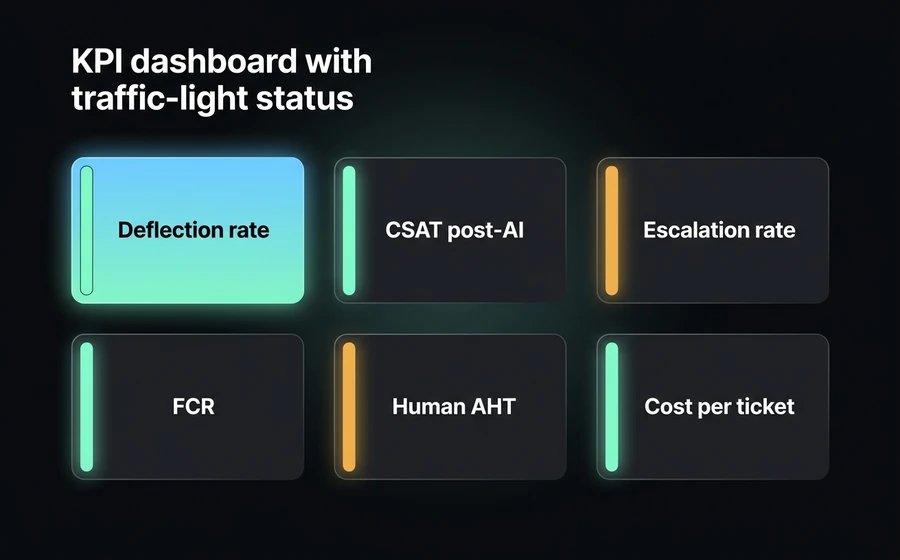
Here's the minimum dashboard a Head of Support should have to operate this system. The six core KPIs, with their reference thresholds for mature B2B SaaS:
| KPI | What it measures | Green | Yellow | Red |
|---|---|---|---|---|
| Deflection rate | % queries resolved without escalating | >50% | 30-50% | <30% |
| CSAT post-deflection | Satisfaction after AI interaction, without escalation | ≥general CSAT | -5 to -10pts | <-10pts |
| Escalation rate | % queries escalated to a human | <40% | 40-60% | >60% |
| First Contact Resolution (FCR) | % tickets resolved on first contact (human + AI) | >75% | 60-75% | <60% |
| Human AHT (with Copilot) | Average human agent time | -25% vs baseline | -10 to -25% | no improvement |
| Cost per ticket | Total support OPEX / total tickets | -30% vs baseline | -10 to -30% | no improvement |
Some notes on interpretation:
- Deflection rate and post-deflection CSAT are always looked at together. Raising one while dropping the other is not winning.
- FCR is the most neglected metric. A ticket that's resolved "fast" because the customer abandoned is not a resolved ticket. Measure FCR at 48h, not 24h.
- Human AHT with Copilot should drop 25-40% according to McKinsey and our own benchmarks. If it doesn't, the Copilot isn't well implemented (probably it isn't passing full context to the human). Check AHT on WhatsApp: benchmarks for more context on how to measure AHT in conversational channels.
- Cost per ticket is the metric that matters to the CFO. If you want to justify the investment, it's good to have a ROI model built in advance; we wrote about it in detail at Chatbot ROI: the complete formula.
Additionally, it's worth having two system health metrics:
- % of queries not understood by the AI: if it exceeds 15%, there's a knowledge base coverage problem.
- Average AI Agent response latency: if it exceeds 8 seconds, customers start abandoning before reading.
Why AsisteClick (and when managed service makes sense)
You made it this far, which is a good sign. Before closing, an honest observation: many SaaS companies try to implement this self-serve and get stuck. It's not for lack of technology (the tools exist and are accessible), it's because of the operational curve: training an NLP bot well, setting up a functional RAG, iteratively tuning prompts, sustaining the continuous improvement loop, integrating with your current stack (Zendesk/Intercom/Freshdesk via API, account data, single sign-on). That requires a profile that few 50-500 employee SaaS companies have full-time on the team.
AsisteClick offers this system as a managed service: our team takes care of the setup of the three layers, training the NLP bot on your real history, connecting the AI Agent with your knowledge base (via AsisteGPT and AsisteCopilot), the integrations with your CRM/billing, and the weekly operational loop. Your team focuses on the product and the customers; we take care of lowering ticket volume without you having to hire an internal team of Conversational AI Engineers.
If you already have a technical team that wants to implement this self-serve, our platform and the integration API are available. If you prefer to delegate setup and operation, we'll talk about a project scope with assisted onboarding.
In either mode, the goal is the same: that in six months the support report shows a deflection rate of 45-60% with stable or better CSAT, cost per ticket dropping, and a human team that spends its time on the queries that truly need it.
Frequently asked questions
How long does it take to see ticket reduction results?
The first results appear between 30 and 60 days if the four phases of the roadmap are followed. Phase 2 (self-service + NLP bot) delivers between 25% and 40% deflection rate in six to eight weeks. Phase 3 (generative AI Agent + Copilot) adds between 15 and 25 additional points in the following three months. Expecting pillar results before 30 days is unrealistic; going six months without seeing improvement indicates an implementation problem, not a technology one.
What deflection rate can I realistically expect for a B2B SaaS?
With an NLP bot alone, the realistic deflection rate is between 15% and 25%. Adding a generative AI Agent with RAG over the knowledge base, it reaches 40% to 55%. With mature operation (layers 1-2-3 working for six months with a continuous improvement loop), 50% to 65%. Beyond 70% the risk of degrading CSAT grows fast, and beyond 80% the measurement is generally not honest or queries that shouldn't be automated are being automated.
Is it compatible with Zendesk, Intercom, or Freshdesk?
Yes, AsisteClick integrates via API with the main help desks. The typical integration leaves the ticketing system (Zendesk, Intercom, Freshdesk) as the system of record and adds AsisteClick's conversational layer on top: the customer interacts with the AI Agent via WhatsApp, webchat, email, or the channel they use, and escalated tickets appear in your current help desk with all the previous context. It doesn't require replacing the existing tool.
What happens with complex technical tickets that can't be automated?
Complex technical tickets (real errors, unexpected behavior, custom integrations) don't auto-resolve and shouldn't attempt to auto-resolve. What does change is the role of the AI Agent: instead of trying to answer, it does the triage (captures the problem, account data, reproduction steps) and escalates to a human with a pre-built ticket. The Copilot reduces the human agent's AHT by 25% to 40% on that category because they start with full context instead of zero.
Do I need an internal technical team to implement this?
It depends on the mode. In self-serve mode, yes: you need at least one profile who understands APIs, integrations, prompt engineering, and support operation. In managed service mode with AsisteClick, no: our team takes care of the technical setup, bot training, connection with your knowledge base, and operation of the weekly loop. The typical decision is: if you already have a Conversational AI team or a CTO with bandwidth, self-serve works; if not, managed service avoids six months of learning curve.
What if the AI Agent gives an incorrect answer to a customer?
Three layered protections: (1) mandatory escalation to a human when model confidence is below a configured threshold or when trigger words appear (cancellation, formal complaint, executive); (2) full audit log of each interaction for weekly manual review; (3) customer feedback loop directly (a thumbs up/down after the response) that feeds into retraining. The Klarna case is illustrative precisely because they appear to have underdimensioned this: incorrect responses in production without guardrails or audit end in brand problems. The 3-layer architecture with always-visible escalation is the safety net.
Conclusion
Reducing SaaS support tickets with an AI Agent is not a technology question, it's a question of architecture, measurement, and operational discipline. Technology today allows reaching 45-60% deflection rate in six months with stable CSAT; what separates the companies that achieve it from those that don't is having measured before automating, having respected the three layers in order, and having sustained the weekly improvement loop.
If you want to see how this architecture applies to your case —with AsisteGPT, AsisteCopilot, and integration with your current help desk—, check the AsisteClick AI Agents platform o book a demo and we'll show you what percentage of your current ticket volume would be reasonable to deflect in the next six months.
Keep reading
- Klarna and the AI mistake in customer service — full analysis of the case that illustrates each anti-pattern
- AI Copilot for agents in real time — how AI empowers the human without replacing them
- The 3 knowledge layers of an AI Agent — the technical detail of RAG in Layer 3